

Every website owner wants to rank high on search engines. But many overlook the foundation that makes ranking possible: technical health. You can publish the best content in your industry, yet if search engines struggle to crawl, index, or understand your site, you will not see results. This is where an SEO technical audit service becomes essential.
An SEO technical audit service provides a complete health check for your website’s backend. Professionals examine how search engines interact with your site, identify hidden errors, and deliver a clear roadmap for fixes. Unlike surface-level SEO checks, a technical audit dives deep into server configurations, code structure, page speed, mobile usability, and security protocols.
Think of it as a medical checkup for your digital presence. Just as a doctor measures your vitals and runs lab tests, an SEO audit service diagnoses issues that silently hurt your rankings. After the audit, you receive actionable recommendations to strengthen your site’s architecture and improve organic visibility.
Ready to uncover what’s holding your website back Explore our complete SEO services to start your technical health journey today.
What Exactly Is an SEO Technical Audit Service
An SEO technical audit service performs a systematic examination of your website’s infrastructure. We analyze factors that affect search engine crawling, indexing, rendering, and ranking. The service does not focus on content quality or backlinks those belong to on-page and off-page SEO. Instead, we look under the hood.
Core Components of a Technical SEO Audit

A professional audit covers these critical areas:
You can improve readability by breaking this long section into smaller subsections. Here’s a revised version with additional subheadings while preserving the content.
Crawlability and Indexability
Search engines use bots to discover pages across your website. If your robots.txt file blocks important sections or you have orphan pages with no internal links, search engines may never index those pages. SEO auditors also review server log files to understand how Googlebot crawls your site and identify any crawl inefficiencies.
Page Speed and Core Web Vitals
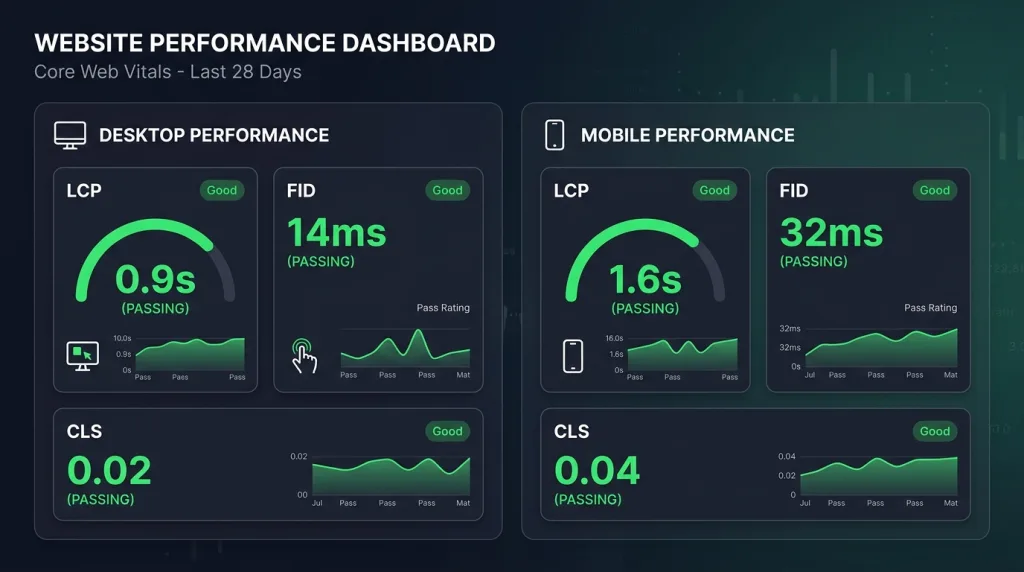
A slow website creates a poor user experience and can hurt search rankings. During an SEO audit, we evaluate Google’s Core Web Vitals, including:
- Largest Contentful Paint (LCP): Measures loading performance.
- First Input Delay (FID): Measures responsiveness to user interactions.
- Cumulative Layout Shift (CLS): Measures visual stability during page loading.
Poor scores often point to unoptimized images, render-blocking resources, slow hosting, or inefficient code.
Mobile-First Indexing
Google primarily ranks websites based on their mobile version. Auditors test websites on real mobile devices and emulators to ensure the mobile experience matches desktop quality. Key checks include:
- Responsive viewport settings
- Easy-to-tap buttons and links
- Readable font sizes
- Proper mobile redirects
- Mobile usability issues
Site Architecture and URL Structure
A clear website structure makes navigation easier for both users and search engines. Auditors review:
- Internal linking strategy
- Page depth from the homepage
- Clean, descriptive URLs
Avoid unnecessary URL parameters, underscores, and deeply nested folders whenever possible.
Structured Data and Schema Markup
Structured data helps search engines understand your content and may qualify your pages for rich results. Auditors validate existing schema markup and identify opportunities to add:
- Local Business schema
- Product schema
- FAQ schema
- Organization schema
- Breadcrumb schema
Security and HTTPS
Website security is a ranking factor. During the audit, we check for:
- Mixed-content issues
- Valid SSL certificates
- Proper HTTP-to-HTTPS redirects
- Secure website configuration
XML Sitemaps and Robots.txt
XML sitemaps help search engines discover your most important pages. We verify that your sitemap:
- Includes canonical URLs
- Excludes noindex pages
- Is submitted through Google Search Console
- Updates automatically when content changes
We also review the robots.txt file to ensure it doesn’t accidentally block important resources such as CSS, JavaScript, or critical pages.
Duplicate Content and Canonicalization
Duplicate or highly similar content can weaken your SEO performance by splitting ranking signals. Auditors identify duplicate:
- Page titles
- Meta descriptions
- Body content
- URL variations
Canonical tags help consolidate ranking authority by telling search engines which version of a page should be indexed.
Server and Hosting Configuration
Server performance directly affects crawl efficiency and user experience. Auditors analyze:
- 404 errors
- 301 and 302 redirects
- Redirect chains
- 5xx server errors
- Server response times
- Crawl logs and timeouts
A stable hosting environment improves both website performance and search engine accessibility.
Why Technical SEO Matters
Every technical element works together to support your website’s overall SEO performance. Without a strong technical foundation, even high-quality content and extensive link-building efforts struggle to produce lasting ranking improvements. Investing in technical SEO ensures search engines can efficiently crawl, index, and understand your website while providing visitors with a fast, secure, and user-friendly experience.
What Does an SEO Technical Audit Service Offer (Key Deliverables)

When you hire a professional service, you receive more than a list of problems. You get a structured report with prioritized actions, explanations, and often a guided implementation plan.
1. Comprehensive Crawl Analysis
We run a full site crawl using industry-grade tools. The crawl simulates how Googlebot sees your website. We then produce a list of:
- Broken internal and external links (404 errors)
- Redirect chains and loops
- Pages with missing or duplicate meta descriptions and title tags
- Orphan pages (no inbound internal links)
- Pages blocked by robots.txt or meta robots tags
Each issue receives a severity rating: critical, moderate, or low. For example, a broken homepage link gets critical priority, while a missing meta description on a low-traffic tag archive page may be low.
2. Page Speed and Performance Report
We measure your site’s loading behavior across desktop and mobile. The report includes:
- Core Web Vitals scores with field data (real user experience)
- Opportunities to reduce server response time (TTFB)
- Specific image compression recommendations
- Render-blocking JavaScript and CSS elimination strategies
- Caching policy improvements
We provide before-and-after benchmarks if you implement the fixes, helping you track progress.
3. Indexability and Crawl Budget Optimization
Large websites (over 10,000 pages) face crawl budget limitations—Google will not crawl every page daily. We analyze how you spend that budget. We then suggest:
- Removing low-value pages from the index (using no-index tags)
- Consolidating paginated or parameter-driven URLs
- Updating your XML sitemap to prioritize fresh or important content
- Fixing soft 404 errors (pages that return 200 OK but show “no results”)
4. Structured Data Validation and Enhancement
We test every schema implementation on your site using Google’s Rich Results Test. Our offer includes:
- A spreadsheet listing all schema types currently in use
- Errors and warnings with line-by-line corrections
- Recommendations for new schema types relevant to your industry (e.g., Product, Event, HowTo, Review)
- Implementation code examples in JSON-LD format (Google’s preferred method)
Proper structured data helps you earn star ratings, product availability, event dates, and FAQ snippets directly in search results.
5. Mobile Usability Audit
We examine your site on multiple screen sizes and operating systems. The deliverable covers:
- Touch elements too close together (tap target spacing)
- Text that requires zooming to read
- Viewport configuration errors
- Mobile-only redirect issues (e.g., serving a separate m-dot domain)
- Interstitials that block content (pop-ups that violate Google’s guidelines)
Google’s mobile-friendly test tool output is included, plus manual checks for edge cases.
6. Security and HTTPS Status Review
We verify that every page on your domain loads securely. Our offer includes:
- SSL certificate expiration date and issuer details
- Mixed content scan (HTTP images, scripts, or stylesheets on HTTPS pages)
- HSTS (HTTP Strict Transport Security) headers implementation check
- Secure forms and payment gateway validation
7. Prioritized Action Plan and Timeline
The most valuable part of any SEO technical audit service is the roadmap. We categorize fixes into:
- Quick wins: Issues you can resolve in under an hour (e.g., updating meta robots tags, fixing a single broken link)
- Short-term projects: Tasks taking one to three days (e.g., implementing 301 redirects, updating sitemap)
- Long-term improvements: Architectural changes requiring development resources (e.g., migrating to a faster hosting provider, rebuilding JavaScript-heavy navigation)
Each recommendation includes step-by-step instructions for developers or DIY site owners.
8. Follow-Up and Monitoring
Some services offer a re-audit after 30 or 60 days. This confirms that your team implemented fixes correctly and no new issues appeared. Ongoing monitoring alerts you to sudden drops in crawl stats or indexing coverage.
Why Do You Need an SEO Technical Audit Service
Technical problems accumulate silently. You might add new plugins, change themes, or migrate servers without realizing the impact on SEO. Here is why proactive audits save you time, money, and rankings.
Prevent Ranking Declines Before They Happen
A sudden drop in traffic often traces back to a technical change. Maybe you accidentally added a no-index tag to your blog category pages. Or your robots.txt file started blocking your entire CSS folder. An audit catches these mistakes before Google penalizes you.
Improve Crawl Efficiency for Large Sites
Websites with thousands of products or articles waste crawl budget on duplicate, parameterized, or low-value URLs. Auditors identify and eliminate these leaks. As a result, Googlebot spends more time on your revenue-generating pages.
Enhance User Experience (Which Google Rewards)
Core Web Vitals and mobile usability directly affect bounce rates. A slow or janky site frustrates visitors. Fixing technical issues improves engagement metrics like time on page and pages per session—signals that search engines interpret as quality.
Unlock Structured Data Rich Results
Without proper schema, you compete without visual enhancements. An audit reveals why your recipe cards, reviews, or events do not appear as rich snippets. Implementing corrections can boost click-through rates by 20–40%.
Save Money on Developer Time
Instead of asking your developers to “fix SEO,” give them a precise list. Audits reduce back-and-forth communication and prevent unnecessary code changes. You focus resources only on what matters.
Your website’s structure directly impacts conversions. Pair your technical audit with expert web development to implement fixes seamlessly.
The Step-by-Step Process of a Professional SEO Technical Audit
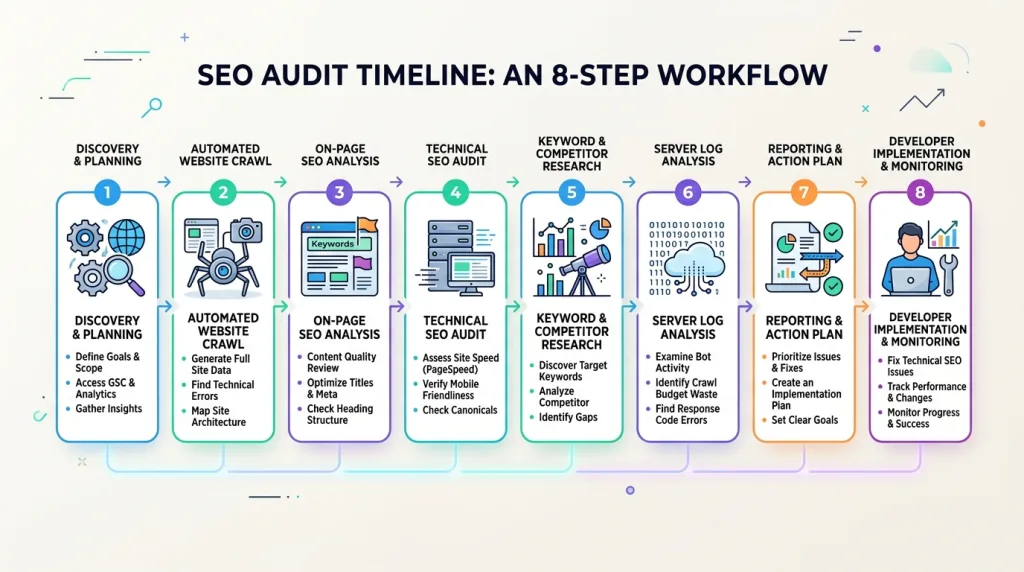
Understanding the workflow helps you know what to expect. Most services follow this sequence:
Step 1: Discovery and Access Setup
We ask for access to:
- Google Search Console and Google Analytics
- Your website’s server log files (or hosting control panel)
- CMS admin credentials (for plugin/theme audits)
- Current XML sitemap URL and robots.txt file
We also discuss your business goals, target keywords, and any recent site changes (migrations, redesigns, new features).
Step 2: Initial Automated Crawl
We deploy crawlers like Screaming Frog, Sitebulb, or DeepCrawl. These tools scan every accessible page, recording response codes, meta tags, headers, and links. For larger sites (100k+ URLs), we configure the crawl to run over 24–48 hours to avoid server overload.
Step 3: Server Log Analysis (Advanced)
Log files contain records of every request to your server. We analyze which search engine bots visited, how often, which pages they requested, and what response codes they received. This data reveals:
- Crawl frequency changes over time
- Bots encountering 500 errors or redirect loops
- Under-crawled important pages (e.g., new products not yet indexed)
Step 4: Performance Testing
We test your site from multiple geographic locations using tools like Google PageSpeed Insights, WebPageTest, and GTmetrix. We record:
- Time to First Byte (TTFB) from different regions
- Load times under simulated 3G and 4G connections
- Rendering blocking resources and their sizes
Step 5: Data Compilation and Analysis
Our team consolidates all findings into a master spreadsheet. We de-duplicate errors, correlate log data with crawl results, and identify root causes. For example, slow LCP scores may stem from unoptimized hero images, but they can also come from slow server response times due to database queries. We distinguish symptoms from causes.
Step 6: Report Generation
We produce a client-friendly report with:
- Executive summary (three to five most critical issues)
- Technical appendix with tables and error URLs
- Visual graphs showing crawl stats, response code distribution, and page speed percentiles
- Implementation guide for each fix (code snippets, configuration changes)
Step 7: Presentation and Q&A
A live walkthrough (video call or screen share) explains the findings. We answer questions like “Why does this matter” and “How long will fixes take” You receive a recording and the full report.
Step 8: Implementation Support (Optional)
Some audit services include direct fixes or developer coordination. We can implement redirects, update schemas, or reconfigure server settings for an additional fee. Alternatively, we provide detailed instructions for your in-house team.
Common Technical Issues Uncovered During Audits
Real-world examples show why audits matter. Here are problems we frequently find:
Soft 404 Errors
A page returns a 200 OK status (meaning “all good”), but the content says “No products found” or “Category empty.” Search engines waste time crawling empty pages. We recommend returning a 404 or 410 status for genuinely empty pages.
Infinite Spaces in URL Parameters
Ecommerce sites with faceted navigation generate URLs like color=red&size=m&brand=nike&sort=price. Each parameter combination creates a new URL. Crawlers get stuck in loops, indexing thousands of near-duplicate pages. The fix involves parameter handling in Google Search Console or canonical tags pointing to the main version.
JavaScript Rendering Problems
Single-page applications (React, Vue, Angular) often hide content from search engines. Googlebot can execute JavaScript, but it costs extra crawl budget and may time out. Audits reveal missing server-side rendering or dynamic rendering setups.
Orphan Pages
You have a landing page created for a campaign, but no internal link points to it. Only external backlinks (or no links at all) lead to it. Orphan pages rarely rank well because search engines cannot discover them naturally. The solution is to add contextual internal links from relevant parent pages.
Hreflang Implementation Errors
Multilingual sites misuse hreflang tags by referencing non-canonical URLs or missing return links (language A points to language B, but B does not point back to A). Auditors validate all language annotations and provide corrected code.
Image Optimization Gaps
Uncompressed images, missing alt attributes, and oversized file dimensions slow down your site. We list every image that exceeds recommended file size (e.g., over 200KB for a content image) and suggest compression tools or CDN solutions.
How to Choose the Right SEO Technical Audit Service
Not all services deliver equal value. Use these criteria when evaluating providers:
Look for Log File Analysis
Basic audits rely only on crawlers. Advanced services analyze server logs. Without logs, you cannot verify how Google actually crawls your site. Ask “Do you include log file analysis in the standard audit”
Check for Human Interpretation
Automated tools produce long lists of errors, but a machine cannot prioritize what matters most for your business. A good service explains why each issue impacts your specific goals. Avoid agencies that simply forward a Screaming Frog CSV file.
Verify Structured Data Expertise
Many auditors skip schema or only report errors without providing corrected JSON-LD examples. Your service should demonstrate past rich snippet wins (case studies or screenshots).
Request a Sample Report
Ask for a redacted audit sample from a previous client. Review the clarity of recommendations, visual presentation, and actionable steps. If the sample looks generic or overly technical (full of developer jargon without explanations), look elsewhere.
Assess Turnaround Time
Comprehensive audits for sites under 5,000 pages typically take 5–10 business days. Faster deliveries often mean automated reports without manual analysis. Longer delays (over 15 days) might indicate understaffing.
Ensure Follow-Up Support
The best audit services schedule a re-crawl 30 days after delivery. This confirms that you fixed the issues correctly. Without follow-up, you risk leaving errors half-resolved.
Tools Used in Professional SEO Technical Audits
You do not need to buy these tools yourself. But knowing them helps you understand the service’s methodology.
Crawling Tools: Screaming Frog SEO Spider (desktop), Sitebulb (visual reporting), DeepCrawl (cloud-based for large sites)
Performance Tools: Google PageSpeed Insights, Lighthouse CLI, WebPageTest, Calibre
Log File Analyzers: Logz.io, Loggly, or custom Python scripts
Structured Data Testers: Schema.org Validator, Google Rich Results Test, JSON-LD Playground Mobile Testing: Google Mobile-Friendly Test, BrowserStack real device lab
Backlink & Indexation: Google Search Console (Coverage report, URL inspection)
We combine data from five to seven tools because no single tool catches everything. For example, Screaming Frog may miss JavaScript-rendered content, so we also run a headless browser crawl.
After your technical audit, let us help you attract qualified visitors. Discover our lead generation strategies to turn traffic into customers.
How to Prepare for an SEO Technical Audit
You can maximize the value of an audit by providing complete access and background information.
Gather All Credentials
Compile a secure document with:
- Google Search Console (full admin access, not just “view”)
- Google Analytics (property level)
- FTP/SFTP or hosting control panel (for log file downloads)
- CMS admin (WordPress, Shopify, Magento, etc.)
- CDN dashboard (Cloudflare, Akamai, etc.)
Document Recent Changes
Write a timeline of the past six months:
- Platform migrations or theme changes
- Plugin installations or updates
- Redirect rule modifications
- Server moves or IP changes
- Security certificate renewals
Identify Business Priorities
Tell the auditor which pages matter most: product categories, blog posts, lead generation forms, or pricing pages. The audit report will then highlight issues affecting those priority pages first.
Remove Temporary Blocks
If you previously blocked crawlers via robots.txt or IP whitelisting (e.g., during development), lift those restrictions. The audit needs to see your live, public-facing site.
What Happens After an SEO Technical Audit
Receiving the report is not the finish line. Implementation determines your return on investment.
Fix Critical Issues Immediately
Start with issues marked “critical” or “high severity.” These often include broken homepage links, no-index tags on important pages, or robots.txt blocking CSS/JS. Within 48 hours, correct these errors to prevent further ranking damage.
Assign Responsibility
Create a spreadsheet with columns for: Issue description, severity, owner (developer, content writer, sysadmin), deadline, and status. Review progress in weekly standups.
Re-Test After 30 Days
Run a focused crawl on the pages you fixed. Confirm that no new errors appeared. Share the re-test results with your audit provider if you purchased follow-up support.
Schedule Regular Audits
Technical SEO is not a one-time event. Changes to your CMS, hosting, or plugins introduce new issues. We recommend:
- Quarterly audits for sites over 10,000 pages
- Bi-annual audits for smaller business sites (under 5,000 pages)
- After any major migration or redesign (immediate audit)
Case Study: How a Technical Audit Saved a Client’s Traffic
An online retailer selling outdoor gear saw a 40% traffic drop over three months. They had not changed any content or built new backlinks. We performed an SEO technical audit and discovered:
- A plugin update accidentally added a noindex, follow meta tag to all product category pages
- The CDN caching policy served stale pages for up to seven days, ignoring product inventory updates
- Twenty-three percent of internal links pointed to 302 redirects (temporary) instead of 301 (permanent), diluting link equity
After we corrected these three issues, the client’s indexed pages increased from 8,000 to 15,000 within six weeks. Traffic recovered to pre-drop levels and then grew 25% year-over-year.
This example shows why technical audits uncover hidden problems that content and link building cannot fix.
Frequently Asked Questions (FAQ)
1. How often should I run a technical SEO audit?
We recommend a full audit every six months for most websites. Ecommerce or news sites with frequent updates benefit from quarterly audits. Also audit immediately after any platform migration, redesign, or server change.
2. Can I perform a technical SEO audit myself?
You can run basic crawls using free tools like Screaming Frog (up to 500 URLs) or Google Search Console. However, professional services include log file analysis, manual interpretation, and prioritized implementation plans tasks that require experience and multiple data sources.
3. What is the typical cost of an SEO technical audit service?
Prices range from 500 for small sites(under1,000pages) to 500 for small sites (under1,000pages) to 5,000+ for enterprise websites with 100,000+ pages. Log file analysis and structured data validation often add
500– 500–1,000 to the base price.
4. How long does a technical audit take?
Expect 5 to 15 business days from access provisioning to final report delivery. Complex sites with JavaScript frameworks or custom databases take longer because we need to test rendering behavior.
5. Does a technical audit guarantee higher rankings?
No responsible provider guarantees rankings. But fixing technical issues removes barriers to ranking. If competitors have better technical health, you will still need quality content and backlinks. The audit ensures you compete on a level playing field.
6. What is the difference between a technical audit and an SEO site review?
A site review is often a quick checklist (e.g., “do you have a sitemap?”). A technical audit involves deep data analysis, server logs, performance benchmarks, and actionable code-level fixes. Treat a review as a starting point; an audit as a comprehensive diagnosis.
7. Do I need to fix all issues the audit finds?
No. Focus on critical and high-severity issues first. Low-priority items (e.g., missing alt text on a single old image) may not justify developer time. Your auditor should provide a triage guide.
8. Will a technical audit slow down my website?
Running the crawl itself consumes server resources. Professional auditors schedule crawls during off-peak hours and limit request rates to avoid performance impact. The fixes we recommend (e.g., image compression, caching) actually speed up your site.
9. Can a technical audit fix a Google penalty?
If you have a manual penalty from Google (notified via Search Console), the audit identifies the likely cause (e.g., unnatural links, thin content, hacked site). But you must submit a reconsideration request after fixes. Automatic algorithmic penalties often reverse after you correct technical issues.
10. What should I look for in an audit report?
A high-quality report includes: executive summary, severity ratings, root cause explanations, step-by-step fixes (with code examples), visual graphs, and a follow-up plan. Avoid reports that only list URLs without context or prioritization.
Conclusion
An SEO technical audit service does more than find broken links. It uncovers the hidden barriers between your website and its ranking potential. From crawlability and indexability to page speed and structured data, a thorough audit gives you a clear, actionable roadmap.
Technical SEO gives you confidence that search engines can access, understand, and prioritize your most valuable content. It also prevents crawl budget from being wasted on duplicate or low-value pages. Rich snippets can improve click-through rates, while ongoing technical optimization helps protect your organic traffic from silent regressions and indexing issues.
Do not wait for a traffic drop to investigate your site’s health. Proactive audits pay for themselves by preventing lost revenue and guiding efficient development spending.
Ready to turn your technical audit findings into higher rankings Build quality signals with our SEO backlink service and strengthen your domain authority today.
Keep reading
All articles
What Is Advanced SEO? Benefits for Business
You publish content regularly. Keywords are added, backlinks are built, and your SEO strategy stays active. Yet your traffic remains flat or…
Read article
Why HTTPS & TLS Matter for Your Website
You just sipped your morning coffee, clicked on a website, and noticed a small grey padlock in the address bar. Most users…
Read article
Anchor Text: The Definitive Guide to Boosting SEO & Generative Engine Rankings in 2026
Search engines have evolved faster in the last two years than in the previous decade. Google now serves AI-generated overviews, Bing integrates…
Read article