

The Complete Blueprint for Ecommerce Web Development
Building a digital storefront requires far more than just uploading a few product photos and adding a checkout button. Today, creating a successful online retail business demands a strategic approach to architecture, user experience, and technical performance. You must treat your website as your most valuable salesperson, one that works around the clock to guide visitors from initial discovery to final purchase. Modern consumers expect lightning-fast load times, seamless navigation, and ironclad security when they shop on the internet. If your platform fails to deliver on these expectations, shoppers will quickly abandon their carts and move to your competitors.
Understanding the intricacies of building an online shop empowers you to make informed decisions that directly impact your bottom line. You need to align your technical choices with your broader business goals, ensuring that your digital infrastructure can scale as your inventory and customer base grow. Every element on your site, from the navigation menu to the payment gateway, plays a crucial role in the overall customer journey. By focusing on robust architecture and intuitive design, you lay a concrete foundation for long-term retail success.
Understanding the Fundamentals of Digital Retail Platforms
Standard brochure websites merely display information, but digital retail platforms must handle complex, dynamic interactions in real-time. Shoppers need to filter products, add items to a virtual cart, securely input payment details, and receive automated order confirmations. This level of functionality requires a sophisticated backend system that connects a user-facing interface with complex databases. You must understand the fundamental concepts behind this process to ensure your technical team builds exactly what your business requires. The architecture must constantly sync inventory levels, manage user sessions securely, and process complex mathematical calculations for shipping and taxes instantly.
A well-architected system separates the presentation layer from the business logic and database layers. This modular approach allows developers to update the visual design without breaking the underlying payment processing or inventory management systems. You also need a reliable content management system (CMS) tailored specifically for retail, allowing non-technical staff to update product descriptions, launch promotions, and adjust pricing effortlessly. When you prioritize a solid technical foundation, you prevent costly downtime and eliminate frustrating bugs that drive potential buyers away.
Core Components of a High-Converting Store
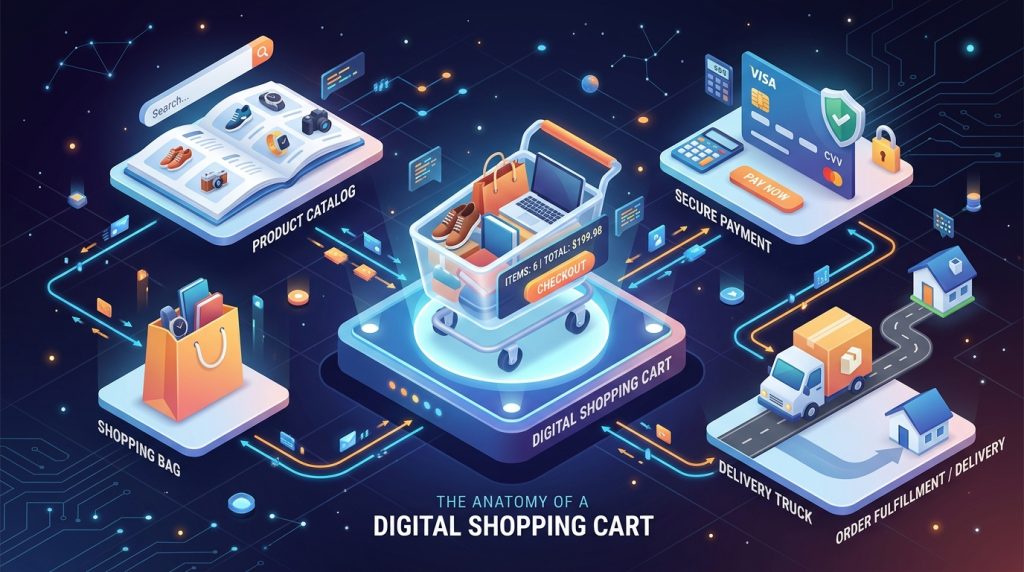
Every profitable online shop relies on a specific set of non-negotiable features that drive user engagement and facilitate sales. The product catalog serves as the heart of your operation, requiring logical categorization and highly detailed product detail pages. Visitors need high-resolution imagery, comprehensive descriptions, and clear pricing to make informed purchasing decisions. You must implement intuitive navigation structures, such as mega menus and breadcrumb trails, so users can find exactly what they want without feeling overwhelmed.
The shopping cart and checkout flow represent the most critical conversion points on your website. A clunky or confusing checkout process directly causes cart abandonment, destroying your hard-earned marketing efforts. You can study the essential components of a digital storefront to ensure you include every necessary element for a frictionless transaction. You should offer guest checkout options, display clear shipping costs upfront, and provide multiple payment methods to accommodate different user preferences. Streamlining these core components dramatically increases your overall conversion rate and maximizes your revenue potential.
Choosing the Ideal Framework for Your Business
Selecting the underlying technology for your digital shop represents one of the most consequential decisions you will make. Software-as-a-Service (SaaS) platforms like Shopify and BigCommerce offer excellent out-of-the-box functionality, handling server maintenance and security protocols on your behalf. These hosted solutions allow you to launch quickly and operate with minimal technical overhead. However, they often lock you into their specific ecosystems and charge monthly subscription fees, which can escalate as your transaction volume increases. You must weigh the convenience of a hosted platform against the long-term financial implications for your specific business model.
Alternatively, open-source frameworks like Magento or WooCommerce provide complete ownership and total customization capabilities. You control the codebase, meaning you can build highly specific features tailored to your unique operational requirements. Open-source solutions require you to manage your own hosting environments, handle security patches, and perform regular system updates. You should consult organizations like the World Wide Web Consortium (W3C) to ensure whichever framework you choose adheres to strict global accessibility and coding standards. Choosing the right platform ultimately depends on your available technical resources, your initial budget, and your long-term scalability requirements.
The Critical Role of Interface and Experience Design
Design dictates behavior in the digital retail space. Your visual interface must immediately communicate trust, professionalism, and brand identity the second a user lands on your homepage. Excellent design goes far beyond selecting attractive colors; it involves creating a visual hierarchy that naturally guides the user’s eye toward your primary call-to-action buttons. You must utilize whitespace effectively to prevent pages from feeling cluttered, allowing your product photography to command attention. Thoughtful typography choices ensure readability across all devices, making the shopping experience enjoyable rather than frustrating.
User experience involves the structural flow of your website and how intuitively visitors can accomplish their goals. If a shopper struggles to find the search bar or cannot figure out how to apply a discount code, they will simply leave. You must anticipate user needs, placing crucial elements exactly where consumers expect to find them.
Transform your customer journey and drive more sales by implementing professional design principles tailored for your target audience.
Mastering Mobile Commerce and Responsive Layouts

Smartphones now generate the vast majority of online retail traffic, making mobile-first design an absolute necessity rather than a secondary consideration. You cannot simply shrink a desktop website down to fit a smaller screen; you must rethink the entire interaction model for touch-based devices. Responsive design ensures your layouts dynamically adapt to any screen size, reorganizing content blocks to maintain perfect legibility. You must prioritize large, thumb-friendly touch targets to prevent frustrating accidental clicks that disrupt the buying process.
Mobile consumers have shorter attention spans and frequently shop while multitasking or on the go. You must simplify navigation menus, utilizing hamburger icons or sticky bottom bars to keep core functions instantly accessible. Mobile layouts require streamlined checkout forms that leverage smartphone capabilities, such as auto-filling addresses or integrating native digital wallets like Apple Pay. By optimizing explicitly for the mobile experience, you capture a massive segment of shoppers who exclusively use their phones for internet browsing and purchasing.
Essential Features Every Modern Storefront Needs
Beyond the basic catalog and cart, modern storefronts require advanced features to meet elevated consumer expectations. A robust internal search engine acts as a digital sales assistant, helping users locate specific items instantly. You must implement faceted search and advanced filtering options, allowing shoppers to narrow down massive catalogs by size, color, brand, or price range. Intelligent search bars that tolerate typos and suggest products as the user types significantly increase the likelihood of a successful transaction.
Diversified payment processing stands as another non-negotiable feature for contemporary online retail. You must accommodate how your customers prefer to pay, offering a mix of traditional credit card processing, digital wallets, and “buy now, pay later” services. Connecting your site securely to a reliable payment gateway ensures funds transfer safely from the buyer to your merchant account. Reviewing the technical documentation provided by processors like Stripe helps you understand how tokenization keeps sensitive financial data off your actual servers. Providing flexible, frictionless payment options drastically reduces abandonment at the final stage of the funnel.
Ironclad Security Protocols and Data Protection

Operating an online store means you handle highly sensitive personal and financial data every single day. Security breaches destroy brand reputation instantly and expose your business to severe legal and financial penalties. You must install a Secure Sockets Layer (SSL) certificate to encrypt all data passing between your customer’s browser and your web server. This encryption ensures that malicious actors cannot intercept passwords, addresses, or credit card numbers during transmission. Modern web browsers actively warn users away from sites lacking basic SSL encryption, killing your traffic before visitors even see your products.
You must strictly adhere to the Payment Card Industry Data Security Standard (PCI DSS) to process credit cards legally and safely. Achieving PCI compliance involves maintaining secure firewalls, updating antivirus software, and restricting physical and digital access to cardholder data. Instead of storing credit card numbers on your own databases, you should utilize payment tokenization, which replaces sensitive data with unique identification symbols. By treating security as a foundational element rather than an afterthought, you protect your customers and build the necessary trust required for repeat business.
Accelerating Site Speed and Performance
Digital consumers possess virtually zero patience for slow-loading websites. If your store takes longer than three seconds to render, a massive percentage of visitors will click the back button and never return. You must optimize your Time to First Byte (TTFB), which measures the responsiveness of your primary web server. Implementing robust caching strategies allows your server to deliver pre-built HTML pages instantly, bypassing the need to query the database for every single visitor. You can evaluate your current speed metrics using tools like Google PageSpeed Insights to identify specific bottlenecks harming your user experience.
Images usually represent the heaviest files on an online store, directly causing sluggish performance if left unoptimized. You must compress product photos meticulously, balancing high visual quality with minimal file sizes using modern formats like WebP. Implementing lazy loading ensures the browser only downloads images when they enter the user’s immediate viewport, saving massive amounts of bandwidth. Furthermore, you should route your static assets through a Content Delivery Network (CDN) to serve files from servers geographically closest to your individual visitors, guaranteeing rapid load times worldwide.
Dominating Search Results with Optimized Architecture
Creating a beautiful store accomplishes nothing if potential customers cannot find it on search engines. You must engineer your site architecture specifically to help search engine crawlers understand and index your content easily. Implementing clear, logical URL structures allows both humans and search algorithms to navigate your product categories intuitively. You need to conduct extensive keyword research to understand exactly what phrases your target audience types into search bars, strategically placing those terms in your page titles, headers, and product descriptions.
Technical optimization plays a massive role in how search algorithms evaluate your storefront. You must implement schema markup, a specific vocabulary of microdata that clearly defines your product prices, availability, and review ratings directly within the search results pages. This rich snippet data dramatically increases your click-through rates from the search engine results page.
A Step-by-Step Guide to the Creation Process

Successful development requires a highly structured, phased approach to prevent scope creep and budget overruns. The process begins with a comprehensive discovery and planning phase, where you define your target audience, analyze competitors, and finalize your technical requirements. During this phase, you establish the core feature list and determine the data architecture required to support your catalog. You can review detailed methodologies for planning your development phases effectively to ensure your project stays on track.
Following the planning phase, designers create wireframes and high-fidelity prototypes to visualize the user interface and validate the user experience flow. Once stakeholders approve the designs, developers begin writing the code, setting up the database, and integrating the necessary payment gateways. Modern teams use agile methodologies, working in short sprints to deliver functional components continuously rather than waiting months for a single massive reveal. This iterative approach allows you to review progress regularly, test individual features as developers complete them, and pivot your strategy quickly based on immediate feedback.
Seamlessly Integrating Third-Party Tools
No online store operates as an isolated island; it must communicate seamlessly with your broader business ecosystem. You need to integrate your storefront with an Enterprise Resource Planning (ERP) system to ensure your online inventory matches your physical warehouse stock precisely. When a customer purchases an item, the website must instantly tell the ERP to deduct that item from available inventory, preventing frustrating backorders and out-of-stock cancellations. You also need to connect a Customer Relationship Management (CRM) platform to centralize your support tickets, purchase histories, and customer communication logs in one accessible dashboard.
Developers achieve these connections using Application Programming Interfaces (APIs) and webhooks, which allow disparate software systems to exchange data securely in real-time. You might integrate robust marketing automation platforms to trigger personalized email campaigns based on specific user behaviors, such as abandoning a cart or browsing a specific category. Furthermore, integrating specialized fulfillment and shipping software automates label creation, calculates real-time carrier rates, and sends tracking numbers directly to the buyer. Building these integrations securely ensures your daily operations run smoothly, allowing your team to focus on growth rather than manual data entry.
Rigorous Testing and Post-Launch Maintenance
You absolutely cannot launch a digital retail business without subjecting the platform to exhaustive, rigorous testing. Quality Assurance (QA) engineers must perform cross-browser and cross-device testing to verify that the layout renders perfectly on Chrome, Safari, Firefox, and across various smartphone models. You must execute comprehensive User Acceptance Testing (UAT), simulating real-world purchasing scenarios to guarantee every button, form, and payment method functions flawlessly. Additionally, load testing simulates massive traffic spikes to ensure your server infrastructure will not crash during critical sales events like Black Friday.
The development process does not end on launch day; maintaining a secure, high-performing site requires ongoing dedication. You must regularly update your core framework, plugins, and server software to patch newly discovered security vulnerabilities and access new features. You should monitor error logs daily to catch and resolve hidden bugs before they negatively impact a large number of shoppers. By committing to continuous post-launch maintenance, you protect your initial investment, extend the lifespan of your website, and consistently provide a secure, enjoyable shopping experience for your customers.
Tracking Success Through Advanced Analytics
Data removes the guesswork from running an online retail business. You must integrate advanced analytics platforms into your storefront to track precisely how visitors interact with your digital environment. Setting up detailed conversion funnels allows you to pinpoint exactly where users drop off during the checkout process. By tracking event metrics, you can measure specific actions, such as how many people add an item to their cart versus how many actually complete the purchase. This granular data reveals hidden friction points in your user experience that you might completely overlook otherwise.
Beyond basic traffic metrics, you should utilize heatmaps and user session recording tools to visualize actual human behavior on your web pages. Heatmaps show you exactly where users click, scroll, and pause, helping you determine if your primary call-to-action buttons sit in the optimal location. Session recordings let you watch anonymized playbacks of users navigating your site, highlighting confusing navigation menus or broken mobile layouts. You use this empirical data to fuel a continuous cycle of conversion rate optimization, making incremental adjustments to your design and copy that drastically increase your overall profitability.
Conclusion
Building a high-performing digital storefront represents a significant investment of time, resources, and strategic thinking. From selecting the appropriate underlying framework to mastering the nuances of mobile-first design, every technical decision directly influences your ability to capture and retain customers. You must prioritize ironclad security protocols to protect sensitive data while simultaneously optimizing performance metrics to deliver the lightning-fast experience modern shoppers demand. By implementing intuitive navigation, seamless checkout flows, and robust third-party integrations, you create an environment that naturally encourages conversions and builds lasting brand loyalty.
Remember that a successful retail website functions as a living, breathing entity rather than a static digital brochure. The launch day merely marks the beginning of an ongoing journey of optimization, testing, and refinement. You must consistently monitor your analytics, gather customer feedback, and stay informed about emerging technical trends to maintain your competitive edge. By treating development as a continuous cycle of improvement, you ensure your online store remains an unstoppable engine for business growth well into the future.
FAQs
How long does it take to build an online store?
The timeline varies drastically based on complexity. A basic store using a hosted template can launch in a few weeks, while a custom enterprise build with complex third-party integrations typically takes three to six months to complete properly.
What is the most secure payment gateway for digital retail?
Major providers like Stripe, PayPal, and Braintree all offer exceptional security. The key is ensuring your gateway utilizes tokenization and maintains strict PCI DSS compliance, which prevents raw credit card data from ever touching your own servers.
How much does a custom digital storefront cost?
Costs range widely depending on functionality, design uniqueness, and platform choice. A small custom build might start around $10,000, whereas complex enterprise architectures requiring bespoke coding and ERP integrations can easily exceed $100,000.
Why do I need a mobile-responsive design?
The majority of global internet traffic now originates from smartphones. If your site does not dynamically adapt to small screens, mobile users will struggle to read text or tap buttons, leading to massive bounce rates and lost revenue.
Can I migrate my existing store to a new platform?
Yes, you can migrate products, customer data, and order histories to a new framework. However, this process requires careful database mapping and URL redirection strategies to prevent losing your established search engine rankings during the transition.
What makes a product page convert visitors into buyers?
High-converting product pages feature exceptional, multi-angle photography, crystal-clear pricing, detailed specifications, and authentic customer reviews. They also utilize prominent, easy-to-click “Add to Cart” buttons positioned above the fold.
How do I handle shipping and tax calculations automatically?
You integrate dedicated APIs provided by major shipping carriers (like FedEx or UPS) and tax software (like Avalara) directly into your checkout flow. These tools instantly calculate accurate rates based on the customer’s exact location and cart contents.
Do I need ongoing technical support after launching my site?
Absolutely. E-commerce platforms require constant security patches, plugin updates, and performance monitoring. Ongoing technical support prevents catastrophic downtime, fixes emerging bugs, and ensures your infrastructure scales smoothly as your traffic increases.
Keep reading
All articles
How to Optimize Your Website Yourself: DIY vs. Outsourcing
Want to rank higher without a big budget? Explore our comprehensive DIY guide to site optimization and build a powerful online presence…
Read article
Marketing Agency Cost: How Much It Costs To Market Your Business in 2026
Business owners face a rapidly changing digital landscape today. If you want to stay ahead of the competition, you need a robust…
Read article
Google Algorithms You Must Follow in 2026 to Dominate SERP
Discover the Google algorithms you must master in 2026. Learn to boost rankings, avoid penalties, and build a future-proof strategy. Read now.
Read article