
You wake up to a frantic call from your team. Your website displays a terrifying red warning screen. Customers cannot check out. Your brand looks hacked and untrustworthy.
This nightmare happens to thousands of business owners every single day. Web security stops it from happening to you.
Web security means protecting your website, customer data, and business operations from digital attacks. It includes everything from basic passwords to advanced firewalls. When you neglect security, you risk losing everything you built online.
Protect your business from digital threats before they strike. See how our secure web development builds safety into every site.
What Exactly Is Web Security? A Simple Explanation
Web security covers all the tools, practices, and policies that keep your website and its data safe from cybercriminals. Think of your website as your digital storefront. Web security provides the locks, alarms, security cameras, and guard dogs.
Without proper security, you leave your doors wide open. Anyone can walk in, steal customer credit cards, deface your brand, or lock you out of your own site.
The Core Elements of Web Security
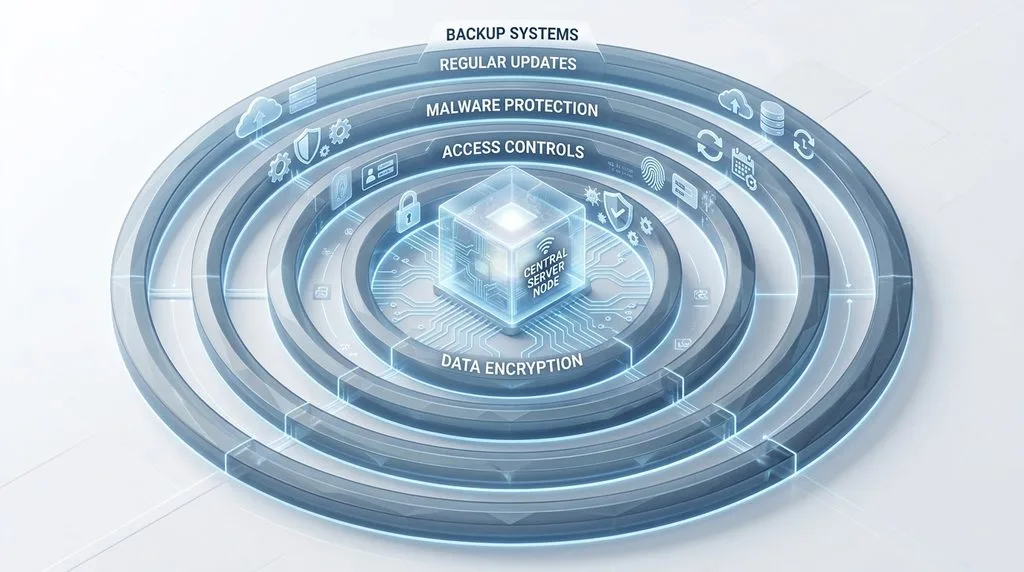
Effective web security includes several layers working together:
- Data encryption: Scrambles information so only authorized people can read it
- Access controls: Ensures only the right people reach sensitive areas
- Malware protection: Blocks malicious software from infecting your site
- Regular updates: Closes known vulnerabilities in your software
- Backup systems: Lets you restore everything if disaster strikes
Each layer matters. A weak lock on one door compromises your entire building.
Why Every Business Needs Web Security Now
Cyberattacks are not slowing down. They are accelerating. Recent data shows that 46% of small businesses experienced a cyberattack in 2025. Attackers now target smaller businesses specifically because they often have weaker defenses.
New technologies also expand the attack surface. Cloud services, mobile apps, and third-party integrations all create additional entry points. You cannot assume you are too small or too unimportant to attract attention.
Why Web Security Matters for Your Business Results
Web security directly impacts your revenue, reputation, and long-term survival. Here is why you should treat it as a business priority, not a technical chore.
Protecting Customer Trust and Brand Reputation
Customers trust you with their personal information. When you betray that trust through negligence, they leave and never come back.
A single data breach destroys years of brand building. Customers remember which companies lost their data. They share those stories widely. Your reputation, the most valuable asset you own, takes a direct hit.
Secure websites build trust visibly. When customers see the padlock icon and “https” in their browser, they feel safer entering their credit card details. That feeling directly translates into more completed purchases.
Avoiding Costly Business Interruptions
A hacked website often goes offline completely. Sometimes for days. During that downtime, you sell nothing. Your customer support grinds to a halt. Marketing campaigns fall apart.
The financial impact adds up quickly. Lost sales represent only the beginning. You also pay cleanup costs, legal fees, and potentially regulatory fines. For many small businesses, a major attack proves fatal.
Web security keeps your operations running. It prevents attackers from disrupting your revenue streams or stealing your data.
Boosting Your Search Engine Visibility
Search engines actively punish insecure websites. Google flags sites without HTTPS as “Not secure.” It demotes sites infected with malware. It warns users before they click on compromised results.
A secure website ranks better. Google confirmed HTTPS as a ranking signal. Secure sites also earn better user engagement metrics because visitors stay longer and bounce less frequently.
Google’s transparency report shows that over 95% of traffic to Chrome on Android now uses HTTPS. Users expect security. Search engines reward it.
Meeting Legal and Compliance Requirements
Depending on your location and industry, you must follow specific security regulations. The GDPR in Europe, CCPA in California, and HIPAA for healthcare all mandate security protections.
Failure to comply brings heavy fines. GDPR violations can cost up to €20 million or 4% of global revenue. Web security helps you avoid these catastrophic penalties while protecting customer data.
The FTC’s guidance on data security makes clear that businesses of all sizes hold responsibility for protecting customer information. The Cybersecurity and Infrastructure Security Agency (CISA) also provides free resources to help businesses implement basic protections.
Creating Competitive Advantage
Smart businesses use security as a marketing feature. They tell customers “we protect your data” and “our site stays safe.” In crowded markets, this trust signal differentiates you from competitors.
When customers choose between two similar businesses, they pick the safer option. Web security gives you that advantage.
The Current Threat Landscape: What You Face Today

Understanding modern threats helps you defend against them effectively. Here is what attacks look like in 2025 and beyond.
Rising Attack Volume and Sophistication
Attack volume continues climbing year over year. But quantity is not the only problem. Attack quality also improved dramatically.
Modern attackers use automation and artificial intelligence. They probe your defenses constantly. They adapt when you block one approach. Simple, set-it-and-forget-it security no longer works.
API Vulnerabilities Create New Entry Points
Modern websites rely on APIs (Application Programming Interfaces). These connections let different software systems talk to each other. Your payment processor talks to your shopping cart. Your email service talks to your CRM.
Each API creates a potential entry point for attackers. Research shows APIs played a role in 33% of web application breaches in 2024. Securing these connections requires specialized attention.
Sophisticated Bots Attack Continuously
Not all website traffic comes from real humans. Bad bots, automated programs that mimic human behavior, constantly probe for weaknesses.
These bots attempt credential stuffing (trying stolen passwords across multiple sites), content scraping (stealing your text and images), and fake account creation. Advanced bots bypass basic security measures easily.
Complexity Creates Hidden Weaknesses
Many businesses suffer from tool bloat. They install dozens of security plugins, monitoring services, and protection tools. These tools often conflict or leave gaps.
The complexity itself becomes a vulnerability. Misconfigured tools provide less protection than using fewer tools correctly.
Small Businesses as Primary Targets
Here is the misconception that hurts most business owners: “Attackers only target big companies.” The opposite proves true.
Attackers actively target small and medium businesses because they know security often lags. These businesses hold valuable data (customer records, payment info) but defend it poorly. You look like an easy paycheck.
Core Web Security Components You Need
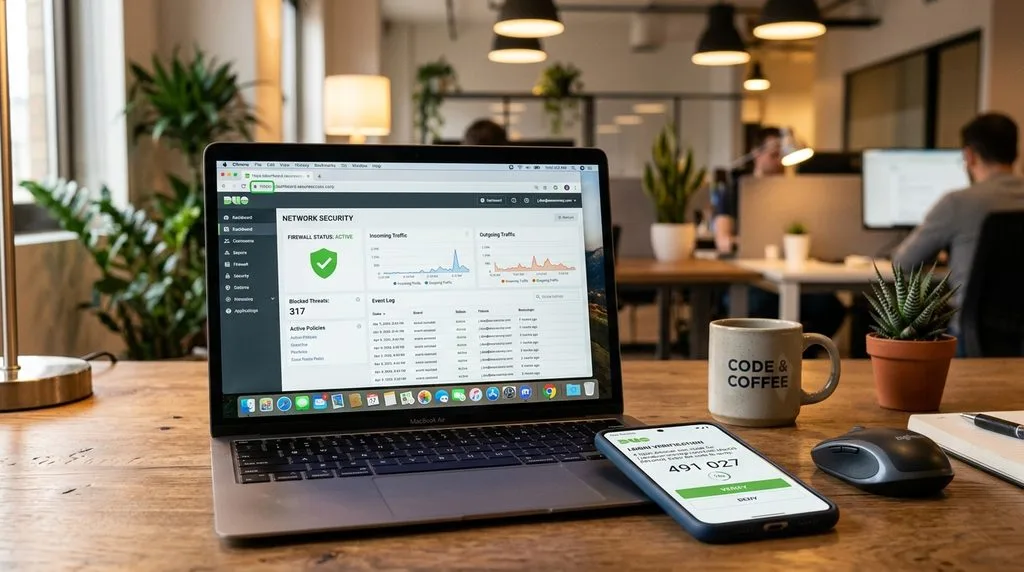
Building real protection requires multiple layers. Implement these essential components.
HTTPS, SSL, and TLS: Encryption Basics
HTTPS encrypts everything traveling between your website and your customer’s browser. Without it, anyone on the same network can read passwords, credit cards, and form submissions.
SSL and TLS certificates make HTTPS possible. They verify your identity and create secure connections. Most hosting providers now include free SSL certificates. Use them.
Check that your site automatically redirects all HTTP traffic to HTTPS. One insecure page compromises your entire security posture.
Web Application Firewalls (WAF)
A WAF filters malicious traffic before it reaches your website. It blocks common attacks like SQL injection (where attackers insert database commands into form fields) and cross-site scripting (where they inject malicious code).
Think of a WAF as a security guard at your front door. It checks every visitor, blocks known troublemakers, and lets legitimate customers through.
If you run an e-commerce store, accept logins, or store customer data, you need a WAF.
Multi-Factor Authentication (MFA)
Passwords alone fail constantly. People reuse them, share them, and choose weak ones like “password123.” Attackers buy stolen passwords in bulk from dark web markets.
MFA adds a second verification step. After entering a password, users must also provide a code from their phone or a biometric scan. This stops attackers even when they have your password.
One major technology company reported a 99.9% decrease in successful phishing attacks after implementing MFA across its services. Implement MFA for all admin accounts immediately.
Regular Patch Management
Outdated software causes most successful breaches. Hackers know about known vulnerabilities. They scan for sites running old versions of WordPress, plugins, or server software.
Patch management means applying updates promptly. When a security update releases, install it within days, not months. Automate updates where possible. Remove unused plugins and themes entirely.
Backup and Recovery Plans
Even with perfect security, breaches sometimes happen. A strong backup strategy lets you recover quickly.
Back up your entire website daily. Store backups in a separate location (not on the same server). Test your restoration process regularly. When disaster strikes, you restore operations in hours instead of weeks.
Build a secure website that performs brilliantly. Let our CMS development experts create a safe foundation for your business.
How Web Security Connects to Your Marketing and Brand
Security is not just an IT problem. It directly impacts your marketing, brand perception, and customer relationships.
Security as a Trust Signal in Your Messaging
Use your security practices in marketing materials. Add statements like “Your data stays encrypted” to checkout pages. Mention your security certifications in email campaigns. Display trust badges prominently.
Customers actively look for security signals. Provide them clearly and honestly. Hollow reassurance backfires, so only claim what you actually do.
SEO Benefits Drive Organic Traffic
Search engines prefer secure websites. HTTPS directly impacts rankings. Fast, secure pages improve user experience metrics like time-on-site and bounce rate.
When browsers flag your site as insecure, users leave immediately. That behavior signals low quality to search engines. Rankings drop. Traffic follows.
User Experience Must Include Security
Security should never block legitimate users. Balance protection with convenience.
Good security design stays invisible to normal users but blocks attackers. For example, CAPTCHA challenges only appear when the system detects suspicious behavior. MFA only triggers on new devices.
Integrate security into your checkout, login, and form pages seamlessly. Customers should feel protected, not annoyed.
Risk Management Protects Campaign Investments
You invest heavily in marketing campaigns. You drive traffic through ads, social media, and email. All that investment disappears if your site goes down from an attack.
Include security reviews in campaign planning. Ensure your site can handle traffic spikes (which can mask attack patterns). Have contingency plans for communicating with customers during outages.
Practical Steps to Audit Your Website Security

Use this audit process to evaluate your current security posture.
Step 1: Inventory All Digital Assets
List every website, microsite, mobile app, and third-party integration your business uses. Include test sites and staging environments. Attackers often find weak points in forgotten test installations.
Document who has access to each asset. Review user roles and permissions regularly.
Step 2: Verify Basic Security Configuration
Check that HTTPS works across your entire site. Use tools like Qualys SSL Labs to test your SSL configuration. Ensure HTTP traffic redirects to HTTPS automatically.
Verify that all software runs the latest versions. Outdated plugins or server software require immediate updates.
Step 3: Strengthen Access Controls
Enable MFA for every administrative account. Enforce strong password policies. Remove old accounts from former employees immediately.
Apply the principle of least privilege: give each user only the access they absolutely need. A marketing intern does not need server configuration permissions.
Step 4: Test Your Defenses
Run vulnerability scans using tools like Sucuri SiteCheck. These free tools detect common malware and security issues.
If you have a WAF, verify it blocks test attacks. Consider hiring an external security firm for penetration testing annually.
Step 5: Validate Backups and Recovery
Test your backup restoration process today. Do not assume backups work. Actually restore your site on a test server and verify everything functions.
Document your recovery steps. Assign specific people to each task. Practice the process quarterly.
Step 6: Establish Monitoring and Response
Set up alerts for failed login attempts, file changes, and unusual traffic patterns. Many security tools offer free tiers with basic monitoring.
Create an incident response plan before you need it. Define who gets notified, how you communicate with customers, and step-by-step recovery procedures.
Key Metrics to Track for Web Security
Measure these metrics to understand your security effectiveness.
- Website uptime: Your site’s percentage of operational time. Aim for 99.9% or higher.
- Time to patch: How quickly you apply security updates after release. Measure in days, not weeks.
- Security incidents: Number of attempted and successful breaches. Track trends over time.
- SEO visibility: Monitor organic traffic and rankings. Drops may indicate security issues.
- Bounce rate on secure pages: Compare to industry benchmarks. High bounce rates on secure pages may signal trust issues.
Turn your secure website into a lead generation machine. Explore our lead generation services to convert trust into customers.
Common Web Security Mistakes Businesses Make
Avoid these frequent errors that leave websites vulnerable.
Treating Security as an Afterthought
“We will fix security later” creates permanent vulnerability. Security requires building it in from the start, not adding it at the end.
When you launch new campaigns or build new features, include security requirements in the initial planning. Later rarely comes.
Ignoring Software Updates
Outdated plugins cause most WordPress hacks. Attackers know the exact vulnerabilities in old versions. They scan constantly.
Set up automatic updates where possible. For critical systems, schedule weekly manual updates. Never postpone security patches.
Relying Only on Basic Protections
HTTPS and a firewall provide a foundation, not complete protection. You also need monitoring, access controls, backups, and incident response.
Defense in depth means multiple layers of protection. When one layer fails, others stop the attack.
Assuming Small Size Means Safety
Small businesses face higher risk per employee than large enterprises. Attackers know you have less security expertise and fewer resources.
Your size does not protect you. Your security practices do.
Failing to Train Your Team
Your employees represent your biggest security vulnerability. Phishing attacks target them. Weak passwords start with them.
Train your team regularly. Run mock phishing tests. Enforce security policies consistently.
Emerging Web Security Trends to Watch
Stay ahead of threats by understanding where security evolves.
AI-Powered Attacks and Defenses
Attackers now use artificial intelligence to craft convincing phishing emails and adapt their techniques in real-time. Defenders fight back with AI that detects unusual behavior patterns.
Expect this arms race to intensify. Manual security monitoring cannot keep pace with AI-driven attacks. Automated defenses become essential.
Zero Trust Architecture
Traditional security assumed everything inside your network could be trusted. Zero Trust assumes nothing and verifies everything.
Every access request gets authenticated and authorized, regardless of source. This approach protects you even when attackers compromise internal systems.
API-First Security
As businesses rely more on APIs, securing these connections becomes critical. API security requires different tools than traditional web security.
Expect more breaches originating through poorly secured APIs. Prioritize API security if your business uses many third-party integrations.
Frequently Asked Questions About Web Security
Do I need a large budget for good web security?
No. Basic protections like HTTPS, MFA, regular updates, and backups cost little to nothing. Many excellent free tools exist. What matters most is consistent implementation, not expensive products.
How does web security affect my marketing results?
Secure websites convert better because customers trust them. Security also improves SEO rankings directly. An insecure site or a breach destroys campaign performance and brand reputation.
How often should I review my website security?
Review basic security posture quarterly. Run vulnerability scans monthly. For e-commerce or high-traffic sites, monitor continuously. Security is not a one-time project.
What if a third party hosts my website?
You still hold ultimate responsibility. Ask your hosting provider about their patching schedule, backup retention, and isolation between customers. Read your contract carefully. Never assume they handle everything.
How do I measure return on investment for security?
Calculate potential costs of a breach: downtime, cleanup, legal fees, customer churn, and reputation damage. Compare to your security spending. Track metrics like fewer incidents and faster recovery times.
What is the most common way hackers break into websites?
Outdated software causes most breaches. Attackers scan for known vulnerabilities in old versions of WordPress, plugins, themes, and server software. Regular updates prevent the vast majority of attacks.
Can I handle web security myself without hiring experts?
You can manage basics like updates and backups yourself. However, comprehensive security including monitoring, penetration testing, and incident response typically requires specialized expertise. Many businesses hire managed security providers.
Conclusion: Turn Web Security Into Business Growth
Web security protects everything you built online. It safeguards customer trust, revenue streams, brand reputation, and long-term survival.
Start with the basics: HTTPS, MFA, regular updates, daily backups, and a WAF. Build from there based on your specific risks. Train your team. Monitor continuously. Practice incident response.
When you treat security as a business enabler instead of a technical cost, you gain competitive advantage. Customers choose secure businesses. Search engines reward them. Attacks fail against them.
The threats will not disappear. But you can defend effectively. Start your security audit today.
Take control of your website security today. Partner with our full-service digital team for complete protection and peace of mind.