
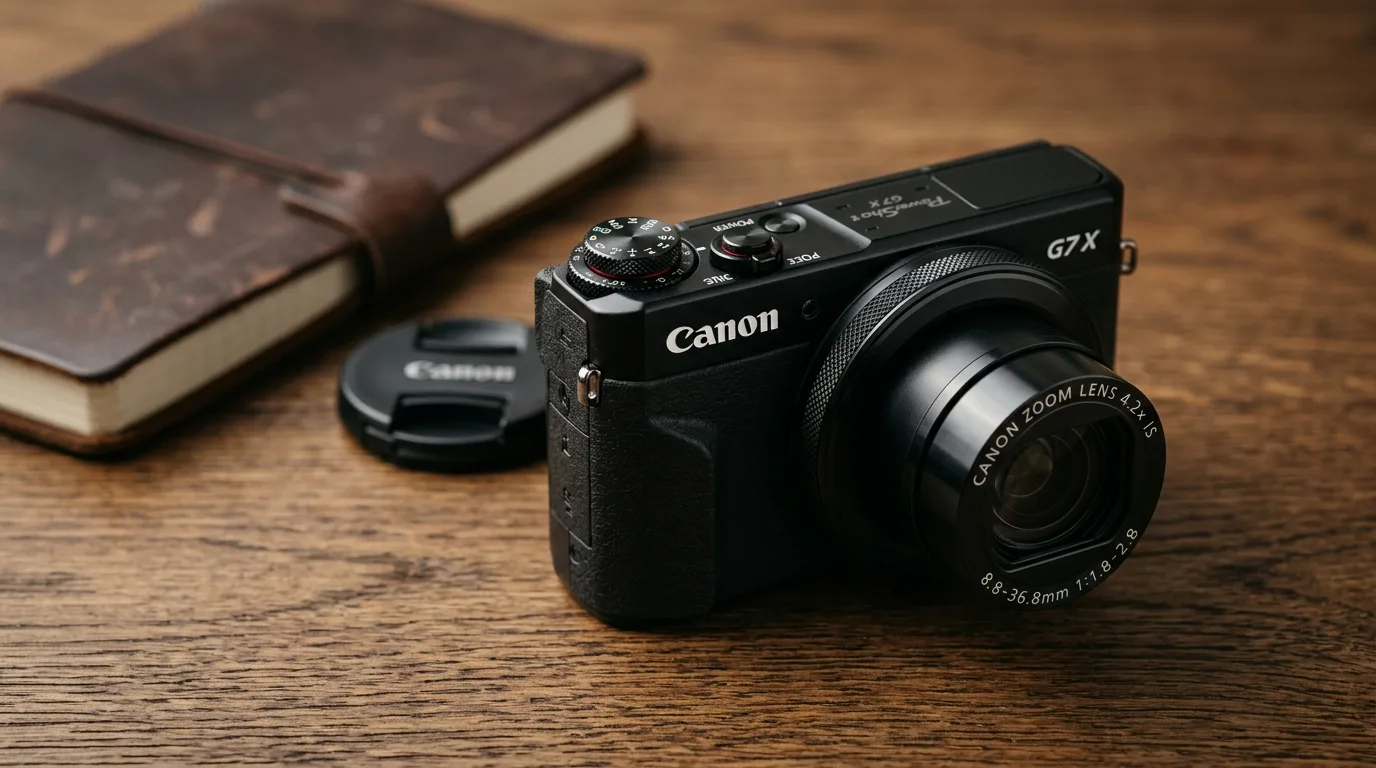
The premium compact camera market underwent a massive revolution when manufacturers started squeezing large 1-inch sensors into bodies that easily slide into a jacket pocket. For years, point-and-shoot cameras suffered from a reputation of delivering mediocre image quality that smartphones eventually replaced. However, Canon turned the tables by introducing the PowerShot G7 X. This pocket-sized powerhouse targeted enthusiast photographers, content creators, and casual shooters who refused to compromise on image clarity, manual controls, and low-light performance.
In this exhaustive review, we analyze every facet of the Canon PowerShot G7 X. We evaluate its optical performance, physical design, sensor capabilities, and autofocus speed to help you determine if this camera deserves a permanent spot in your creative toolkit.
The Emergence of the Premium 1-Inch Sensor Category
Before diving into the hardware, we must understand why the 1-inch sensor category matters. Standard compact cameras traditionally utilized tiny 1/2.3-inch sensors, which struggled significantly in high-contrast environments and dim lighting. By integrating a 1-inch sensor which offers roughly four times the surface area of a traditional point-and-shoot sensor—Canon unlocked unprecedented dynamic range, cleaner high-ISO files, and authentic background separation.
The PowerShot G7 X arrived as a direct challenger to established market leaders, bringing unique advantages such as a longer optical zoom range and a fully interactive touchscreen interface. It successfully bridged the gap between clumsy DSLR configurations and limited mobile phone optics, offering a dedicated imaging platform for creators on the move.
Target Audience: Who Is This Camera For?
Canon specifically tailored this camera for three distinct groups of creators:
- Travel Photographers: Individuals who require manual controls and exceptional optics without the physical burden of interchangeable lenses.
- Vloggers and Video Creators: Videographers who need an articulation screen, reliable face tracking, and a bright aperture for self-recording.
- Enthusiast Hobbyists: Photographers who want a secondary, highly portable “everyday carry” camera that matches the menu system and color science of their larger primary camera systems.
If you want to maximize the potential of a dedicated camera system like this, building a solid foundational understanding of exposure, composition, and manual adjustments is crucial. You can elevate your creative vision by exploring our comprehensive guide on mastering photography fundamentals, which clarifies technical settings for beginners and intermediate shooters alike.
Want to transform your casual snapshots into breathtaking visual masterpieces? Read our guide on mastering photography fundamentals and unlock the true creative potential of your premium compact camera today!
Canon Power Shot G7 X: Core Specifications At A Glance
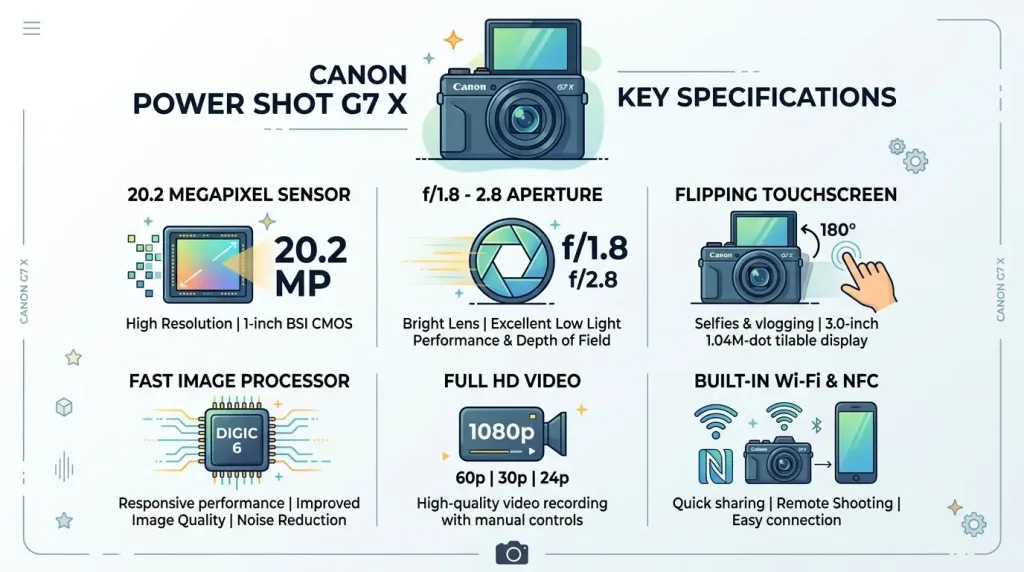
To set a solid foundation for our deep dive, let us examine the primary technical specifications that power this premium compact device.
| Technical Feature | Specification Details |
| Image Sensor | 20.2 Megapixel, 1-inch High-Sensitivity BSI-CMOS Sensor |
| Image Processor | Canon DIGIC 6 Image Processor |
| Focal Length | 8.8 – 36.8 mm (35mm equivalent: 24–100mm) |
| Optical Zoom | 4.2x Optical Zoom |
| Maximum Aperture | f/1.8 (Wide) – f/2.8 (Telephoto) |
| Autofocus System | 31-Point Contrast-Detection AF System |
| ISO Sensitivity Range | ISO 125 to ISO 12800 |
| Shutter Speed Range | 1/2000 sec to 40 seconds (total range varies by shooting mode) |
| LCD Monitor | 3.0-inch Tilting (180° Up) Touchscreen LCD with 1.04M Dots |
| Video Recording | Full HD 1080p at 60p, 30p, and 24p in MP4 format |
| Connectivity | Built-in Wi-Fi and Near Field Communication (NFC) |
| Battery Life | Approximately 210 shots per CIPA standard guidelines |
Design, Ergonomics, and Tactile Build Quality
Canon constructed the PowerShot G7 X with a robust, reassuringly heavy metallic chassis. Despite its dense engineering, the body measures just 103 x 60 x 40 millimeters and weighs approximately 304 grams with the battery and memory card inserted. This compact footprint ensures that the camera fits comfortably into jacket pockets, small waist bags, and travel pouches.
+-------------------------------------------------------+
|  [Mode Dial / Exposure Comp]             [Shutter]     |
|                                                       |
|   +-----------------------------------------------+   |
|   |                                               |   |
|   |         3.0-Inch Tilting Touchscreen         |   |
|   |                 (Flips 180°)                  |   |
|   |                                               |   |
|   +-----------------------------------------------+   |
|                                                       |
|  [Lens Control Ring]        [D-Pad]    [Menu Button]  |
+-------------------------------------------------------+
Physical Controls and Dial Customization
The physical interface of the G7 X emphasizes manual efficiency. On the upper plate, Canon implemented a stacked dual-dial design. The top layer controls your exposure modes (Manual, Aperture Priority, Shutter Priority, and Program), while the lower, wider ring provides direct exposure compensation adjustment from -3 EV to +3 EV in one-third stop increments.
The star of the physical interface is undoubtedly the clicky control ring situated around the base of the lens barrel. This knurled aluminum ring gives crisp tactile feedback as you rotate it. By default, the camera changes its behavior based on your shooting mode—adjusting aperture in Aperture Priority or shutter speed in Shutter Priority. However, a dedicated button on the rear panel allows you to reassign this ring to control manual focus, ISO sensitivity, white balance, or step zoom increments.
The 180-Degree Tilting Touchscreen Mechanism
The back of the camera houses a bright, 3.0-inch capacitive touchscreen liquid crystal display. This screen utilizes a hinge mechanism that tilts upward by a full 180 degrees. When you flip the screen completely up, the camera automatically mirrors the live view image, transforming the device into an elite vlogging tool or a high-precision selfie machine.
The touch responsiveness matches modern smartphone standards. You can tap anywhere on the frame to instantly select an autofocus point, fire the shutter, or navigate through the dense menu system. Pinch-to-zoom and swiping gestures during image playback operate smoothly without noticeable lag. The only design limitation here is the lack of a downward tilt, which complicates shooting high-angle shots over crowds.
Grip and Everyday Handling Limitations
While the metallic exterior feels undeniably premium, the front surface lacks a pronounced, rubberized handgrip. Canon opted for a mostly flat front facade with a subtle textured thumb rest on the back. For users with larger hands, this clean aesthetic can occasionally feel slippery during extended single-handed shooting sessions. We highly recommend utilizing the included wrist strap or purchasing an aftermarket adhesive rubber grip to ensure maximum security while navigating busy urban environments.
The Optical Marvel: Analyzing the 24-100mm f/1.8-2.8 Lens
The defining characteristic that sets the Canon PowerShot G7 X apart from many competing 1-inch sensor cameras is its highly ambitious optical formulation. Canon engineers integrated a 4.2x optical zoom lens that delivers a 35mm equivalent focal length range of 24mm to 100mm.
24mm (Ultra-Wide Landscape) ----------> 50mm (Natural Street View) ----------> 100mm (Telephoto Portrait)
     [ f/1.8 Max Aperture ]                     [ f/2.5 ]                     [ f/2.8 Max Aperture ]
This focal spread covers everything from expansive landscape vistas and tight interior architectural views to natural street perspectives and flattering compressed portraits. For a deeper look into official optical technologies, users can cross-reference the manufacturing standards published on the Canon Global Official Platform.
Bright Aperture Performance Across the Zoom Range
Having an ultra-bright maximum aperture of f/1.8 at the wide 24mm end gives photographers a massive advantage when working indoors or during twilight. More importantly, the lens maintains a bright f/2.8 aperture even when zoomed out fully to 100mm. Many competitor compacts drop down to f/4 or f/5.6 at their telephoto endpoints, which severely limits their utility in low light and flattens background separation.
The internal optical design consists of 11 elements arranged in 9 groups, incorporating three aspherical lenses and one Ultra-Low Dispersion (UD) element to fight optical aberrations. A 9-blade curved aperture diaphragm produces beautifully smooth, circular background specular highlights (bokeh), allowing your subject to pop dramatically against a beautifully blurred background.
Center Sharpness vs. Corner Softness
When shooting wide open at 24mm and f/1.8, center sharpness is remarkably high. Micro-details in text, skin texture, and clothing patterns render with clarity. However, the extreme corners of the frame exhibit noticeable softness and minor vignetting when absolute raw files are analyzed without software corrections.
+------------------------------------------+
| Corner: Soft / Vignetted                  |
|                                          |
|            +-----------------+           |
|            |  Center: Sharp  |           |
|            |  & High Contrast|           |
|            +-----------------+           |
|                                          |
|                                          |
+------------------------------------------+
To maximize edge-to-edge resolution for landscape architecture, you simply need to stop the lens down to f/4 or f/5.6. At these intermediate apertures, the lens performance peaks, delivering uniform sharpness and crisp contrast across the entire 20.2-megapixel canvas.
Macro Performance and Close-Up Artifacts

The G7 X boasts an impressive minimum focusing distance of just 5 centimeters (approximately 2.0 inches) when set to the widest focal length. This enables striking macro photography, allowing you to capture intricate textures on flower petals, food dishes, or small product samples.
One optical characteristic to keep in mind: shooting at the absolute minimum focusing distance while simultaneously maintaining the maximum f/1.8 aperture introduces a dreamy, soft-glow spherical aberration around high-contrast edges. If you require razor-sharp technical clarity for close-up macro details, step back slightly, zoom in to around 35mm, or close the aperture down to f/2.8 or f/4 to instantly eliminate this optical haze.
Sensor Capabilities, ISO Performance, and Image Quality
At the heart of the Canon PowerShot G7 X lies a 20.2-megapixel, 1-inch Backside-Illuminated (BSI) CMOS sensor. The backside-illuminated architecture moves the sensor’s circuitry behind the light-sensitive photodiodes, maximizing light-gathering efficiency and minimizing electronic noise generation.
Evaluating the ISO Sensitivity Range (ISO 125 to 12800)
The camera handles digital noise exceptionally well given its physical sensor size class. Let us break down the performance across real-world shooting environments:
- ISO 125 to 400: Images remain pristine, vibrant, and incredibly detailed. This is the optimal range for daylight travel photography, landscapes, and studio portrait work where maximizing dynamic range is paramount.
- ISO 800 to 1600: Minor luminance noise begins to creep into the deep shadow regions. However, color saturation remains strong, and fine details remain intact. You can confidently utilize these settings for indoor family gatherings or shady forest environments.
- ISO 3200 to 6400: Noise becomes visibly apparent, and Canon’s default JPEG noise-reduction algorithm begins to smooth over fine details to counteract grain. While these files are perfectly usable for web presentation and social media sharing, demanding photographers should shoot in RAW to retain control over the balance between sharpness and noise reduction.
- ISO 12800: This maximum setting should be reserved strictly for emergency situations. Images exhibit significant detail loss, reduced dynamic range, and slight color shifting.
Canon Color Science and JPEG Processing
One of the primary reasons photographers return to Canon systems is their proprietary color science. The DIGIC 6 image processor renders skin tones naturally, avoiding the greenish or excessively yellow casts that plague other systems. Blue skies display rich depth, and foliage appears punchy without looking digitally oversaturated.
The camera features customizable “Picture Styles” (Standard, Portrait, Landscape, Neutral, Faithful, and Monochrome). This allows shooters who prefer an immediate workflow to fine-tune sharpness, contrast, and color saturation directly inside the camera before importing files onto mobile devices.
RAW File Dynamic Range and Shadow Recovery
For creatives who prefer total artistic control, the G7 X records 12-bit CR2 RAW files. The dynamic range offered by this 1-inch sensor provides surprising flexibility during post-production. When exposing carefully for bright highlights during a harsh sunset, you can easily pull significant detail out of deep shadows without introducing destructive color noise or banding.
RAW File Flexibility Profile:
[ Highlights: Retains approx. 1.5 Stops of Overexposed Data ]
[ Shadows: Recovers up to 2.5 Stops of Underexposed Data Safely ]
If you plan to extract every ounce of performance from these RAW files, mastering post-processing software is an invaluable asset. You can refine your digital editing skills by exploring our detailed guide on implementing professional photo editing techniques, which provides step-by-step methodologies for refining color accuracy, managing contrast, and maximizing detail retention.
Autofocus, Speed, and Operational Responsiveness
The PowerShot G7 X relies on a 31-point contrast-detection autofocus system. The AF points cover a wide area of the frame, ensuring that subjects positioned near the edges can be acquired quickly without forcing a recomposition.
+---------------------------------------+
|  [+]      [+]      [+]      [+]  [+]  |
|      [+]      [+]      [+]      [+]   |
|  [+]      [+]  [CENTER]    [+]  [+]   |
|      [+]      [+]      [+]      [+]   |
|  [+]      [+]      [+]      [+]  [+]  |
+---------------------------------------+
(31-Point Contrast AF Coverage Layout)
Single AF vs. Continuous Tracking Performance
In Single AF mode (One-Shot AF), the camera locks focus almost instantaneously under bright daylight conditions. The lens elements move swiftly, and the confirmation beep sounds within milliseconds. In low-light environments, focus acquisition slows down slightly as the contrast-detect system searches for clear edges, but the built-in orange AF-assist beam ensures reliable locking even in dark rooms.
Continuous Autofocus (Servo AF) tracks moving subjects adequately for casual use, such as a pet walking toward the camera or a child playing in a park. However, because it lacks phase-detection hardware pixels, it can occasionally exhibit minor “hunting” behavior during high-speed action or erratic sports photography.
Continuous Burst Shooting and Buffer Limitations
The burst rate capabilities of the G7 X present a mixed experience depending entirely on your chosen file format:
- JPEG Only Mode: The camera fires at an impressive 6.5 frames per second with focus locked at the first frame. It maintains this speed continuously until your high-speed memory card fills up, making it highly effective for capturing fast actions or candid expressions.
- RAW / RAW+JPEG Mode: When writing large uncompressed raw files, the burst speed drops substantially to around 1.2 frames per second. The DIGIC 6 processor requires significant processing time to clear the buffer for RAW files. If your goal is high-speed action sequence photography using RAW files, you will need to time your shots carefully rather than spraying continuously.
Shutter Mechanisms and Flash Integration
The camera utilizes a mechanical shutter that tops out at 1/2000 of a second. To counteract this limitation when shooting wide open at f/1.8 under intense, direct afternoon sunlight, Canon thoughtfully built a physical, selectable 3-stop Neutral Density (ND) filter into the lens assembly. Activating the internal ND filter cuts down the incoming light, allowing you to maintain shallow depth of field and beautiful background blur without overexposing your image.
A small physical switch on the side of the body deploys a mechanical pop-up flash. While small, this flash serves as an excellent fill-light source for evening portraits. It can also be manually tilted back with a finger to bounce the light off a white ceiling, producing much softer, more flattering illumination than direct flash.
Video Performance: The Ultimate Travel Vlogging Tool?
Long before the current boom of specialized vlogging cameras, the original Canon PowerShot G7 X established an absolute stronghold among top-tier YouTube creators and travel videographers. Its physical design attributes matched video production needs beautifully.
Full HD 1080p Video Capabilities
While the camera does not offer 4K video recording resolutions, its Full HD 1080p output at 60, 30, and 24 frames per second looks exceptionally clean, organic, and highly professional. The bitrates max out at approximately 35 Mbps using the universally compatible MP4 compression format (H.264 video codec with AAC audio).
The video footage benefits immensely from Canon’s rich color profiles. Out-of-camera clips feature pleasing skin tones and vibrant environmental hues, drastically reducing the time editors must spend color-grading files before publishing content online.
Intelligent Optical Image Stabilization (IS)
To ensure smooth handheld video production, Canon equipped the G7 X with an advanced 5-axis Intelligent Optical Image Stabilization system. This hardware system analyzes camera movement in real time and physically shifts lens elements to counteract hand tremors, walking vibrations, and panning jitters.
5-Axis Stabilization Counteracts:
[ Pitch ]  [ Yaw ]  [ Roll ]  [ Horizontal Shift ]  [ Vertical Shift ]
When walking down a street while vlogging, the stabilization minimizes jerky movements, resulting in cinematic, polished footage that is highly comfortable for audiences to watch. It allows travel videographers to leave bulky gimbals and heavy tripods behind while capturing smooth B-roll sequences on the fly.
Audio Quality, Internal Microphones, and Connectivity Gaps

The top plate houses an internal stereo microphone array that captures clear ambient sound and distinct vocals in quiet or moderately busy environments. However, the camera body lacks a dedicated 3.5mm external microphone input jack and a hot shoe for mounting accessories.
If you plan to record professional video audio in high-wind conditions or noisy public spaces, we recommend utilizing an external audio recorder or a clip-on wireless microphone kit. You can then synchronize the clean external audio track with the camera’s internal scratch audio during the post-production editing phase.
Real-World Connectivity and Battery Life Performance
A travel and lifestyle camera must communicate efficiently with the modern digital ecosystem. Canon addressed this requirement by incorporating built-in Wi-Fi along with Near Field Communication (NFC) protocols.
+-------------------+       Wireless Wi-Fi / NFC       +--------------------+
|   Canon G7 X      | ===============================> | Smartphone / Tablet|
|  (Capture Images) |                                  | (Edit & Share Live)|
+-------------------+                                  +--------------------+
By installing the free Canon Camera Connect application on your iOS or Android smartphone, you establish a direct wireless connection to the camera. This application unlocks two vital functionalities:
- Wireless Image Transfer: You can browse the contents of the camera’s memory card directly on your phone screen, transfer JPEGs or MP4 videos wirelessly in seconds, and upload your travel memories directly to social media networks.
- Full Remote Control: Your smartphone screen transforms into a remote live-view monitor. You can adjust the camera’s zoom lens, modify exposure values (aperture, shutter speed, ISO), select autofocus tracking points, and trigger the shutter button from up to thirty feet away—ideal for wide group photos or discreet wildlife observation.
Managing the NB-13L Battery Constraints
If the Canon PowerShot G7 X has a definitive operational Achilles’ heel, it is its battery longevity. The camera relies on a compact NB-13L rechargeable lithium-ion battery pack, which carries a CIPA rating of approximately 210 shots per charge cycle.
Because the large 1-inch sensor, powerful image processor, and bright touchscreen demand significant electrical power, the battery drains relatively quickly during intense shooting days. To optimize performance, we highly advise implementing the following field adjustments:
- Enable Eco Mode: This internal setting dims the LCD screen quickly when the camera is idle and puts the device into a deep sleep state to preserve precious milliamps.
- Carry Spare Packs: For full-day excursions, weekend travel trips, or heavy video recording sessions, always carry two additional spare batteries in your camera pouch.
- Turn Off Wireless Signals: Keep the internal Wi-Fi functionality deactivated until you actively need to transfer images to your smartphone.
For detailed testing guidelines regarding power consumption and standardized camera performance metrics, you can reference the official documentation hosted by the Camera & Imaging Products Association (CIPA).
Comparative Analysis: Canon G7 X vs. Sony RX100 III
To fully understand the market value of the G7 X, we must compare it directly against its fiercest historical contemporary: the Sony Cyber-shot DSC-RX100 III. Both cameras utilize a premium 1-inch sensor format, but their design philosophies differ fundamentally.
Feature Comparison Profile:
+------------------------+---------------------------------+---------------------------------+
| Specification Element  | Canon PowerShot G7 X            | Sony Cyber-shot RX100 III       |
+------------------------+---------------------------------+---------------------------------+
| Focal Length Range     | 24-100mm (4.2x Optical Zoom)    | 24-70mm (2.9x Optical Zoom)     |
| Maximum Tele Aperture  | f/2.8 at 100mm                  | f/2.8 at 70mm                   |
| Interface Paradigm     | Comprehensive Touchscreen UI    | Traditional Button Navigation   |
| Viewfinder Hardware    | None (Relies entirely on LCD)  | Pop-Up Electronic Viewfinder     |
| Color Presentation     | Warm, Natural Skin Tones        | Cool, Analytical Technical Edge |
+------------------------+---------------------------------+---------------------------------+
Why Choose the Canon G7 X Over the Sony RX100 III?
- Extended Zoom Reach: The Canon offers a 100mm telephoto reach compared to Sony’s shorter 70mm limit. This extra 30mm allows you to isolate distant details and capture far more compressed portraits with enhanced background separation.
- Intuitive Touch Interface: The inclusion of a highly interactive touchscreen makes autofocus point selection, menu navigation, and image playback vastly faster and more intuitive for creators habituated to modern smartphone workflows.
- Economic Value: Canon typically positioned the G7 X at a more accessible entry price point than the premium-priced Sony RX100 series, providing a superior performance-to-cost ratio for budget-conscious buyers.
Why Choose the Sony RX100 III Over the Canon G7 X?
- Built-In Viewfinder: The Sony features an ingenious pop-up electronic viewfinder (EVF). This hardware element becomes indispensable when composing images in blinding midday sun where viewing an LCD screen is challenging.
- RAW Continuous Speed: Sony’s internal processing engine maintains higher burst rates when recording sequential RAW files, making it more reliable for dedicated action photography.
Detailed Breakdown of Pros and Cons
Every imaging system involves structural engineering trade-offs. Let us look at a balanced summary of the core strengths and operational weaknesses of the Canon PowerShot G7 X.
The Advantages (Pros)
- Exceptional Optics: The f/1.8-2.8 aperture combined with a versatile 24-100mm zoom range provides unmatched shooting flexibility.
- Large 1-Inch Sensor: Delivers beautiful image resolution, high dynamic range, and clean low-light performance.
- Ergonomic Control Ring: The physical lens ring enables smooth, tactile manual adjustments for focus, aperture, or exposure settings.
- Vlogger-Friendly Screen: The 180-degree flipping touchscreen simplifies self-recording, high-precision selfies, and low-angle composition.
- Superb Color Science: Out-of-camera JPEGs feature incredibly accurate skin tones and vibrant environmental colors.
- Pocketable Footprint: Delivers enthusiast-level manual control inside a highly portable form factor.
The Disadvantages (Cons)
- Short Battery Life: The 210-shot capacity requires users to carry multiple spare batteries for full-day travel.
- Slow RAW Burst Rate: The drop to 1.2 fps when shooting RAW limits its usefulness for high-speed action sequences.
- No Viewfinder Option: The complete lack of an electronic or optical viewfinder complicates composition under harsh sunlight.
- No External Mic Input: The omission of a 3.5mm microphone jack forces serious videographers to rely on external audio sync workflows.
Final Verdict: Does the Original Canon G7 X Still Hold Up?
The Canon PowerShot G7 X represents a monumental achievement in the compact imaging space. By pairing a bright f/1.8-2.8 lens with a large 1-inch BSI-CMOS sensor, Canon designed a portable device that consistently produces images that punch far above its weight class.
While modern successors have introduced upgrades like 4K video capabilities and microphone jacks, the original G7 X remains a phenomenal option on the secondary market. It delivers identical core photographic image quality, legendary Canon color science, and tactile dual-dial ergonomics at a fraction of the cost of current-generation models.
If you seek a portable, highly reliable, and manual-control-heavy everyday carry camera that easily outperforms any smartphone on the market, the Canon PowerShot G7 X remains a highly compelling choice for visual storytellers worldwide.
Frequently Asked Questions (FAQs)
1. Does the Canon PowerShot G7 X support 4K video recording?
No, the original Canon PowerShot G7 X does not record video in 4K resolution. It maxes out at Full HD 1080p resolution at 60, 30, and 24 frames per second. The 1080p video output remains sharp and highly detailed, making it perfect for standard YouTube production, online vlogging, and social media content creation.
2. Can I charge the Canon G7 X via a USB cable inside the camera?
No, the original version of the G7 X does not support internal battery charging via its USB port. You must physically remove the NB-13L lithium-ion battery from the base compartment and place it inside the included external wall charger to replenish its power supply.
3. How can I avoid overexposed images when shooting at f/1.8 in bright sunlight?
Because the camera has a maximum mechanical shutter speed limitation of 1/2000 of a second, shooting at f/1.8 in direct sunlight can occasionally result in overexposure. To solve this issue, Canon integrated a physical 3-stop Neutral Density (ND) filter inside the camera. You can activate this filter through the quick menu system to reduce incoming light, allowing you to shoot wide open at f/1.8 even under harsh sunlight.
4. Is the Canon G7 X good for low-light photography?
Yes, the Canon G7 X performs exceptionally well in low-light environments compared to standard compact cameras and smartphones. The combination of its large 1-inch sensor architecture and the ultra-bright f/1.8 maximum aperture allows it to gather substantial light, keeping your image files clean and sharp during evening excursions or indoor events.
5. Can I attach external microphones or flashes to this camera?
The original G7 X does not feature a 3.5mm external microphone input jack or a physical hot shoe on the top plate. If you require premium audio for video productions, we highly recommend recording your audio tracks externally using an independent lavalier or wireless microphone setup, then synchronizing the audio track with the video during editing.
6. What memory card type does the Canon Power Shot G7 X require?
The camera utilizes standard Secure Digital (SD, SDHC, or SDXC) memory cards. To ensure smooth performance when recording Full HD video at 60 frames per second or capturing high-speed JPEG bursts, we recommend utilizing an SDHC/SDXC card rated at UHS-I Speed Class 3 (U3) or higher.
Keep reading
All articles
The Ultimate Guide to Video Editing: Mastering the Art and Science of Visual Storytelling
Visual media dominates the modern digital landscape. Every day, millions of individuals watch videos on streaming platforms, social media networks, and corporate…
Read article
The 9 Best Mirrorless Cameras in 2026: The Ultimate Buying Guide
The global photography landscape has completed its historic transition. In 2026, mirrorless technology completely dominates the creative sector, rendering legacy digital single-lens…
Read article
Easy Ways to Remove Background Noise From Video Perfectly
Introduction: The Importance of Crystal Clear Audio Nothing ruins a beautiful shot faster than terrible sound. You spend hours setting up the…
Read article