Your journey into building websites doesn't start with writing a single line of code. It starts with learning the language. Web development comes with its own vocabulary, and understanding these terms helps you talk to developers, read documentation, and move forward with confidence. This guide covers 50 essential web development terms every beginner needs to know.
Ready to turn your ideas into a real website? Let Vastcope's expert team build a custom web solution that grows with you. Check out our web development services.
Why Learn Web Development Terminology?
Web development can feel overwhelming when every conversation includes words you don't understand. Learning the key terms helps you in three important ways:
-
Communicate clearly with developers – When you know what to ask, you get better results faster.
-
Follow tutorials and documentation – Most learning resources assume you understand basic terminology.
-
Make informed decisions – Understanding trade-offs between different approaches helps you choose the right path.
Beyond these benefits, knowing the jargon saves you hours of confusion. You will read blog posts, watch video courses, and join developer communities without feeling lost.
The Core Trio: HTML, CSS, and JavaScript
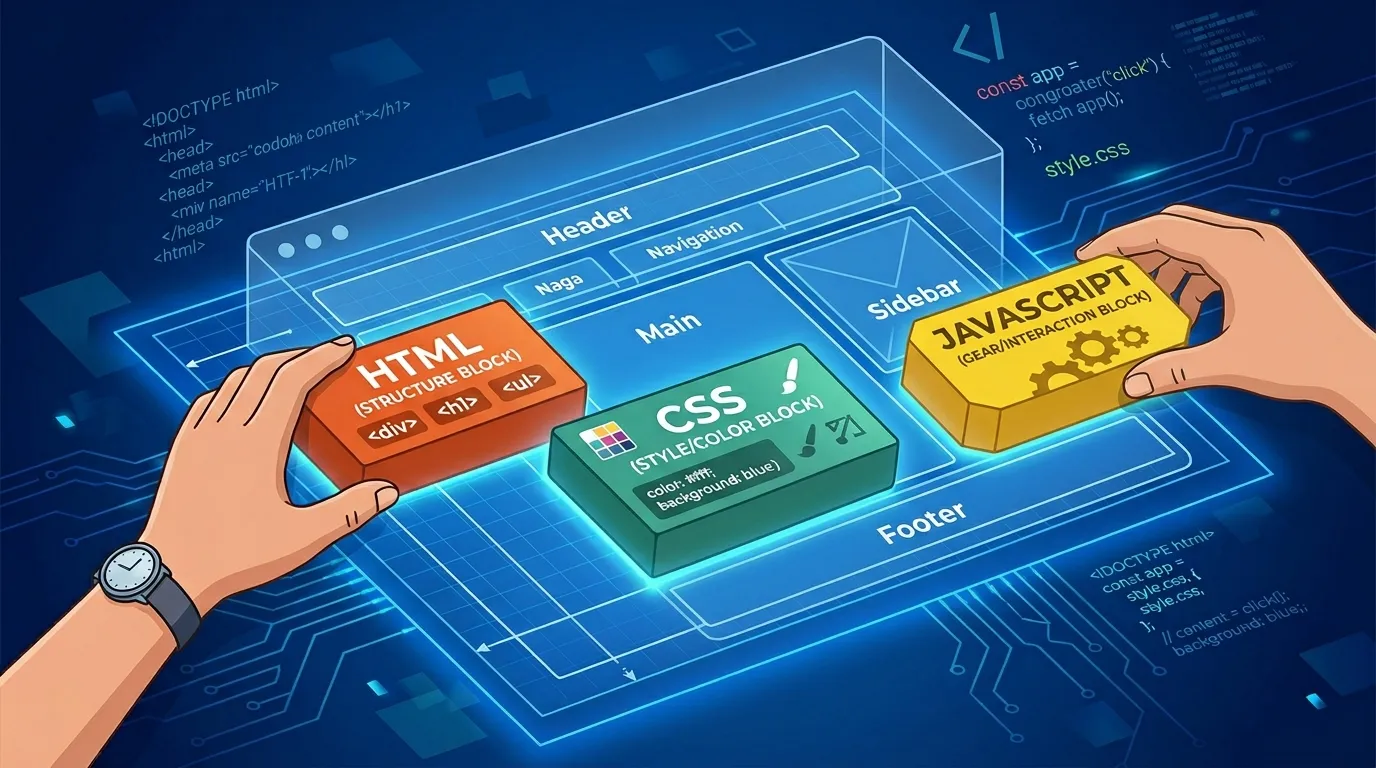
Every website on the internet relies on these three fundamental technologies. You cannot build a modern website without them.
1. HTML (HyperText Markup Language)
HTML gives structure to web pages. Think of it as the skeleton of a website. You use HTML tags to define headings, paragraphs, images, links, and other elements on the page. Without HTML, a browser has no idea how to display your content. Learn more about HTML from MDN Web Docs – the most trusted resource for web standards.
2. CSS (Cascading Style Sheets)
CSS controls how HTML elements look. Colors, fonts, spacing, layouts, and responsive designs all come from CSS. If HTML is the skeleton, CSS is the clothing and makeup that gives your website its visual identity.
3. JavaScript
JavaScript makes websites interactive. When you click a button and something happens, when content updates without refreshing the page, or when a form validates your input before submitting – that is JavaScript at work. It brings websites to life.
Frontend vs Backend: Where Things Happen
These two terms describe where code runs and what users see.
4. Frontend (Client-Side)
The frontend includes everything users see and interact with directly in their browser. Buttons, navigation menus, forms, images, and text all live on the frontend. Frontend developers work with HTML, CSS, and JavaScript to create smooth, visually appealing experiences.
5. Backend (Server-Side)
The backend runs on a server and handles everything users cannot see. Database queries, user authentication, business logic, and API calls all happen on the backend. When you log into a website, the backend verifies your credentials and serves your account information.
6. Full Stack
A full stack developer works on both frontend and backend. This term describes someone who understands how the entire web application fits together, from the user interface down to the database.
Struggling to decide between frontend or backend for your project? Vastcope’s full stack team handles both sides seamlessly. See our development process.
Development Approaches and Workflows
7. Agile Development
Agile breaks large projects into small, iterative cycles called sprints. Teams plan, build, test, and review their work every one to four weeks. This approach allows developers to adapt to changing requirements and deliver working software faster.
8. Version Control (Git)
Version control tracks every change made to your code. Git, the most popular version control system, allows multiple developers to work on the same project without overwriting each other's work. Over 90% of developers use Git for collaboration. Explore Git’s official documentation to get started.
9. Repository (Repo)
A repository stores all files and revision history for a project. You can think of it as a project folder that remembers every change ever made.
10. Debugging
Debugging is the process of finding and fixing errors in code. Developers spend a significant portion of their time debugging – it is a normal and expected part of building software.
Web Pages and Navigation
11. Web Page vs Website
A web page is a single document accessible through a browser. A website is a collection of related web pages linked together under a single domain name.
12. URL (Uniform Resource Locator)
A URL is the address you type into a browser to visit a specific page. For example, "https://vastcope.com/web-development" is a URL that points to a specific service page.
13. Domain Name
Your domain name is your website's address on the internet, like "vastcope.com". Domain names make it easy for people to find your site without remembering numeric IP addresses.
14. DNS (Domain Name System)
DNS translates human-readable domain names into the IP addresses that computers use to locate each other on the internet. When you type a website address, DNS finds the correct server behind the scenes.
15. HTTP and HTTPS
HTTP is the protocol browsers use to communicate with web servers. HTTPS adds encryption to keep data secure. Over 95% of websites now use HTTPS to protect user information. Google’s transparency report shows how HTTPS adoption has grown globally.
Web Design and User Experience
16. Responsive Web Design (RWD)
Responsive design makes websites work well on any device – phones, tablets, laptops, and desktop monitors. The layout automatically adjusts based on screen size. With over 50% of web traffic coming from mobile devices, responsive design is essential.
17. UI (User Interface)
UI refers to the visual elements users interact with – buttons, icons, spacing, typography, and color schemes. Good UI makes websites easy and pleasant to use.
18. UX (User Experience)
UX encompasses the entire experience a person has when using your website. It includes ease of use, efficiency, accessibility, and how users feel after interacting with your site. UX research helps designers understand what users actually need.
19. Accessibility (A11y)
Accessibility means designing websites that everyone can use, including people with disabilities. This includes support for screen readers, keyboard navigation, sufficient color contrast, and text alternatives for images. The W3C Web Accessibility Initiative provides free guidelines to make your site inclusive.
20. Above the Fold
This term describes content visible without scrolling. The most important information and calls-to-action should appear above the fold because that is what visitors see first.
Great UI/UX keeps visitors on your site longer. Vastcope’s design team creates user-friendly interfaces that convert. Explore UI/UX services.
Content Management and Tools
21. CMS (Content Management System)
A CMS allows you to create, edit, and manage website content without writing code. WordPress, the most popular CMS, powers over 40% of all websites. CMS platforms make it easy for non-developers to update their sites.
22. Headless CMS
A headless CMS separates content management from content presentation. You manage content in one place, then deliver it through APIs to websites, mobile apps, smartwatches, or any other device. This approach offers maximum flexibility for modern omnichannel experiences.
Want a website that you can update easily without touching code? Vastcope specializes in CMS development that puts you in control. Explore our CMS solutions.
23. CDN (Content Delivery Network)
A CDN stores copies of your website on servers around the world. When someone visits your site, they receive content from the server closest to them. This dramatically reduces loading times for international visitors.
24. Cache
Caching stores copies of files so they load faster on repeat visits. Browsers cache images, stylesheets, and scripts to avoid downloading the same resources every time a user returns to your site.
Data and Databases
25. Database
A database stores all your website's dynamic information – user accounts, blog posts, product inventory, orders, and comments. Most web applications rely on databases to manage and retrieve data efficiently.
26. SQL (Structured Query Language)
SQL is the language used to communicate with relational databases. Developers write SQL queries to insert, update, delete, and retrieve data. MySQL and PostgreSQL are popular SQL databases.
27. API (Application Programming Interface)
An API allows different software applications to talk to each other. When your website displays live weather data or processes credit card payments, APIs handle the communication behind the scenes. Approximately 80% of web applications use APIs. Postman’s API glossary offers deeper explanations.
28. JSON (JavaScript Object Notation)
JSON is the standard format for exchanging data between a server and a web application. It is lightweight, easy to read, and supported by virtually every programming language.
29. REST (Representational State Transfer)
REST is an architectural style for designing APIs. RESTful APIs use standard HTTP methods (GET, POST, PUT, DELETE) to perform operations on resources. Most modern web APIs follow REST principles.
Web Hosting and Infrastructure
30. Web Hosting
Web hosting is the service that stores your website files on a server and makes them accessible on the internet. Hosting providers range from shared servers for small sites to dedicated servers for high-traffic applications.
31. Server
A server is a computer that runs software and serves resources to other computers (clients). When you visit a website, your browser (the client) requests data from a web server, which sends back the HTML, CSS, and JavaScript needed to display the page.
32. Bandwidth
Bandwidth measures how much data your hosting can transfer over a given period. If your website receives a traffic spike, you need sufficient bandwidth to handle all those requests without slowdowns.
33. Cloud Hosting
Cloud hosting distributes your website across multiple interconnected servers. If one server fails, others take over automatically. Cloud hosting scales resources up or down based on demand, making it ideal for growing businesses.
Getting more traffic soon? Make sure your hosting and SEO work together. Vastcope’s SEO experts prepare your site for growth. Check SEO services.
Essential Web Concepts
34. Algorithm
An algorithm is a set of step-by-step instructions for solving a problem or completing a task. Search engines use algorithms to rank pages, social media platforms use algorithms to curate feeds, and developers write algorithms to process data efficiently.
35. Framework
A framework provides a pre-built structure for developing web applications. Instead of starting from scratch, developers use frameworks that include common patterns and best practices. React, Angular, and Vue.js are popular frontend frameworks.
36. Library
A library is a collection of pre-written code that developers can call to perform common tasks. Unlike frameworks, libraries do not control the flow of your application – you call the library when you need specific functionality.
37. Package Manager
Package managers automate installing, updating, and removing libraries and dependencies. npm (Node Package Manager) is the most widely used package manager for JavaScript development.
38. IDE (Integrated Development Environment)
An IDE is a software application that provides comprehensive tools for coding – syntax highlighting, debugging, version control integration, and code completion. VS Code is one of the most popular IDEs among web developers.
Advanced Terminology for Beginners to Know
39. DOM (Document Object Model)
The DOM is a programming interface that represents an HTML document as a tree of objects. JavaScript manipulates the DOM to dynamically change content, styles, and structure after the page loads.
40. SEO (Search Engine Optimization)
SEO involves optimizing your website to rank higher in search engine results. Proper HTML structure, fast loading times, mobile responsiveness, and quality content all contribute to better SEO.
41. SSL Certificate
An SSL certificate enables HTTPS encryption on your website. It verifies your website's identity and creates a secure connection between the server and visitors' browsers. Search engines favor sites with SSL certificates.
42. 301 Redirect
A 301 redirect permanently sends visitors and search engines from one URL to another. Use 301 redirects when you move content or change your website structure to preserve SEO value.
43. 404 Error
A 404 error appears when someone tries to access a page that does not exist. Custom 404 pages can help visitors find what they need instead of leaving your site frustrated.
44. Wireframe
A wireframe is a basic visual guide that shows a webpage's structure and layout without colors, fonts, or images. Designers and developers use wireframes to plan content placement and user flow before building.
45. Prototype
A prototype is an interactive model of a website that demonstrates functionality and user flows. Unlike wireframes, prototypes include clickable elements that simulate how the final site will work.
46. Favicon
A favicon is the small icon that appears in browser tabs next to your page title. It helps users identify your website when they have multiple tabs open.
47. Breadcrumb
Breadcrumbs show users where they are within your website's hierarchy. They typically appear as a trail of links like "Home > Products > Shoes > Running Shoes" and help users navigate back to previous sections.
48. Minification
Minification removes unnecessary characters (spaces, line breaks, comments) from code files without changing functionality. Smaller files load faster, which improves website performance.
49. Lazy Loading
Lazy loading delays loading images and other resources until users need them. Instead of loading every image on page load, lazy loading loads images as users scroll down. This speeds up initial page loads significantly.
50. CORS (Cross-Origin Resource Sharing)
CORS is a security mechanism that controls which domains can access resources on your website. Browsers enforce CORS policies to prevent malicious websites from stealing data. Understanding CORS helps you debug API connection issues.
Need high-quality visuals for your newly built site? Vastcope’s photo editing team optimizes every image for speed and beauty. See photo editing services.
Modern Web Development Trends (2026)
Web development continues to evolve rapidly. Here are key trends shaping how developers build websites in 2026:
AI-Assisted Development
Artificial intelligence is now embedded throughout the development workflow. Developers use AI tools to generate boilerplate code, auto-complete functions, identify bugs, and refactor legacy systems.
Serverless Architecture
Serverless computing allows developers to run code without managing servers. The cloud provider automatically handles infrastructure scaling. This approach reduces operational overhead and allows teams to focus on writing business logic.
Progressive Web Apps (PWAs)
PWAs combine the best of websites and native mobile apps. They work offline, send push notifications, and can be installed on a user's home screen without going through an app store.
WebAssembly (WASM)
WebAssembly allows developers to run high-performance code (written in C++, Rust, or other languages) directly in browsers. This enables complex applications like video editors and games to run smoothly on the web.
How to Optimize Content for Generative AI Engines (GEO)
Traditional SEO focuses on ranking in search engine results pages. Generative Engine Optimization (GEO) focuses on getting your content cited by AI models like ChatGPT, Perplexity, and Google AI Overviews. Here is how to apply GEO principles to your content:
Structure Content for AI Parsing
Break your content into clear sections with H2 and H3 headings. Use bullet points and numbered lists to present key information. Add tables for comparisons and data. AI models prefer well-structured content that they can easily extract and reference.
Build E-E-A-T Signals
AI models prioritize content from authoritative sources. Include author bios with credentials. Link to credible domains. Keep your content accurate and updated with visible timestamps.
Use Direct Language and Data
Write in active voice with clear, direct statements. Include verifiable statistics and cite your sources. AI models favor factual, well-sourced information over vague opinions.
Want your website to appear in AI search results? Vastcope’s GEO-ready SEO services get you cited. Start with an SEO audit.
Need more visitors from search engines? Vastcope’s lead generation strategies turn traffic into customers. Explore lead generation services.
Frequently Asked Questions
Q1: Which web development term should I learn first?
Start with HTML, CSS, and JavaScript. These three languages form the foundation of every website. Once you understand how they work together, other terms will make much more sense.
Q2: What is the difference between frontend and backend development?
Frontend handles everything users see and interact with in their browser. Backend manages servers, databases, and application logic behind the scenes. A full stack developer works on both.
Q3: Do I need to learn all 50 terms to start building websites?
No. Focus on the core terms first – HTML, CSS, JavaScript, frontend, backend, API, database, and responsive design. You will naturally learn the others as you gain experience.
Q4: How long does it take to become comfortable with web development terminology?
Most beginners feel confident with basic terms after 2-3 weeks of consistent learning. The key is building real projects while learning – terms stick better when you use them in context.
Q5: What does API mean in simple terms?
An API is a messenger that allows two software applications to talk to each other. When your weather app shows today's forecast, an API fetched that data from a weather service and delivered it to your app.
Q6: Is responsive design the same as mobile-friendly?
Responsive design goes beyond basic mobile-friendliness. A responsive website automatically adjusts layout, font sizes, and navigation based on screen size. It works well on phones, tablets, laptops, and desktop monitors.
Q7: What programming language should I learn after HTML and CSS?
JavaScript is the clear next step. It is the only programming language that runs natively in browsers, and it is also widely used on servers through Node.js. Learning JavaScript opens doors to both frontend and backend development.
Q8: Why do developers use version control like Git?
Version control tracks every change to your code. If you break something, you can revert to a working version. Git also allows multiple developers to work on the same project without overwriting each other's work.
Q9: How can I practice these terms without feeling overwhelmed?
Build a tiny project – even a single-page personal bio. Write the HTML, style it with CSS, add a button with JavaScript. As you hit problems, search for solutions using the terms you learned. This hands-on approach cements vocabulary faster than memorization.
Conclusion
Learning web development terms is your first step toward building websites with confidence. The 50 terms covered in this guide give you the vocabulary you need to read documentation, follow tutorials, and communicate effectively with developers.
Start with the core languages – HTML, CSS, and JavaScript. Practice using them in small projects. The other terms will become familiar as you encounter them in real development scenarios.
Your website is your most valuable digital asset. Let Vastcope handle the technical details while you focus on growing your business. Request a consultation today.