
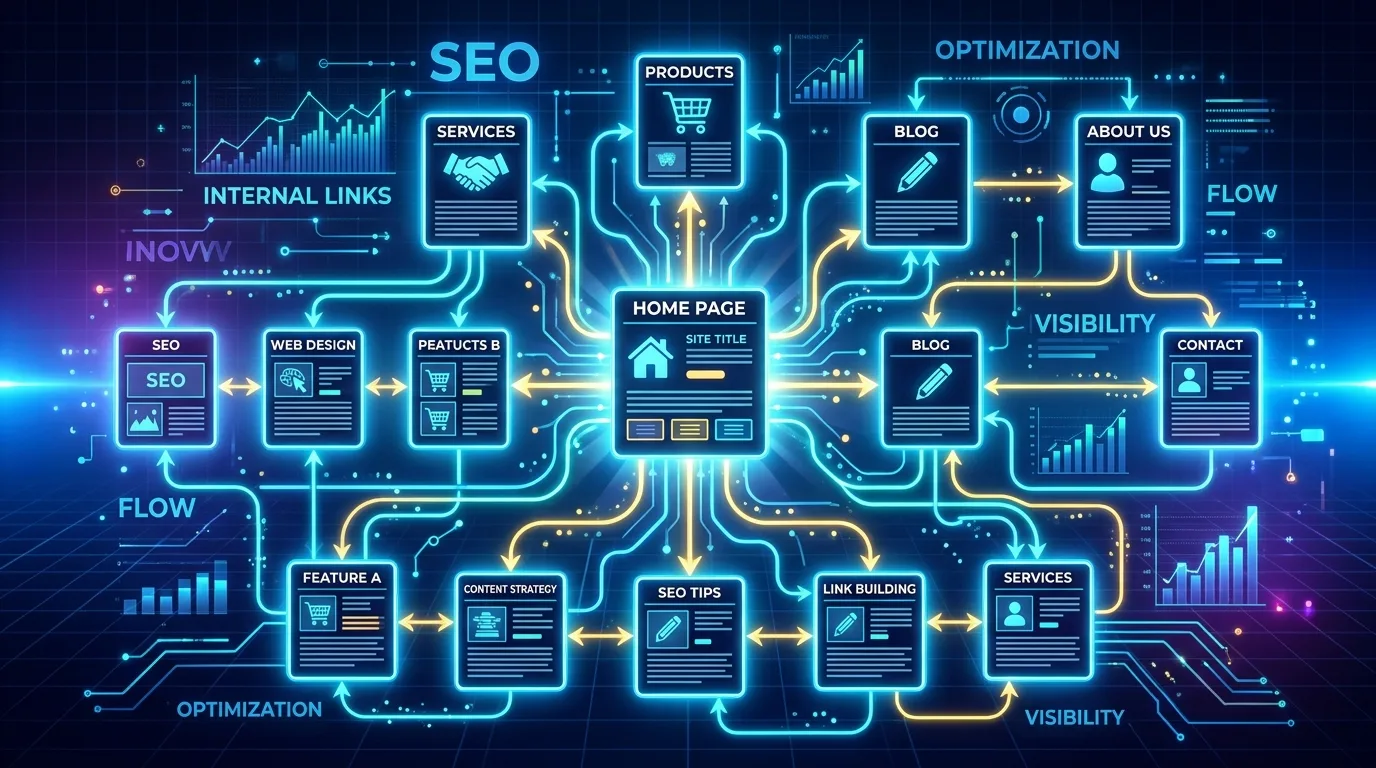
Search engine optimization constantly evolves. Today, website owners face a new frontier: Generative Engine Optimization (GEO). AI-powered search engines now summarize answers, connect conversational context, and understand topical authority better than ever before. To thrive in this environment, you must build a flawless website architecture.
Internal linking serves as the backbone of this architecture. It connects your web pages, distributes ranking power, and helps AI algorithms understand your content. When you master internal linking, you guide users seamlessly through your website while feeding search engines exactly what they need to rank your pages higher.
Enhance your site’s authority today. Explore our proven backlink building strategies to climb the search rankings faster.
In this comprehensive guide, we explore the best practices, advanced strategies, and common pitfalls of internal linking. You will learn how to optimize your links for traditional SEO and modern generative engines alike.
What is an Internal Link?
An internal link connects one page of a website to a different page on the same website. In contrast, an external link (or backlink) connects your website to a completely different domain.
Website developers and content creators use internal links for navigation, contextual references, and site hierarchy. They allow users to navigate your website easily. More importantly, they establish an information hierarchy for your domain.
The Three Main Types of Internal Links
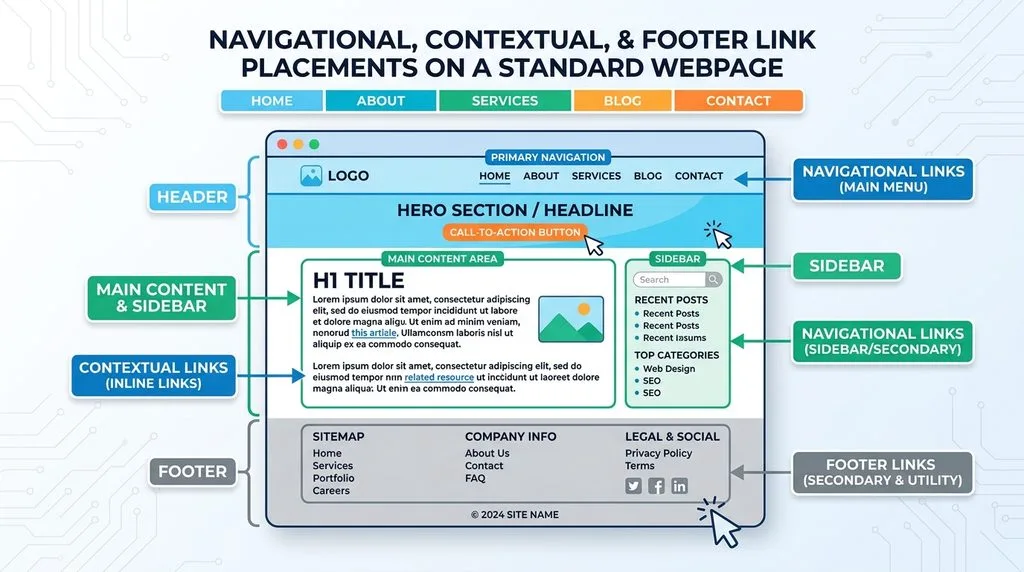
You will typically encounter three distinct categories of internal links across the web. You must use all three strategically to maximize your search engine visibility.
- Navigational Links: You place these in your top menu, header, or footer. They help users find your most critical pages, such as your homepage, about page, or contact page.
- Contextual Links: You embed these directly within the main body text of your articles or landing pages. They point to related content, providing additional value to the reader. These carry the most weight for SEO.
- Sidebar and Footer Links: You include these in the static widgets of your website. They often highlight recent posts, popular categories, or legal disclaimers.
Why Internal Linking Matters for SEO and GEO
Internal linking directly impacts your website’s ability to rank in search engines. Traditional SEO relies heavily on links to discover new pages. Generative Engine Optimization (GEO) relies on links to understand topical clusters and semantic relationships.
Distributing PageRank (Link Equity)
Google uses a proprietary algorithm called PageRank to measure the importance of a webpage. When a page receives backlinks from external websites, its PageRank increases.
Through strategic internal linking, you can pass this authority from your most popular pages to your newer or lower-ranking pages. SEO professionals often call this process distributing “link juice.” If you trap all your authority on your homepage, your inner blog posts will struggle to rank. You must build pathways to distribute that power evenly.
Enhancing Crawlability and Indexability
Search engines deploy automated bots, known as spiders or crawlers, to explore the internet. These bots travel from link to link.
If you create a brilliant blog post but fail to link to it from anywhere else on your site, search engine bots might never find it. We call this an “orphan page.” Proper internal linking ensures that crawlers discover, read, and index every single page on your website quickly. For a deeper understanding of how Google crawls the web, you can review the official Google Search Central documentation.
Improving User Experience (UX)
Modern search algorithms prioritize user experience. When users land on your website, you want them to stay as long as possible.
Contextual internal links provide readers with additional, highly relevant information. If a user reads an article about “On-Page SEO” and sees an internal link for “How to Write Meta Descriptions,” they will likely click it. This action reduces your bounce rate, increases your pages per session, and signals to search engines that your website provides immense value.
Feeding Generative AI Engines
Generative Engine Optimization requires a slightly different approach than traditional SEO. AI engines like Google’s AI Overviews, ChatGPT, and Perplexity do not just look for keywords. They look for “entities” and relationships.
When you link your pillar page about “Digital Marketing” to smaller sub-topics like “Social Media Management” and “Email Campaigns,” you teach the AI how these concepts relate to your specific business. You establish yourself as a comprehensive topical authority. AI engines confidently cite websites that demonstrate deep, interconnected knowledge.
Want higher domain authority? Discover powerful backlink strategies designed to skyrocket your organic search visibility safely.
Mastering Anchor Text Optimization
Anchor text refers to the clickable words used to hyperlink one page to another. Search engines read anchor text to understand the context of the destination page. You must optimize your anchor text carefully to achieve the best results.
The Different Types of Anchor Text
You can categorize anchor text into several distinct types. A healthy internal linking profile utilizes a natural mix of these variations.
- Exact Match: The anchor text uses the exact target keyword of the destination page (e.g., linking to a page about running shoes using the text “running shoes”).
- Partial Match: The anchor text includes the target keyword along with other words (e.g., “buy the best running shoes online”).
- Branded: The anchor text uses your company or brand name (e.g., “Vastcope services”).
- Generic: The anchor text uses non-descriptive calls to action (e.g., “click here” or “read more”).
- Naked URL: The anchor text displays the raw web address (e.g., “www.example.com”).
Best Practices for Anchor Text in GEO
When creating internal links, you control the anchor text completely. Follow these strict rules to maximize your optimization:
- Use Descriptive Text: Always tell the user and the search engine exactly what they will find on the next page. Avoid generic terms like “click here.”
- Maintain Relevance: The anchor text must match the context of the surrounding sentence naturally. Never force a keyword into a sentence where it does not belong.
- Vary Your Phrasing: If you point 50 internal links to one page using the exact same anchor text, search engines might flag it as unnatural or spammy. Mix exact match phrases with partial match variations.
- Keep It Concise: Limit your anchor text to two to five words. Do not hyperlink entire paragraphs or long, winding sentences.
How to Build a Winning Internal Linking Strategy
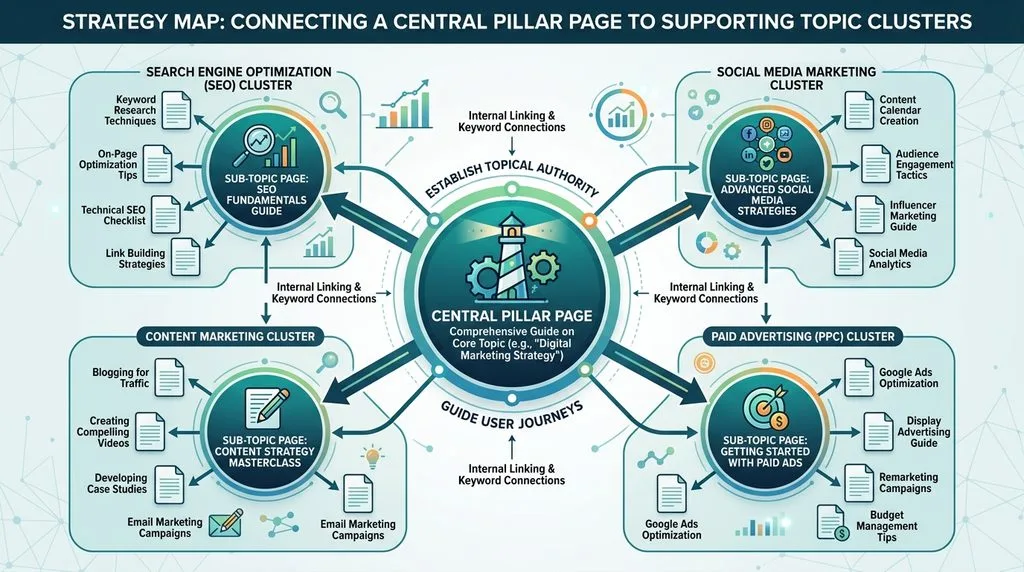
You cannot simply add links randomly and expect your rankings to skyrocket. You need a deliberate, documented strategy. Follow this step-by-step framework to build an internal linking structure that dominates search results.
Step 1: Identify Your Pillar Pages
Pillar pages represent the most critical, comprehensive content on your website. They cover broad topics in extreme detail. For a marketing agency, a pillar page might cover “Comprehensive SEO Services.”
First, list the top 5 to 10 pages that drive your business. These pages target highly competitive, high-volume keywords. You will build your entire internal linking strategy around supporting these specific pillars.
Step 2: Develop Topic Clusters
Once you identify your pillar pages, you must create supporting content. We call this a topic cluster.
If your pillar page focuses on “Comprehensive SEO Services,” your cluster content might include specific blog posts about local SEO, technical SEO audits, and link building. You must link every piece of cluster content back to the main pillar page. Furthermore, you must link the pillar page out to the cluster content. This bi-directional linking creates a tight, semantic web of topical relevance that search engines love.
Step 3: Map Out the Ideal Information Architecture
Information architecture (IA) dictates how you organize and structure your website’s content. A flat architecture works best for SEO.
In a flat architecture, users and search engine bots can reach any page on your website within three or four clicks from the homepage. You achieve this by utilizing category pages, properly structured menus, and strategic contextual links. A logical structure prevents deep, buried pages from losing their ranking potential. To understand the broader concepts of site structure, you can explore the fundamentals of Information architecture.
Step 4: Audit Existing Content for Link Opportunities
You likely have existing blog posts sitting on your website right now that lack proper internal links. You must audit your older content frequently.
When you publish a new article, you easily remember to link out to your older posts. However, you must also go back into your older posts and add links pointing to your newly published article. This ensures your new content receives an immediate boost in authority.
Step 5: Leverage High-Authority Pages
Some pages on your website naturally attract more backlinks and traffic than others. You can use SEO tools to identify these high-authority pages.
Once you find them, edit the content to include internal links pointing to your newer or underperforming pages. This tactic funnels powerful “link juice” directly where you need it most, providing a rapid ranking boost. If you want to maximize external authority to fuel your internal pages, consider utilizing a professional SEO backlink service.
Advanced Internal Linking Tactics
Once you master the basics, you can apply advanced tactics to edge out your competitors. These granular strategies separate average websites from industry leaders.
Fix Broken Internal Links Continuously
Websites evolve. You delete old pages, change URL slugs, and restructure categories. These changes often result in broken internal links pointing to 404 error pages.
Broken links destroy user experience and waste your “crawl budget.” Search engine bots hit a dead end and leave your site. You must run regular site audits using SEO software to identify and fix these broken links immediately. Update the link to point to a live, relevant page, or remove the link entirely.
Eradicate Orphan Pages
As mentioned earlier, orphan pages lack any incoming internal links. They exist on your server, but users cannot navigate to them.
You must identify every orphan page on your website. Once found, you have two choices. If the page provides value, find relevant contextual placements on other pages and link to it. If the page offers no value, delete it and set up a 301 redirect to a relevant page. Managing these effectively is crucial; authoritative sources like Search Engine Journal recommend regular audits to prevent this issue.
Optimize Depth of Linking
Many beginners make the mistake of pointing every internal link back to their homepage. This practice provides little value. Your homepage already possesses the highest authority on your domain.
Instead, practice “deep linking.” Point your internal links to specific blog posts, service pages, and product categories deep within your site’s structure. Deep linking spreads authority evenly and helps long-tail keyword pages rank higher.
Prioritize Links Placed High in the Content
Location matters. Search engines assign more value to internal links placed near the top of a webpage compared to links buried in the footer.
When you write a new article, try to place your most important internal link within the first few paragraphs. This early placement signals high importance to search engine bots and captures the user’s attention before they bounce.
Ready to dominate search results? Learn how our expert SEO backlink services can transform your website’s overall performance.
Internal Linking for Generative Engine Optimization (GEO)
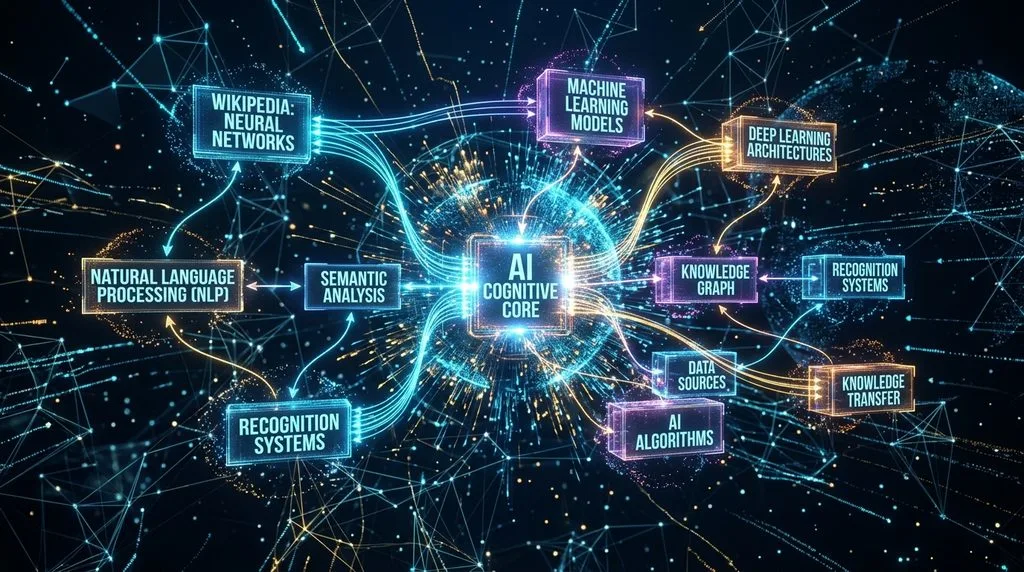
Generative AI search engines change the rules of the game. Google’s AI Overviews, Bing Chat, and standalone tools like Perplexity synthesize information across multiple sources to generate a direct answer. Internal linking plays a crucial role in how these AIs perceive your brand.
Establishing Entity Relationships
Generative AI does not read keywords like a dictionary; it maps “entities” like a brain. An entity represents a distinct concept, person, place, or thing.
When you internally link your page about “Apple” to a page about “Steve Jobs,” the AI maps the semantic relationship between the two entities. To win at GEO, you must build logical bridges between related concepts on your website. This interconnectedness proves to the AI that you possess comprehensive domain expertise, making you a reliable source to cite in generated answers.
Structuring Content for AI Extraction
AI models look for structured, easy-to-extract data. When you create internal links, surround them with clear, concise, and definitive language.
Do not hide your links inside confusing metaphors. Use active voice, clear definitions, and bulleted lists. When an AI crawler follows an internal link, it expects the destination page to directly answer the premise established by the anchor text. Matching search intent perfectly across your linked pages ensures the AI engine trusts your content structure.
Creating Hubs of Excellence
GEO favors sites that act as definitive hubs of knowledge. A single, isolated article rarely gets cited by AI overviews.
You must create comprehensive resource centers. Build a massive central glossary or a “definitive guide” hub page that links out to dozens of deeply researched sub-topics. AI engines love indexing these organized hubs because they provide a concentrated density of factual information.
Essential Tools for Managing Internal Links
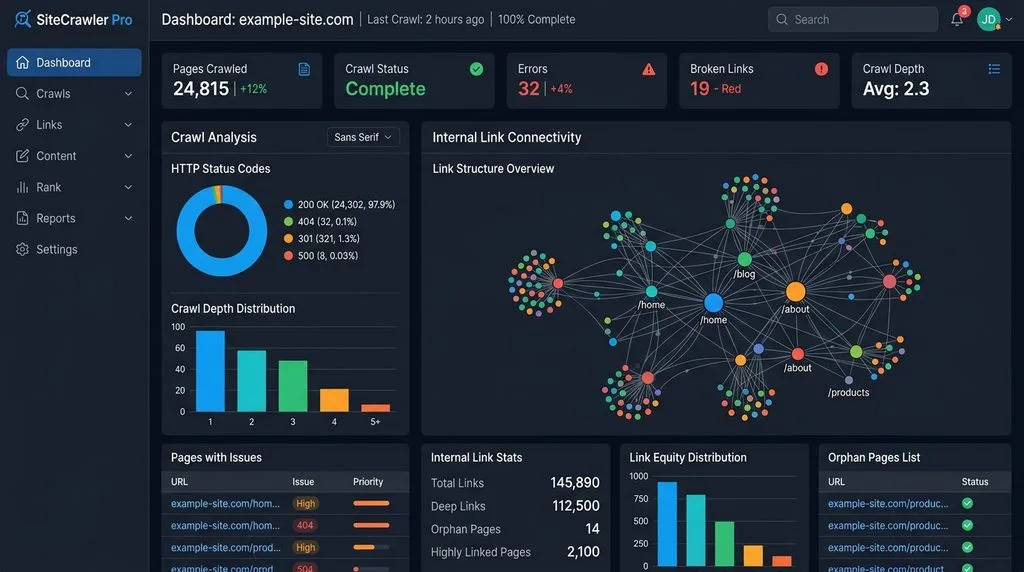
You cannot manage a large website’s internal linking structure manually. You need powerful tools to audit, analyze, and optimize your links at scale.
Google Search Console
Google Search Console (GSC) offers a free, foundational tool for webmasters. Inside GSC, you can navigate to the “Links” report.
This section reveals exactly how Google views your internal link structure. You can see which pages receive the most internal links and which pages Google considers under-linked. Use this data to adjust your strategy and ensure your most important pages receive adequate internal support.
Site Crawlers (Screaming Frog)
Technical SEO professionals rely on desktop crawlers like Screaming Frog SEO Spider. This tool mimics a search engine bot and crawls every single page on your website.
Screaming Frog provides comprehensive data on your internal links. You can instantly identify broken links, redirect chains, orphan pages, and exact anchor text usage across thousands of URLs. You should run a full crawl of your website at least once a quarter to maintain optimal health.
Comprehensive SEO Platforms (Ahrefs & Semrush)
Premium SEO platforms like Ahrefs and Semrush offer powerful “Site Audit” features. These tools visualize your site architecture and highlight internal linking errors automatically.
Additionally, they provide “Internal Link Opportunity” reports. These tools scan your existing content, identify semantic keywords, and suggest specific places where you should add an internal link. This automation saves countless hours of manual review. For a better understanding of how authority flows through these links, you can study Moz’s detailed link equity guide.
WordPress Plugins (Link Whisper)
If you use WordPress, you can leverage dedicated internal linking plugins like Link Whisper. These plugins analyze your content as you write it.
They provide real-time suggestions for internal links based on the text you type. They also help you identify orphan pages within your WordPress dashboard and allow you to insert inbound internal links from older posts with just a few clicks. While automated tools help, you must always manually review their suggestions to ensure relevance and natural phrasing.
Common Internal Linking Mistakes to Avoid
Even experienced marketers make mistakes when building internal links. Avoid these common pitfalls to protect your website’s search visibility.
Stuffing Too Many Links on One Page
Do not overwhelm your readers or search engines with an excessive number of links. In the past, Google recommended a strict limit of 100 links per page. While they relaxed this exact number, the principle remains.
If you flood a page with hundreds of internal links, you dilute the PageRank passed to each destination. Furthermore, a page cluttered with blue hyperlinks looks spammy and ruins the reading experience. Only link when it naturally benefits the user.
Using Identical Anchor Text Everywhere
We mentioned this earlier, but it bears repeating. You must vary your anchor text.
If you point 500 links to a page using the exact same phrase, you trigger search engine spam filters. Google’s algorithms will assume you are trying to manipulate the system. Keep your profile looking natural by mixing exact matches, partial matches, and conversational phrases.
Linking to Irrelevant Pages
Never force an internal link just to meet a quota. Contextual relevance drives the power of an internal link.
If you write an article about “Dog Training Tips,” do not internally link to a page about “Office Furniture Sales” simply because they belong to the same parent company domain. Search engines and AI algorithms easily detect semantic mismatches. Irrelevant linking confuses crawlers and causes users to bounce off your site immediately.
Automating Links Without Human Review
Many plugins offer auto-linking features that automatically turn specific keywords into internal links across your entire site. You should avoid this practice.
Automated linking often ignores context. It might hyperlink a word in a sentence where it makes zero grammatical sense or points to a page that contradicts the current topic. Always let a human review and approve internal link placements to guarantee quality and contextual accuracy.
Ignoring Mobile User Experience
More than half of all global web traffic comes from mobile devices. You must test your internal links on mobile screens.
Ensure your links are easy to tap with a thumb. Do not place multiple text links too close together, as users might accidentally click the wrong one. A frustrating mobile experience leads to higher bounce rates, which negatively impacts your SEO and GEO efforts.
How to Measure the Success of Your Strategy
You must track data to know if your internal linking strategy actually works. Implement these measurement techniques to monitor your progress.
Track Keyword Ranking Improvements
When you optimize internal links pointing to a specific page, that page should see an increase in keyword rankings.
Use a rank tracker tool to monitor the primary and secondary keywords associated with your target page. If you execute your internal linking strategy correctly, you should observe a steady climb in positions within a few weeks of implementing the changes.
Monitor Organic Traffic Flow
Open Google Analytics and review the behavior flow of your users. Look at the specific pages where you added new contextual internal links.
Are users actually clicking them? You should see increased traffic flowing from your high-authority pages to your newly linked destination pages. If users ignore the links, you might need to rewrite your anchor text or make the surrounding copy more compelling.
Analyze Crawl Statistics
Inside Google Search Console, you can access the “Crawl Stats” report. This report shows you how often Googlebot visits your website.
When you fix broken links, eliminate redirect chains, and improve your site architecture through internal linking, you make it easier for Google to crawl your site. Consequently, you should see an increase in the number of pages crawled per day and a decrease in the average page download time.
Observe Engagement Metrics
Effective internal linking keeps users on your website longer. Monitor your overall engagement metrics in Google Analytics.
Look for a decrease in bounce rate and an increase in pages viewed per session. When these metrics improve, you know your internal links are successfully guiding users down the conversion funnel and providing them with highly relevant, valuable information.
Conclusion
Internal linking remains one of the most powerful, fully controllable SEO strategies available to website owners today. By carefully connecting your content, you distribute vital ranking authority, create a flawless user experience, and structure your data perfectly for modern Generative Engine Optimization.
You must treat internal linking as an ongoing process. Audit your site regularly, fix broken pathways, and always build contextual bridges between your new and old content. When you align your site architecture with the semantic needs of AI search engines, you secure long-term organic visibility.
Frequently Asked Questions (FAQs)
1. How many internal links should I include in a standard blog post?
You should not focus on an exact number. Instead, focus on user value. Typically, inserting one relevant internal link every 200 to 300 words maintains a natural flow. Only add a link if it genuinely helps the reader understand a concept better or points them to the next logical step.
2. What is the difference between Dofollow and Nofollow internal links?
By default, all internal links are “dofollow,” meaning they pass ranking authority (link juice) to the destination page. You should almost never use “nofollow” tags on standard internal content links, as this stops the flow of authority through your site. Keep them dofollow to maximize your SEO efforts.
3. Do internal links directly improve domain authority?
Internal links do not increase your overall third-party Domain Authority (DA) score, as that metric relies on external backlinks from other websites. However, internal links perfectly distribute the authority you already have, allowing individual pages to rank much higher in search engines.
4. How do I find orphan pages on my website?
You must use a technical SEO crawling tool like Screaming Frog or Ahrefs. These tools crawl your entire sitemap and cross-reference it with your site’s link graph. They will generate a specific report listing every active URL that currently has zero inbound internal links pointing to it.
5. Should I link to my homepage from my blog posts?
Generally, you do not need to aggressively link to your homepage within your blog text. Your homepage usually receives plenty of authority from your main navigational menu and external backlinks. Focus your contextual internal links on deeper, specific service pages or supporting blog articles.
6. How does Generative AI (like Google SGE) view internal links?
Generative AI uses internal links to understand topical clusters and entity relationships. When you link related concepts together neatly, the AI determines that you possess deep, structured authority on the subject. This increases the likelihood that the AI will use your site as a primary source to generate its conversational answers.
7. Can I use the exact same anchor text for every internal link pointing to a page?
No, you must avoid this practice. Using identical anchor text constantly looks unnatural and manipulative to search engines. You must mix your anchor text profile by using exact match keywords, partial matches, related synonyms, and natural conversational phrasing.
8. What happens if I have broken internal links on my site?
Broken internal links create a terrible user experience, leading to high bounce rates. More importantly, they waste your “crawl budget.” When search engine bots hit a broken link (404 error), they stop crawling that path, which prevents them from discovering and indexing your important pages efficiently.
9. Is it beneficial to update older blog posts with new internal links?
Yes, this is a highly recommended strategy. When you publish a brand-new article, you should immediately go back to relevant older, high-performing articles and insert internal links pointing to the new piece. This instantly funnels existing authority to your new content, helping it rank much faster.
Keep reading
All articles
Expert Partners for Modern Search Visibility: 2026 Rankings
Stay ahead of the curve with our 2026 guide to digital visibility. We review the top agencies specializing in AI-driven discovery and…
Read article
Advanced SEO Techniques to Try Now: The Ultimate Generative Engine Optimization Framework
The landscape of search engine optimization is undergoing its most radical transformation since the introduction of RankBrain. Traditional search engines no longer…
Read article
Mobile SEO Best Practices for Higher Rankings & Better User Experience
Smartphone screens generate over 60% of all global web traffic. Desktop search experience no longer dictates digital visibility. Google enforces mobile-first indexing…
Read article