
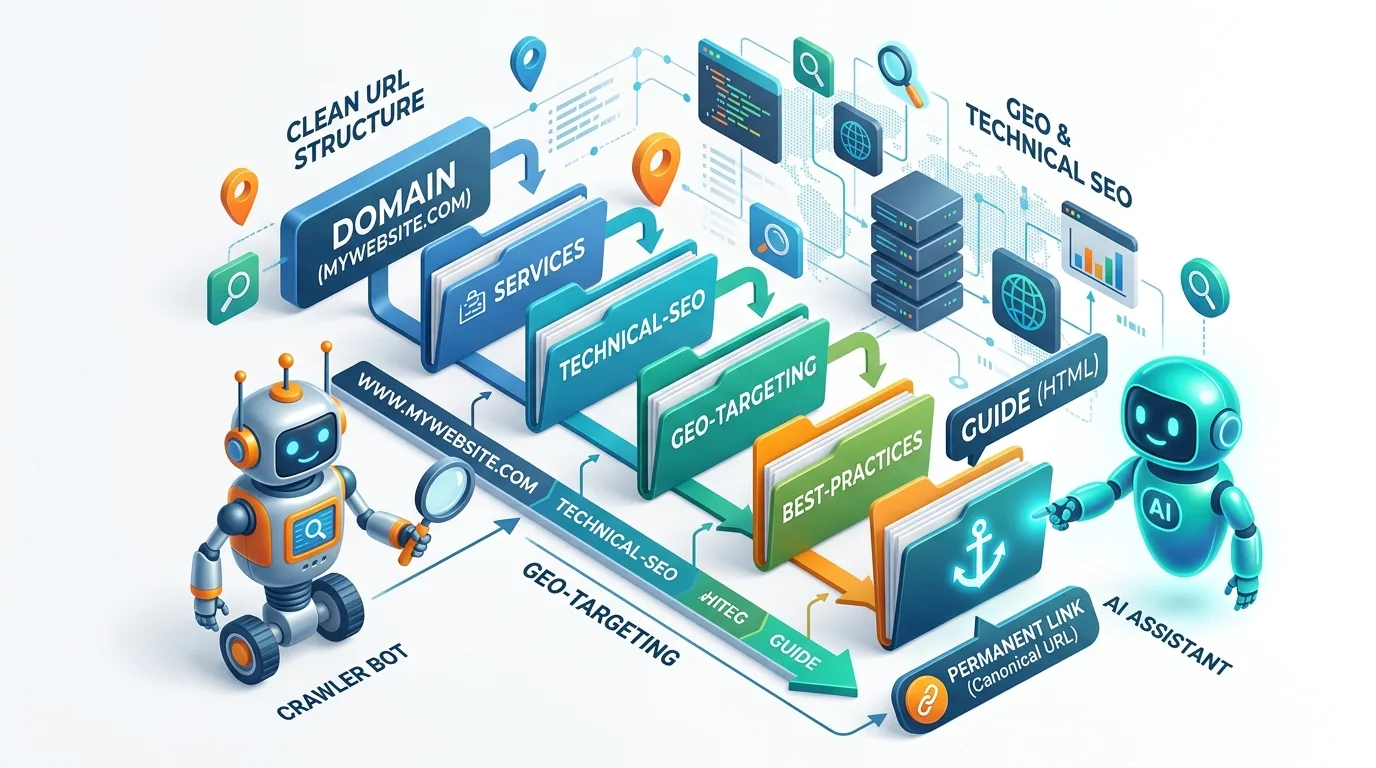
Every time you publish a page, you make a decision that follows it for years: you choose its URL. Most site owners treat this as an afterthought. They accept the auto-generated slug, leave dates in the path, or stuff five folders into the address. Then they wonder why their pages underperform in search and why users hesitate to click.
A URL is not just an address. It is the first impression a searcher sees in the results, a signal Google reads before it even crawls your content, and the citation that AI engines attach to your brand. Get it right, and you improve click-through rates, crawl efficiency, and the odds that an AI answer names your site. Get it wrong, and you create duplicate content, broken links, and migration headaches that take months to unwind.
This guide walks you through everything: what an SEO-friendly URL really is, the twelve rules that matter in 2026, which myths you can safely ignore, and exactly how to fix your existing URLs without losing traffic. We also cover the generative engine optimization (GEO) angle, because clean, permanent URLs are now a citation signal for AI search too.
Want higher rankings and cleaner, clickable URLs? Our SEO team audits your site structure and fixes what holds you back.
What Is an SEO-Friendly URL (and Does It Still Matter in 2026)?
An SEO-friendly URL is a web address that is simple, readable, descriptive, and consistent. It tells a human and a search engine what the page is about before either of them opens it. It uses real words instead of ID numbers, hyphens instead of underscores, lowercase letters, and a logical folder structure. It also lives on HTTPS and stays the same for the life of the page.
You may have heard that URLs no longer matter because Google uses AI to understand content. That is only half true. Google’s John Mueller has said repeatedly that URL length is not a ranking factor and that keywords in URLs carry a “very small” weight. But that does not make URLs irrelevant. A clean URL improves click-through rate, helps Google pick the right canonical version, prevents duplicate-content issues, and makes your site easier to crawl and maintain. In AI search, a stable, permanent URL is also the reference that large language models use to cite your content and a broken or changing URL can erase that citation overnight.
The right frame is this: you will not rank number one because of a good URL, but you can lose rankings, traffic, and trust because of a bad one. That asymmetry is why URL optimization still belongs in every SEO workflow. Google’s official SEO starter guide still recommends using words in URLs that help users understand a page, and that advice has not changed.
Anatomy of a URL: The Six Parts You Need to Control
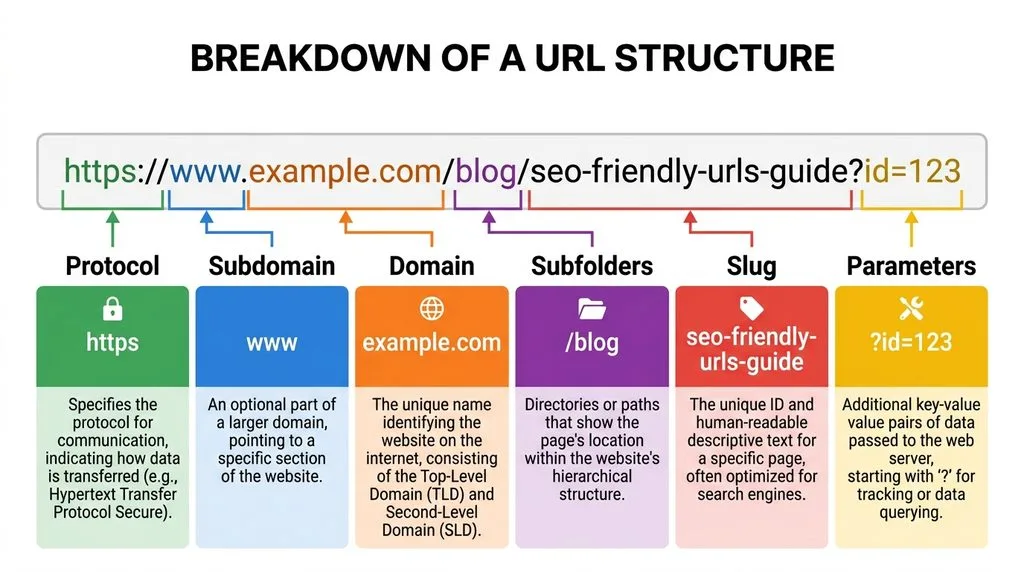
Before you write a single slug, you should know the parts of a URL and which ones you can optimize. Most people only ever touch the slug, but the other parts quietly shape your SEO.
- Protocol:
http://orhttps://. Always use HTTPS; it is a lightweight ranking signal and a baseline trust requirement for browsers. - Subdomain:
www,blog,shop,help. Search engines treat subdomains as largely separate entities, so keep core content on your main domain. - Domain: your brand name plus its extension (
.com,.co,.org). Keep it short, brandable, and hard to misspell. - Subfolders / path: the hierarchy after the domain, like
/blog/or/services/seo/. Use folders to group related content and signal hierarchy. - Slug: the final, unique part of the path that names the page, like
/seo-friendly-urls/. This is where you do most of your optimization. - Parameters and fragments: the
?id=123and#sectionbits. Use them sparingly, because they create multiple URLs for the same content.
The slug and the folder structure are the two levers you will touch most often. Everything else you set once and leave alone. A useful habit is to write your slug before you finish the article it forces you to nail the topic in three to five words, which sharpens the whole piece.
Rule Set 1: Readability and Format (The Basics Everyone Gets Wrong)
These rules are simple, but broken URLs everywhere prove that teams skip them. Apply them to every new page, and you will avoid 80% of URL problems.
Use lowercase letters only. Many servers treat uppercase and lowercase as different addresses. /About-Us and /about-us can become two separate pages, which splits your link equity and creates duplicate content. Force lowercase at the server level and redirect any uppercase variant to the lowercase one.
Separate words with hyphens, never underscores. Google reads a hyphen as a space, so best-seo-tools becomes “best seo tools.” It reads an underscore as a joiner, so best_seo_tools becomes one unrecognized word. This is one of the oldest and most consistent rules in technical SEO. Google’s official URL structure guidelines spell out the encoding and formatting rules every site should follow.
Avoid special characters, spaces, and non-ASCII symbols. Spaces become ugly %20 strings. Ampersands, accents, and emoji can break when people share links in emails or social posts. Stick to plain letters, numbers, and hyphens. If you must use a reserved character, percent-encode it correctly.
Remove stop words only when they add nothing. Words like “a,” “the,” “and,” “of,” and “to” rarely help a URL. Compare /the-ultimate-guide-to-seo-friendly-urls-for-beginners/ with /seo-friendly-urls-guide/. The second is cleaner. But do not strip so aggressively that the slug stops making sense. Readability always wins.
Keep the slug short and descriptive. There is no magic character limit for rankings, but long URLs get truncated in search results, in browser bars, and when people paste them. Aim for a slug of three to five words and a full URL under roughly 80 characters. As short as possible, as long as necessary.
Rule Set 2: Keywords, Slugs, and Folder Structure
Your slug should match the search intent of the page. If you target “seo friendly urls,” your slug should contain that phrase naturally. Do not force three keyword variants into one slug; one clear primary phrase beats a stuffed mess every time.
Match the slug to the page title, but make it shorter. If your title is “How to Create SEO-Friendly URLs: 12 Best Practices for 2026,” your slug can be /seo-friendly-urls/ or /create-seo-friendly-urls/. Drop the year and the fluff unless the year is core to the topic, such as a tax-year guide.
Use folders to show hierarchy, not to pad keywords. A logical path like /blog/technical-seo/seo-friendly-urls/ tells Google and users how the page relates to the rest of your site. But /best-seo/seo-services/seo-expert/ looks spammy and helps no one. Use one or two folders for most pages; never go more than three or four levels deep.
Never use dates in URLs unless you run a news site. A date in the path stamps your content as old the moment the calendar turns. Evergreen content should live at a timeless URL that you can update year after year. If you already use dates, you can remove them during a planned migration with proper 301 redirects, of course.
Good vs. bad examples:
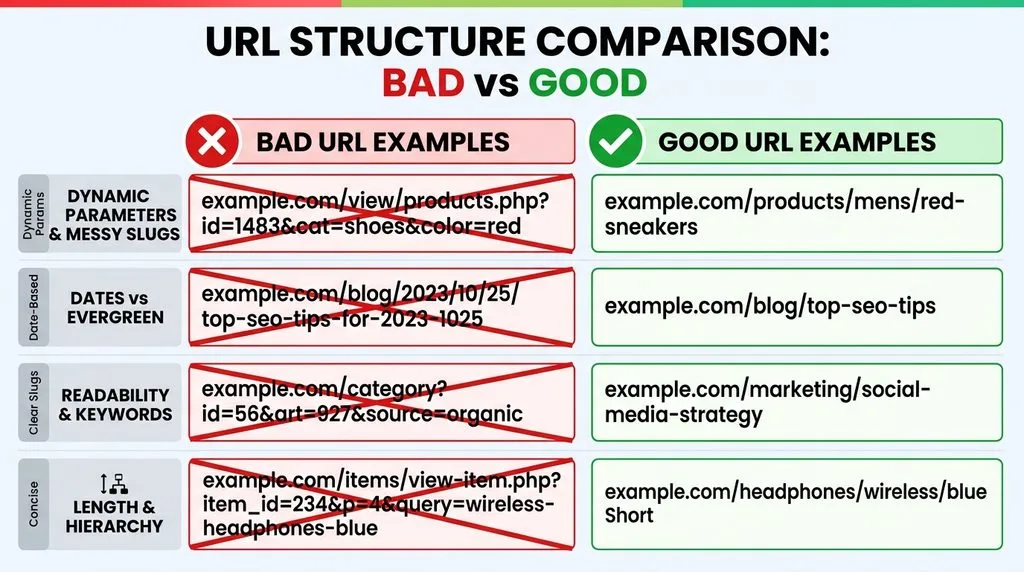
- Bad:
https://example.com/index.php?page=123&cat=45&sort=asc - Good:
https://example.com/blog/seo-friendly-urls/ - Bad:
https://example.com/2019/05/12/the-best-seo-tips-ever/ - Good:
https://example.com/blog/seo-tips/
Rule Set 3: Technical Integrity (HTTPS, Canonicals, Redirects, and More)
Formatting gets you halfway. Technical integrity gets you the rest of the way, and it is where most serious SEO damage happens.
Force HTTPS site-wide. Install an SSL certificate, redirect all HTTP traffic to HTTPS, and update internal links and canonicals to the HTTPS version. Browsers mark HTTP pages as “not secure,” and Google uses HTTPS as a tiebreaker signal. A mixed-content warning can cost you conversions even before rankings enter the picture.
Pick one canonical version of every URL. Decide whether you use www or non-www, trailing slash or no trailing slash, and uppercase or lowercase. Then 301-redirect every other variant to the chosen one and set a self-referencing canonical tag on every page. This consolidates link equity and prevents duplicate content.
Use 301 redirects for any URL change. A 301 tells search engines the page moved permanently and passes most of the link equity to the new address. Never change a URL without redirecting the old one, and never leave a 404 in place of content that moved.
Avoid dynamic parameters in the public URL. ?id=123&sort=price&session=xyz creates crawl waste and duplicate URLs. If parameters are unavoidable common in ecommerce use canonical tags, configure URL parameter handling in Google Search Console, and keep session IDs in cookies, not in the URL.
Building a new site or restructuring URLs? Explore our full range of services to get every technical detail right from day one.
Do Keywords in URLs Actually Help Rankings? (The Honest Truth)
Let us settle the debate. Yes, keywords in URLs are a ranking signal but a tiny one. Google may use the words in a URL to understand a page when it first discovers it, before it has crawled the content. Once Google reads your title, headings, and body, the URL’s keyword value fades almost to zero. Mueller has called the signal “overrated” and advises against restructuring a live site just to stuff keywords into URLs.
So why include keywords at all? Three real reasons remain. First, keywords in the URL make your result look more relevant to the human scanning the page. Second, a keyword-rich slug often matches the anchor text people use when they link to you, which reinforces relevance. Third, it keeps your URL honest: if the slug says what the page is about, you are less likely to drift off-topic while writing.
The practical rule: include your primary keyword once, naturally, near the front of the slug. Do not repeat it, do not add variants, and never rewrite a mature site’s URLs for keywords alone. You can read more on how search engines treat URL keywords in Moz’s guide to URLs and SEO.
URL Structure, Site Architecture, and Click Depth
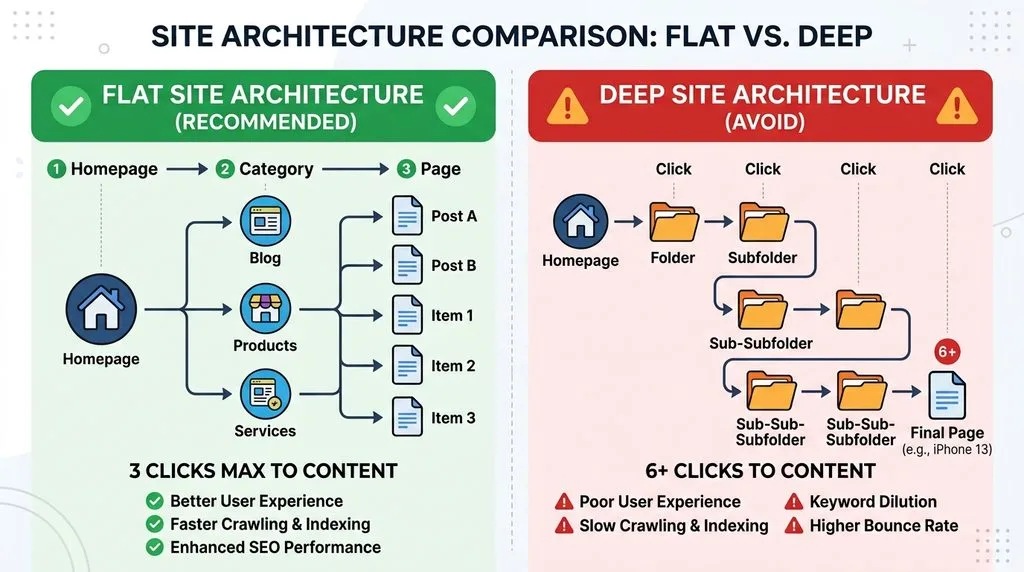
Your URL structure should mirror your site architecture. If a page sits under /services/, it should be reachable from the services hub. If it lives in /blog/, it should link back to the blog index. This consistency helps Google understand relationships and helps users navigate without guessing.
The metric that matters more than folder depth is click depth how many clicks a page is from the homepage. Pages within two or three clicks of the homepage get crawled more often and pass more authority. Pages buried seven levels deep may be ignored entirely. You can have a flat URL (/article-slug/) and still bury a page in navigation, or a deep URL (/blog/category/subcategory/slug/) and still reach it in two clicks with strong internal links. The URL and the navigation are separate levers; optimize both.
A clean URL structure also makes breadcrumbs possible. Google can display breadcrumbs in search results instead of the raw URL, which makes your result look more authoritative and easier to trust. Breadcrumbs only work well when your folder hierarchy is logical, so this is one more reason to keep folders meaningful.
Subdomain vs. subfolder is a related decision. blog.example.com and example.com/blog can both work, but authority does not flow as freely between a subdomain and the root domain. For most businesses, core content like the blog, help center, and store should live in subfolders so the whole site shares one pool of authority.
Internal linking is the partner of URL structure. A great URL with no internal links still struggles; a mediocre URL with strong internal links can rank. Once you fix your URLs, reinforce them with a deliberate internal linking strategy our guide to internal linking best practices and strategies walks you through the exact framework.
Dynamic URLs, Parameters, and Duplicate Content: How to Handle Them
Dynamic URLs are common on ecommerce, forum, and filter-heavy sites. A single product page might exist under hundreds of URLs because of sorting, filtering, tracking, and session parameters. Google can waste crawl budget on these duplicates and may index the wrong version.
Start by asking whether you need the parameter at all. Many filters and sort options can live in JavaScript or in a faceted navigation that does not change the URL. For parameters that must remain, use canonical tags to point every variant to the master URL. Block low-value parameter URLs from crawling with robots.txt or Google Search Console’s parameter tool, and use the noindex tag on thin duplicate pages.
Session IDs in URLs are especially dangerous. They create a unique URL for every visitor, which can generate millions of duplicate addresses. Move session identification to cookies. If you run an ecommerce platform that appends tracking parameters, make sure those parameters do not get indexed. Seobility’s wiki on SEO-friendly URLs covers the duplicate-content risk of parameters and session IDs in detail.
Trailing slashes deserve a quick note. /blog/seo and /blog/seo/ are technically two different URLs. Pick one convention, enforce it with redirects, and use it consistently in internal links and canonicals. The choice itself does not matter; the consistency does.
GEO and AI Search: Why URL Permanence Wins Citations
Generative engine optimization (GEO) is the practice of making your content easy for AI systems to discover, understand, and cite. URLs play a bigger role here than most marketers realize. When an AI engine like Google’s AI Overviews or a chatbot cites a source, it stores the URL. If that URL later returns a 404, the citation becomes a dead end and the AI may stop surfacing your content because it can no longer verify the source.
Researchers and SEO tools have already documented a rising number of broken links inside AI citations. The sites that win long-term visibility in AI search are the ones with stable, permanent URLs. A URL that never changes, served on a fast HTTPS site, with clear authorship and structured data, is the most citeable asset you own.
Three GEO-specific URL habits will protect you:
- Never change a URL without a 301 redirect, and keep redirects alive permanently.
- Avoid date-based and parameter-based URLs that become obsolete.
- Keep your domain and folder structure stable; frequent rebrands and migrations erase citation history.
If you want to go deeper on preparing your whole site for AI-driven search, our SEO growth strategies guide covers the full stack, from content to authority.
Seven Costly URL Mistakes That Hurt Your SEO (and How to Fix Them)
Even experienced teams make these mistakes. Here is how to spot and fix each one.
- Keyword stuffing in the slug.
/buy-cheap-seo-services-best-seo-company/looks like spam and may trigger a manual review. Fix: rewrite to one primary phrase and 301 the old URL. - Changing URLs without redirects. Every changed URL that lacks a 301 bleeds traffic and link equity. Fix: audit your site for 404s and redirect every old URL to the closest relevant new page.
- Mixed HTTP and HTTPS. If some pages load on HTTP, you split signals and scare users. Fix: force HTTPS site-wide and update all internal links and canonicals.
- Inconsistent trailing slashes and case. Fix: pick one standard, enforce it at the server level, and audit internal links.
- Dates in evergreen URLs. Fix: remove the date during a planned migration, redirect old URLs, and commit to evergreen slugs going forward.
- Subdomains for content that belongs on the main domain.
blog.example.comcan underperformexample.com/blogbecause authority does not flow as freely. Fix: move the subdomain to a subfolder if the content is core to your brand, with proper redirects. - Orphan pages with no internal links. A great URL that no page links to is invisible. Fix: add internal links from relevant hub pages and include it in your XML sitemap.
SEO-Friendly URL Templates for Every Page Type
Use these templates as your starting point. Swap in your own slugs and keep the structure consistent across the site.
- Homepage:
https://example.com/ - Blog post:
https://example.com/blog/primary-keyword-slug/ - Blog category:
https://example.com/blog/category-name/ - Service page:
https://example.com/services/service-name/ - Product page:
https://example.com/shop/category/product-name/ - Product variant:
https://example.com/shop/product-name/color/(or a canonicalized parameter) - Landing page:
https://example.com/offer-name/(keep it close to root) - Glossary or knowledge base:
https://example.com/glossary/term-name/ - Author or team page:
https://example.com/team/first-last/
Notice that every template uses real words, hyphens, and at most two or three folders. None of them use IDs, dates, or session parameters. Print this list and hand it to anyone on your team who publishes pages.
How to Audit, Migrate, and Fix Your Existing URLs Without Losing Traffic
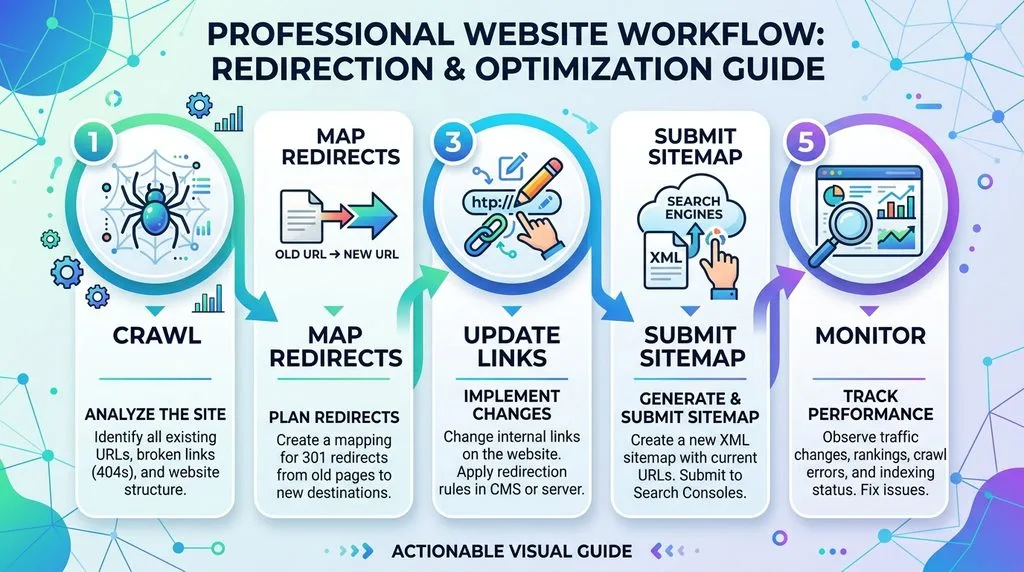
If your site already has messy URLs, you do not need to live with them forever but you must migrate carefully. A botched URL migration can tank your traffic for months. Follow this sequence.
First, crawl your site with a tool like Screaming Frog, Sitebulb, or the data in Google Search Console. Export every URL and flag the problems: uppercase, underscores, parameters, dates, duplicate variants, and 404s. Group the fixes into a staged plan rather than rewriting everything at once.
Second, build a one-to-one redirect map. Every old URL must point to the closest relevant new URL. Never redirect everything to the homepage; that reads as a soft 404 to Google and wastes equity. Use 301 redirects, not 302s, for permanent moves.
Third, update internal links, canonical tags, the XML sitemap, and any hardcoded navigation links to the new URLs. Submit the new sitemap in Google Search Console and monitor indexing and rankings for at least four to six weeks. Expect a temporary dip; that is normal. What is not normal is a dip that never recovers if you see that, check for redirect chains, missing canonicals, or internal links still pointing to old URLs.
If this sounds like more than your team can handle, you are not alone. URL migrations are exactly the kind of technical work where an extra pair of expert eyes pays for itself. Learn what SEO services actually include before you hire anyone, so you ask the right questions.
Clean URLs earn more clicks and attract natural links. Pair them with our backlink service to compound your authority and traffic.
The 60-Second SEO-Friendly URL Checklist
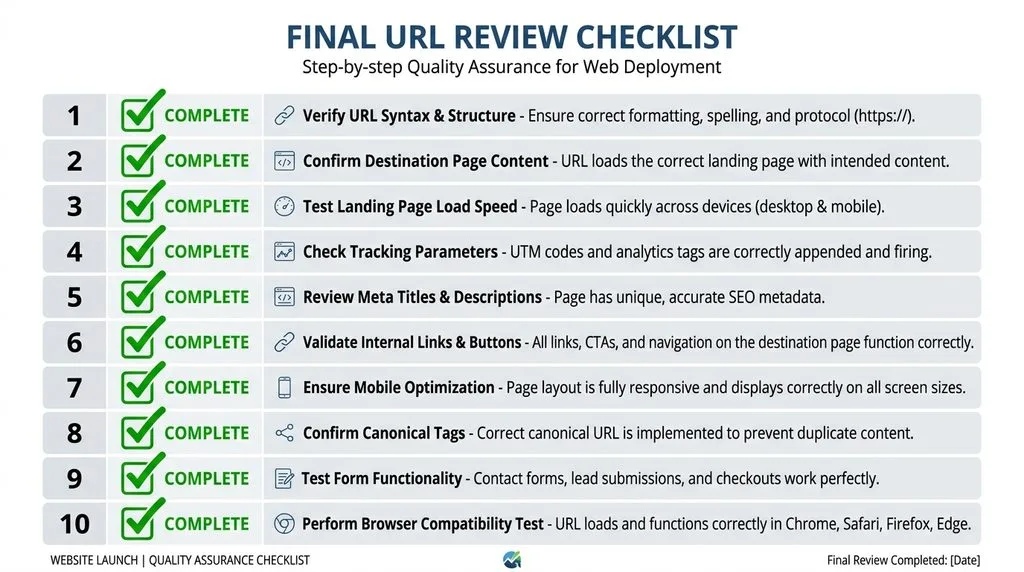
Before you hit publish on any page, run through this list:
- HTTPS is on and the certificate is valid.
- The slug is lowercase, uses hyphens, and contains no special characters.
- The primary keyword appears once, naturally, near the front of the slug.
- The slug is three to five words and free of stop words that add no meaning.
- No dates, IDs, or session IDs appear in the public URL.
- Folders are logical and no deeper than three levels.
- The
www/non-wwwand trailing-slash variants redirect to your chosen canonical. - A self-referencing canonical tag exists on the page.
- The URL is reachable within three clicks of the homepage.
- If the URL changed from an older one, a 301 redirect is in place.
Save this list and run it on every new page. It takes a minute and prevents a year of cleanup.
Final Thoughts
SEO-friendly URLs are not a magic ranking bullet, and anyone who promises first-page rankings from a slug rewrite is overselling. But they are the foundation of a clean, crawlable, trustworthy site. They improve click-through rate, protect you from duplicate content, make migrations painless, and increasingly determine whether AI engines cite your content reliably.
The best time to fix your URLs was before you published. The second-best time is now. Start with new pages: apply the checklist every time. Then, when you are ready, plan a staged migration of your highest-traffic pages with proper 301 redirects. Small, consistent changes beat a chaotic big-bang rewrite every time.
Ready to turn clean URLs into measurable growth? Let Vastcope audit your site and build an SEO strategy that actually ranks.
Frequently Asked Questions (FAQ)
1. What is an example of an SEO-friendly URL?
An SEO-friendly URL looks like https://example.com/blog/seo-friendly-urls/. It uses HTTPS, lowercase letters, hyphens, real words, a logical folder, and no parameters or dates. A non-friendly version would be https://example.com/index.php?post=123&cat=45.
2. Do keywords in URLs help SEO?
Keywords in URLs are a very minor ranking signal. They help Google understand a page at first discovery, and they can improve click-through rate and anchor-text relevance, but you should never restructure a mature site just to add keywords.
3. How long should a URL be for SEO?
There is no official length limit for rankings. As a best practice, keep the slug to three to five words and the full URL under roughly 80 characters so it displays cleanly in search results and browser bars.
4. Should I use hyphens or underscores in URLs?
Always use hyphens. Google treats hyphens as word separators and underscores as joiners, so best-seo-tools reads correctly while best_seo_tools does not.
5. Are dates in URLs bad for SEO?
Dates make evergreen content look stale and can hurt click-through rate as the years pass. Use dates only for news or time-sensitive content. For evergreen content, use a timeless slug and update the article instead.
6. Do I need to include www in my URL?
No. Either www or non-www works. What matters is picking one and 301-redirecting the other to it, then using that version consistently in canonicals and internal links.
7. Can changing URLs hurt my SEO?
Yes, if you change them without 301 redirects. A proper migration with one-to-one 301 redirects, updated canonicals, and a fresh sitemap preserves most of your equity. Expect a short temporary dip, not a permanent loss.
8. What is the difference between a slug and a URL?
The URL is the full address. The slug is the final, unique segment of the path that names the page. In https://example.com/blog/seo-friendly-urls/, the slug is seo-friendly-urls.
9. Are dynamic URLs bad for SEO?
Dynamic URLs with parameters are not automatically bad, but they create duplicate-content and crawl-budget risks. Use canonical tags, control parameters in Google Search Console, and keep session IDs out of the URL entirely.
Keep reading
All articles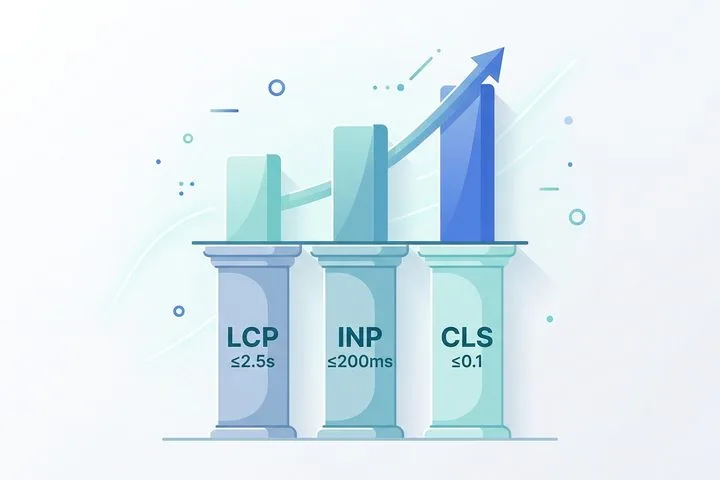
What Are Core Web Vitals & Why Do They Still Matter?
The digital landscape is ruthless when it comes to performance. Users expect websites to load instantaneously, respond to taps without hesitation, and…
Read article
The Ultimate Guide to Keyword Stuffing in SEO: Risks, Penalties, and Modern Alternatives
Search engine optimization constantly evolves, but certain outdated tactics stubbornly refuse to disappear. Decades ago, webmasters manipulated search rankings by packing web…
Read article