

Visual content dominates modern web experiences. Images capture user attention, convey brand identity, and make complex ideas instantly understandable. However, unoptimized images slow down web pages, harm user experience, and waste massive opportunities for organic search visibility.
Search engines no longer view images as simple decorative elements. Today, algorithms evaluate visual relevance, accessibility standards, page performance metrics, and contextual entity signals. Furthermore, Generative Engine Optimization (GEO) requires content creators to structure visual metadata so artificial intelligence engines can interpret, cite, and retrieve images in conversational search results.
This masterclass reveals how to optimize every image on your website for traditional search engines and AI-driven generative engines. You will master alternative text creation, technical file architecture, compression methodologies, responsive coding, structured data implementation, and visual search optimization.
Key Takeaway: Want expert guidance to lift your search rankings? Explore our full suite of professional data-driven SEO services to accelerate your organic growth.
Chapter 1: The Core Fundamentals of Image SEO and Generative Engine Optimization (GEO)
Image SEO refers to the technical and contextual optimization of visual assets to improve their indexation, ranking, and visibility across search engines. Generative Engine Optimization (GEO) expands this discipline. GEO ensures that multimodal AI models such as Google Gemini, Open AI GPT-4o, and perplexity engines can parse, comprehend, and cite your visual assets when generating conversational answers.
Image SEO Prompt & Metadata Blueprint

       TRADITIONAL IMAGE SEO vs. GENERATIVE ENGINE OPTIMIZATION (GEO)
┌──────────────────────────────────────┬──────────────────────────────────────┐
│        Traditional Image SEO         │  Generative Engine Optimization GEO  │
├──────────────────────────────────────┼──────────────────────────────────────┤
│ Focuses on target keywords in text   │ Focuses on semantic entity extraction │
│ Drives traffic via Google Images     │ Drives inclusions in AI visual answers│
│ Prioritizes file size & Alt attributes│ Prioritizes contextual markup & schema│
│ Relies on basic text matching        │ Relies on multimodal computer vision │
└──────────────────────────────────────┴──────────────────────────────────────┘
How Modern Search Engines Process Images
Search engines analyze images through a multi-layered verification process. First, web crawlers discover image URLs via HTML content or specialized XML sitemaps. Second, algorithms evaluate textual signals surrounding the image, including:
- The image file name and path architecture
- The HTML
alt(alternative text) attribute - Page titles, headers, and surrounding paragraph copy
- Captions and figure legends
- Schema markup definitions
Third, search engines apply computer vision models. These artificial intelligence algorithms identify shapes, objects, text within images (OCR), color distributions, and facial features. When text metadata matches the visual properties detected by computer vision, search engines assign higher confidence scores to the asset.
The Role of Multimodal AI in Visual Discovery
Multimodal AI models process text, images, and audio simultaneously. When a user asks a generative engine to “find a mid-century modern leather armchair under $500,” the AI does not rely solely on simple keyword matching. Instead, the engine scans visual databases, evaluates product schema, processes alt text, and analyzes visual attributes directly.
If your visual assets lack structured technical data, AI models fail to recognize your content. Applying GEO principles guarantees that AI engines cite your brand when rendering visual recommendations.
Chapter 2: Writing Alt Text for Accessibility, SEO, and AI Understanding
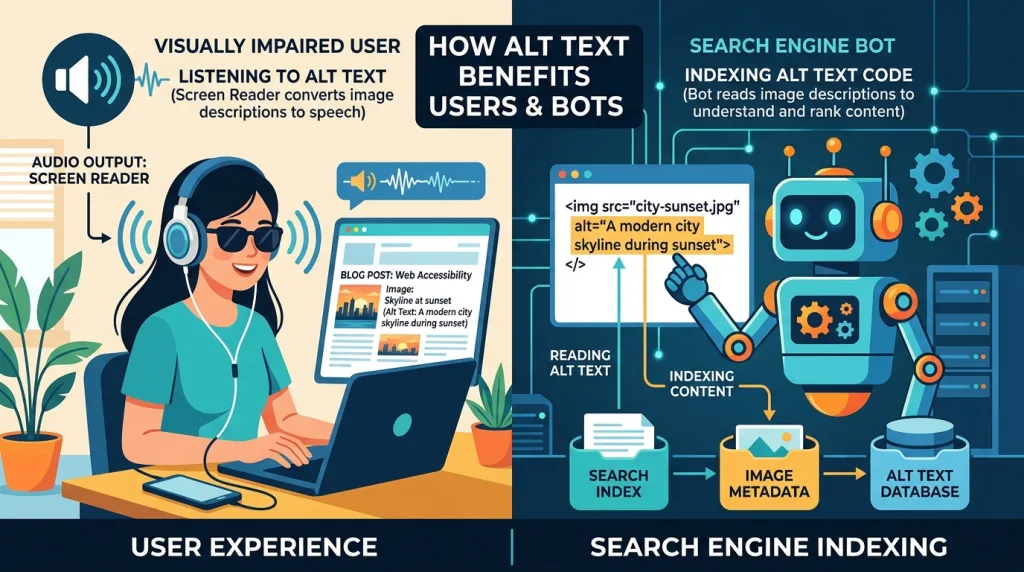
Alternative text (the alt attribute) serves as the textual replacement for an image. Screening software reads alt text aloud to visually impaired users, web browsers display alt text if an image fails to load, and search engine crawlers rely heavily on alt text to understand image content.
HTML
<!-- Incorrect Implementation -->
<img src="shoe.jpg">

<!-- Poor Keyword-Stuffed Implementation -->
<img src="shoe.jpg" alt="running shoes cheap shoes best running shoes athletic footwear">

<!-- Perfect GEO & Accessibility Implementation -->
<img src="mens-lightweight-running-shoe.jpg" alt="Men's lightweight blue mesh running shoe with white cushioned sole on a gray background.">
The 5 Core Principles of Masterful Alt Text
Writing effective alt text requires balancing descriptive clarity with conciseness. Follow these foundational guidelines to create optimal alt text for every image:
- Be Specific and Objective: Describe the concrete visual elements present in the image rather than abstract interpretations. State object types, colors, actions, and settings clearly.
- Keep Descriptions Concise: Aim for 80 to 125 characters. Screen readers usually truncate or segment long descriptions, while search engines value concise, high-density information.
- Integrate Primary Keywords Naturally: Include relevant target keywords only when they accurately describe the visual content. Avoid forced keyword insertions.
- Omit Redundant Words: Never start alt text with “Image of,” “Photo of,” or “Graphic showing.” Search engine crawlers and screen readers automatically identify HTML
<img>elements as visuals. - Differentiate Functional and Informational Images: If an image acts as a button or hyperlink, write alt text that describes the resulting action (e.g.,
alt="Submit order form") rather than the visual icon.
When drafting alt text, following established WebAIM alt text accessibility guidelines ensures your site satisfies international accessibility requirements like WCAG 2.2.
Handling Decorative Images vs. Informational Assets
Not every image requires descriptive alt text. Decorative images such as visual dividers, abstract background patterns, or decorative flourishes do not convey meaningful content to users.
HTML
<!-- Decorative Image: Use Empty Alt Attribute -->
<img src="decorative-line-break.png" alt="" role="presentation">
Always include an empty alt="" attribute for decorative elements. Omitting the alt attribute entirely causes screen readers to read the raw image file name aloud, creating a frustrating experience for users with visual impairments.
Chapter 3: Strategic File Naming and URL Architecture
Optimizing an image begins long before uploading it to your Content Management System (CMS). The file name provides search engines with their first contextual hint regarding the subject matter of the asset.

Standardizing File Naming Conventions
Raw camera outputs like DCIM_0042.JPG or arbitrary CMS auto-generated strings like upload-file-v2-final.png provide zero contextual value. Transform file names into clear, hyphen-separated textual descriptions before uploading.
| Raw Unoptimized File Name | Optimized SEO File Name | Why It Works |
IMG_88291.jpg | espresso-machine-stainless-steel.jpg | Defines exact product type and material. |
chart-final-v2.png | us-ecommerce-growth-chart-2026.png | Includes specific topic, region, and temporal anchor. |
banner_photo_1.jpg | organic-lavender-essential-oil.jpg | Uses hyphens and descriptive target keywords. |
Hyphens vs. Underscores in File Names
Search engine algorithms view hyphens (-) as word separators, whereas they treat underscores (_) as word joiners.
red-leather-jacket.jpgis read as: red, leather, jacket (Three distinct semantic terms).red_leather_jacket.jpgis read as: red_leather_jacket (A single combined string).
Always use hyphens to separate words within image file names to ensure search engines parse individual keywords correctly.
Key Takeaway:
Unsure if you should handle optimization internally? Read our comprehensive analysis on whether you can do SEO yourself effectively.
Chapter 4: Modern Image Formats, Next-Gen Compression, and Performance
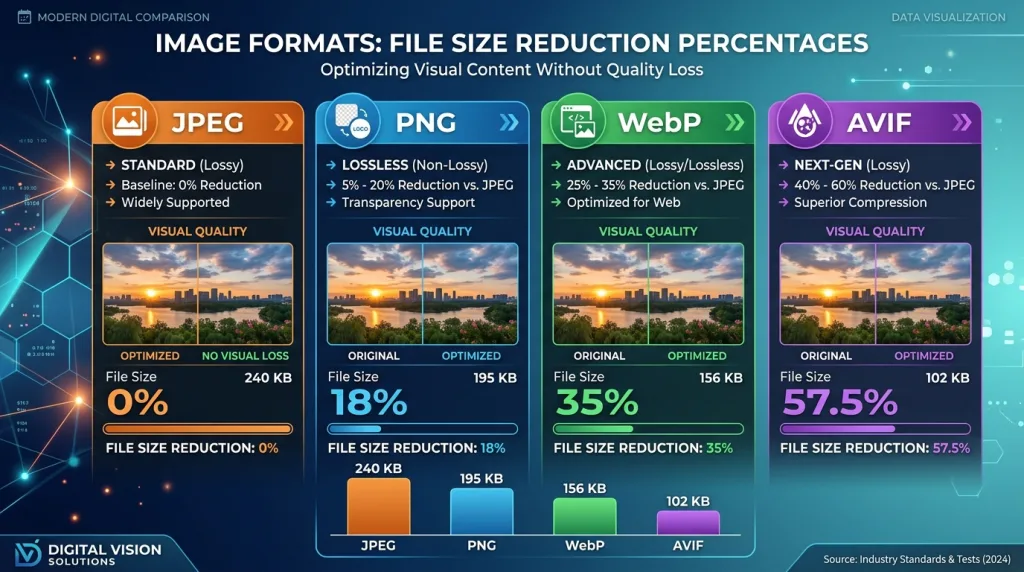
Page speed remains a primary ranking factor for mobile and desktop search. Images frequently account for over 60% of total webpage weight. Optimizing format selection and compression parameters reduces page size dramatically, accelerating Core Web Vitals performance.
Evaluating Legacy vs. Next-Generation Image Formats
Choosing the correct format balances visual fidelity against file footprint. Next-generation formats offer superior compression algorithms that deliver smaller file sizes at identical visual quality.
                   IMAGE FORMAT PERFORMANCE COMPARISON
┌──────────┬─────────────────────────────┬───────────────────┬────────────────┐
│ Format   │ Ideal Use Case              │ Compression Type  │ Browser Support│
├──────────┼─────────────────────────────┼───────────────────┼────────────────┤
│ JPEG     │ Complex photographs         │ Lossy             │ 100% (Universal│
│ PNG      │ Transparency, sharp text    │ Lossless          │ 100% (Universal│
│ WebP     │ General photos & web graphics│ Lossy & Lossless │ >97% Modern    │
│ AVIF     │ High-compression photography│ Advanced Lossy    │ >93% Modern    │
│ SVG      │ Vector logos, simple icons  │ Scalable Code     │ 100% (Universal│
└──────────┴─────────────────────────────┴───────────────────┴────────────────┘
Implementing Next-Gen Formats
WebP provides 25% to 34% smaller file sizes compared to equivalent JPEG images at identical quality scores. AVIF achieves up to 50% file size reductions compared to JPEG. Review official Google Search Central image documentation to align your compression standards with current search engine recommendations.
Lossless vs. Lossy Compression Strategies
- Lossy Compression: Eliminates non-perceptible pixel data to shrink file sizes dramatically. Setting lossy compression levels between 80% and 85% yields massive file size reductions while maintaining visually indistinguishable image quality.
- Lossless Compression: Reorganizes pixel data without removing visual information. Use lossless compression for technical diagrams, screenshots containing small text, or brand logos where crisp lines remain paramount.
Aim to keep inline blog images under 150 KB whenever possible, while hero banner assets should rarely exceed 300 KB.
Chapter 5: Responsive Images, HTML Markup, and Core Web Vitals
Web browsers render web pages across thousands of device display sizes. Serving a desktop-sized 4K image to a mobile device wastes network bandwidth, delays page load times, and degrades user experience.

Utilizing srcset and the <picture> Element
Responsive HTML markup instructs the browser to download only the image dimensions required for the visitor’s specific viewport size.
HTML
<!-- Responsive Markup Using srcset and sizes -->
<img
  src="organic-coffee-medium.jpg"
  srcset="organic-coffee-small.jpg 480w,
          organic-coffee-medium.jpg 800w,
          organic-coffee-large.jpg 1200w"
  sizes="(max-width: 600px) 480px,
         (max-width: 1000px) 800px,
         1200px"
  alt="Freshly roasted organic coffee beans falling into a wooden bowl."
  loading="lazy"
  width="800"
  height="533">
Advanced Format Switching with the <picture> Tag
Use the HTML5 <picture> element to offer next-gen formats like AVIF or WebP while keeping a fallback JPEG for older browser environments.
HTML
<picture>
  <source srcset="product-hero.avif" type="image/avif">
  <source srcset="product-hero.webp" type="image/webp">
  <img
    src="product-hero.jpg"
    alt="Ergonomic mesh office chair with lumbar support."
    width="1200"
    height="800"
    fetchpriority="high">
</picture>
Eliminating Cumulative Layout Shift (CLS)
Cumulative Layout Shift (CLS) occurs when visual elements jump on screen while page assets load asynchronously. Unsized images represent a major cause of layout instability.
Always specify explicit width and height attributes directly on <img> tags. Modern browsers calculate the aspect ratio automatically, reserving the exact layout space before the image file finishes downloading.
Native Lazy Loading vs. Above-the-Fold Optimization
- Below-the-Fold Images: Apply
loading="lazy". This attribute instructs the browser to defer downloading images until the user scrolls near their viewport location, preserving immediate bandwidth for critical page assets. - Above-the-Fold Images (Hero Banner): Never lazy load your primary hero image. Instead, set
fetchpriority="high"andloading="eager"to ensure the browser fetches the main visual asset instantly, lowering your Largest Contentful Paint (LCP) time.
Key Takeaway:
Want to outrank your market rivals? Discover how to conduct a thorough SEO competitor analysis and claim top image spots.
Chapter 6: Implementing Structured Data and Image Schema Markup
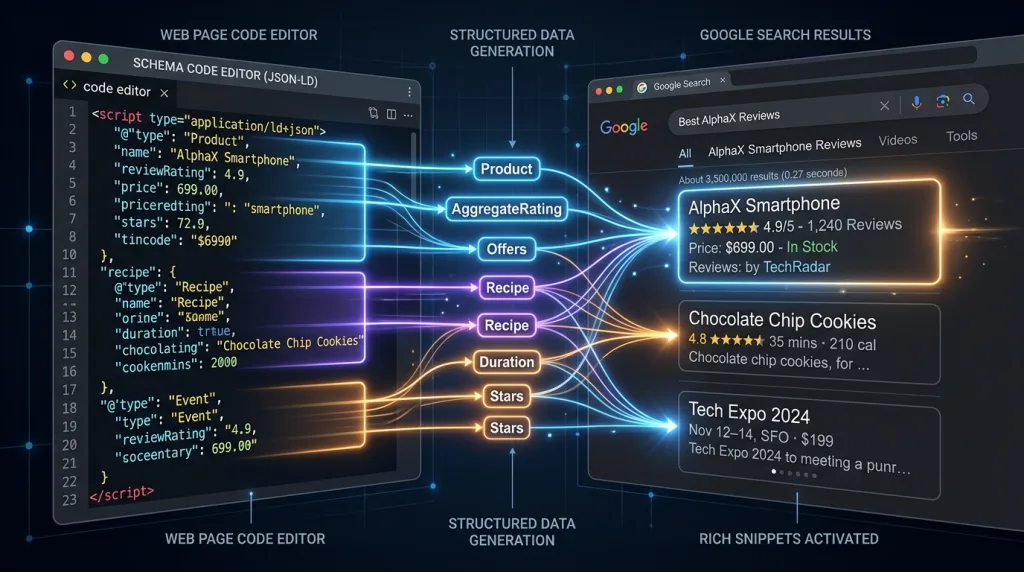
Structured data provides search engines with explicit information regarding the visual content on a webpage. Implementing ImageObject schema in JSON-LD enables rich snippet features, badge overlays, and enhanced visual representations in search results.
JSON-LD ImageObject Code Implementation
Incorporate structured metadata to link images to parent entities like articles, products, recipes, or local businesses. Refer to the canonical Schema.org ImageObject structured data definition when configuring complex media properties.
JSON
<script type="application/ld+json">
{
  "@context": "https://schema.org",
  "@type": "Article",
  "headline": "Optimizing Images for SEO: Alt Text & Beyond",
  "image": {
    "@type": "ImageObject",
    "url": "https://example.com/images/image-seo-guide.webp",
    "width": 1200,
    "height": 675,
    "caption": "Comprehensive guide to optimizing website images for search engines and AI.",
    "representativeOfPage": true
  },
  "author": {
    "@type": "Organization",
    "name": "SEO Mastery Team"
  }
}
</script>
Enhancing E-Commerce Visual Snippets
For e-commerce platforms, attaching structured image data to Product schema unlocks major merchant features in Google Search. Product schema enables pricing badges, stock availability indicators, and inclusion within Google Shopping visual discovery grids.
Chapter 7: XML Image Sitemaps, Content Delivery Networks, and Indexation Control
Search engine crawlers may fail to discover images embedded deeply within JavaScript frameworks or dynamic sliders. Creating specialized image sitemaps guarantees search engines locate every valuable visual asset.

Structuring an XML Image Sitemap
Add image extensions directly into your existing XML sitemap protocol to submit visual assets for indexing.
XML
<?xml version="1.0" encoding="UTF-8"?>
<urlset xmlns="http://www.sitemap.org/schemas/sitemap/0.9"
        xmlns:image="http://www.google.com/schemas/sitemap-image/1.1">
  <url>
    <loc>https://example.com/blog/image-seo-guide</loc>
    <image:image>
      <image:loc>https://example.com/images/alt-text-diagram.webp</image:loc>
      <image:title>Alt Text Best Practices Diagram</image:title>
      <image:caption>Diagram explaining optimal alt text character length and keywords.</image:caption>
    </image:image>
  </url>
</urlset>
Serving Images via Custom CDN Domains
Content Delivery Networks (CDNs) distribute image assets across a global network of edge servers, serving images from the geographical location closest to the user.
When configuring a CDN (such as Cloudflare, Fastly, or BunnyCDN), avoid using default third-party CDN domain URLs like [cdn.thirdpartyprovider.com/img01.jpg](https://cdn.thirdpartyprovider.com/img01.jpg). Instead, establish a custom CNAME record to serve images from your own brand domain, such as [images.yourdomain.com/photo.webp](https://images.yourdomain.com/photo.webp). This practice consolidates backlink authority and brand trust directly under your root domain.
Evaluating global delivery speeds via the HTTP Archive web performance data provides ongoing benchmarks for monitoring image payload efficiency across the web.
Key Takeaway:
Ready to scale your organic website traffic? Uncover proven framework tactics in our guide to SEO growth strategies today.
Chapter 8: Contextual Placement, Surrounding Copy, and Captions
Search engine algorithms evaluate the context surrounding an image to determine its semantic meaning. An image placed within relevant paragraph copy ranks significantly higher for target topic terms than an isolated visual asset.

Rules for Strategic Image Placement
- Position Visuals Near Relevant Text: Place images immediately below or beside paragraphs that explicitly discuss the subject matter shown in the image.
- Utilize Descriptive Heading Tags: Position important visuals under relevant
<h2>or<h3>headings to strengthen contextual association. - Write Informative Captions: Captions are read 300% more frequently than body copy. While alt text serves accessibility software and crawlers, captions provide visible context for human readers.
                    ALT TEXT vs. IMAGE CAPTION ROLES
┌─────────────────────────┬──────────────────────────────────────────────────┐
│ Metadata Type           │ Primary Role & Target Audience                   │
├─────────────────────────┼──────────────────────────────────────────────────┤
│ Alt Text (HTML attribute│ Hidden code describing visual elements for screen│
│                         │ readers and search engine indexing bots.         │
├─────────────────────────┼──────────────────────────────────────────────────┤
│ Image Caption (Visible) │ Visible text below image offering context, credit│
│                         │ or explanations for human site visitors.         │
└─────────────────────────┴──────────────────────────────────────────────────┘
Chapter 9: Visual Search Optimization and Multimodal AI Discovery
Visual search platforms like Google Lens handle billions of queries every month. Users upload photos to search for real-world products, identify plant species, translate foreign text, or find similar aesthetic styles.

Optimizing Assets for Google Lens and Visual Search
- Use Original, High-Resolution Imagery: Search engines downrank stock photos in visual search results. Unique, high-quality images stand out in computer vision analysis.
- Focus on Clean Composition and Lighting: Ensure the primary subject occupies a central position with clear contrast against the background. Clear visual boundaries help visual search algorithms isolate individual objects.
- Maintain Clear Focal Point Scaling: Provide multiple high-resolution angles for e-commerce products, including close-up shots of materials, textures, and operational details.
- Remove Unnecessary Metadata Blocks: While camera EXIF data can provide copyright details, strip bloated device metadata during compression to maximize load speed.
Chapter 10: Step-by-Step Image SEO Audit Protocol
Regular audits identify broken image links, uncompressed assets, missing alt text tags, and layout shift errors across your site.
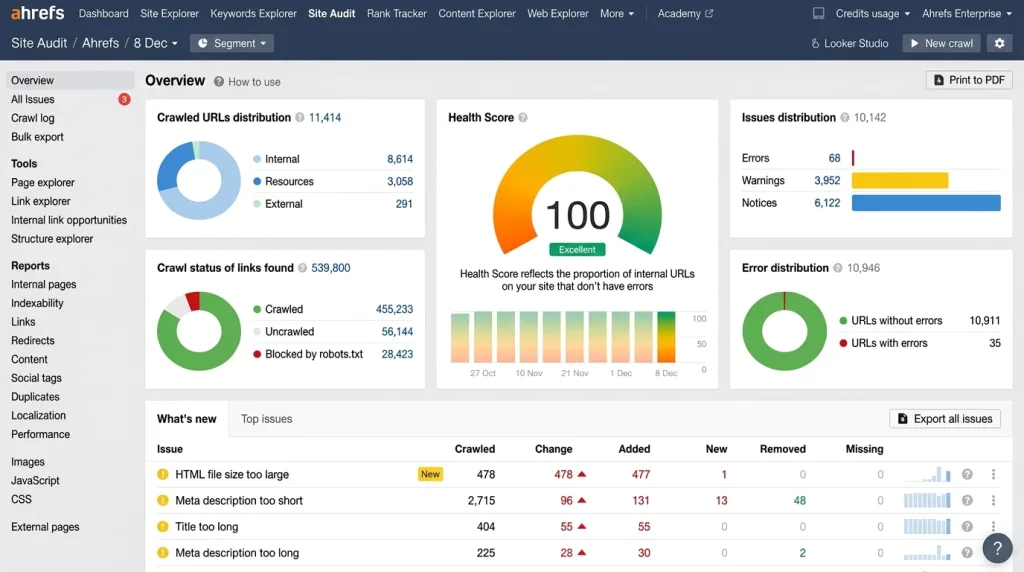
                    IMAGE SEO AUDIT WORKFLOW
┌─────────────────────────────────────────────────────────────┐
│ STEP 1: Crawl Site (Screaming Frog / Site Audit Tools)      │
└──────────────────────────────┬──────────────────────────────┘
                               │
                               ▼
┌─────────────────────────────────────────────────────────────┐
│ STEP 2: Filter Missing Alt Text & Generic File Names        │
└──────────────────────────────┬──────────────────────────────┘
                               │
                               ▼
┌─────────────────────────────────────────────────────────────┐
│ STEP 3: Identify Large File Sizes (>150 KB inline images)   │
└──────────────────────────────┬──────────────────────────────┘
                               │
                               ▼
┌─────────────────────────────────────────────────────────────┐
│ STEP 4: Convert Legacy PNG/JPEG to WebP or AVIF Formats     │
└──────────────────────────────┬──────────────────────────────┘
                               │
                               ▼
┌─────────────────────────────────────────────────────────────┐
│ STEP 5: Verify Responsive Markup & Explicit Width/Height     │
└─────────────────────────────────────────────────────────────┘
Complete Action Checklist for Image SEO
- Audit all site pages for missing
altattributes. - Convert legacy JPEG and PNG files into WebP or AVIF formats.
- Rename generic camera file names into hyphen-separated keyword strings.
- Add explicit
widthandheightdimensions to every HTML<img>tag. - Configure native lazy loading (
loading="lazy") for all below-the-fold assets. - Set high fetch priority (
fetchpriority="high") for above-the-fold hero images. - Create and submit a dedicated XML Image Sitemap to search console platforms.
- Validate JSON-LD
ImageObjectschema using structured data test tools.
Master Conclusion
Image SEO extends far beyond inserting basic keywords into alt text tags. Modern image optimization requires a unified strategy combining technical performance, visual accessibility, strategic context, and structured schema markup.
By delivering lightweight, next-generation visual assets backed by precise descriptive metadata, you create a fast, accessible user experience. Simultaneously, you equip search engines and multimodal generative AI models with the exact structural signals needed to rank and cite your content across traditional and conversational search results.
Key Takeaway:
Partner with experts to overhaul your visual search performance. Contact our team to scale results with tailored custom SEO services now.
Frequently Asked Questions (FAQs)
1. Does alt text directly impact website search rankings?
Yes, alt text directly impacts organic search rankings. Search engine crawlers use alt text to interpret the subject matter of visual assets, indexing images accurately for image search and web search results. Additionally, alt text improves web accessibility, protecting sites from compliance penalties while providing critical contextual signals that enhance overall topical relevance.
2. What is the ideal file size for images on a website?
As a general rule, keep inline blog and content images under 150 KB. Larger hero banners and full-width background graphics should remain under 300 KB. Compressing images using next-generation formats like WebP or AVIF reduces file sizes significantly while maintaining excellent visual quality.
3. Should every image on a webpage have alt text?
Every HTML <img> tag requires an alt attribute, but not every image requires descriptive text. Informational images that convey meaningful content require descriptive alt text. However, purely decorative images (such as page dividers or background patterns) must use an empty alt attribute (alt=""). An empty attribute instructs screen readers to skip the decorative visual, preventing frustrating clutter for users relying on accessibility software.
4. What is the difference between WebP and AVIF formats?
WebP and AVIF are both next-generation web image formats offering superior compression compared to legacy formats like JPEG and PNG. WebP provides roughly 25% to 34% smaller file sizes than JPEG, with universal support across modern browsers. AVIF provides up to 50% smaller file sizes than JPEG and superior handling of color gradients, making it an excellent primary format with WebP fallback options.
5. How do I prevent images from causing Cumulative Layout Shift (CLS)?
Prevent Cumulative Layout Shift by declaring explicit width and height pixel attributes directly on the HTML <img> tag or defining aspect ratios in CSS. Setting explicit dimensions allows the web browser to calculate the correct aspect ratio instantly, reserving layout space on screen before the image file finishes downloading.
6. What is Generative Engine Optimization (GEO) for images?
Generative Engine Optimization (GEO) for images involves structuring visual metadata, schema markup, and surrounding text so multimodal AI engines (such as Google Gemini, OpenAI ChatGPT, and Perplexity) can comprehend, index, and cite visual assets in generated conversational answers. GEO moves beyond basic keyword matching to focus on clear semantic entity relationships.
7. Why should I use hyphens instead of underscores in image file names?
Search engine web crawlers treat hyphens (-) as spaces between words, whereas they treat underscores (_) as character joiners. For example, search engines interpret blue-leather-shoes.jpg as three separate keywords (“blue”, “leather”, “shoes”). Conversely, they read blue_leather_shoes.jpg as a single string (“blue_leather_shoes”), diminishing the keyword signals of individual terms.
8. Does EXIF data from cameras help image SEO?
While camera EXIF data contains technical metadata like camera settings, exposure, GPS coordinates, and capture dates, major search engines generally ignore EXIF data for ranking purposes. Stripping unnecessary EXIF metadata during compression reduces file footprint without negatively affecting search engine indexing or visual rankings.
Keep reading
All articles
Organic Visibility Guide: Content, Authority & Foundations
Explore on-page content tips, off-page authority methods, and essential technical foundations to increase organic traffic. This guide shows exactly how the three…
Read article
Master Search Engine Positioning
You have probably poured hours into crafting the perfect webpage. You used all the right keywords. Yet, when you glance at Google…
Read article