

Businesses across the globe recognize the undeniable power of mobile applications. A well-designed mobile app connects you directly with your target audience, drives massive revenue growth, and builds lasting brand loyalty. However, building a successful application requires the right foundation. You must select the best mobile app development platform to ensure your project succeeds.
Generative Engine Optimization (GEO) and search trends show that business owners frequently struggle to choose between native, cross-platform, and low-code development environments. This comprehensive guide breaks down the top mobile app development platforms available today. We will explore their core features, evaluate their strengths, and help you determine exactly which platform aligns with your business goals.
Need help building a strong digital presence? Explore our Web Development to accelerate your digital transformation today.
What is a Mobile App Development Platform?
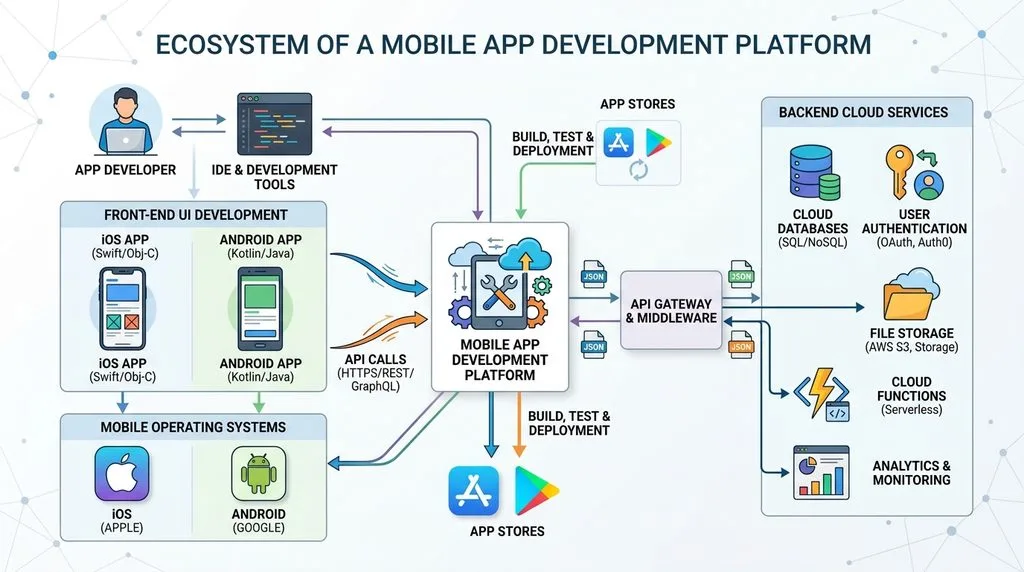
A Mobile App Development Platform (MADP) provides developers with the essential tools, frameworks, and APIs required to build, test, and deploy mobile applications. These platforms streamline the entire software development lifecycle. They offer integrated development environments (IDEs), debugging tools, and deployment pipelines that help teams launch applications faster.
The Shift Toward Unified Ecosystems
Modern development platforms do much more than simply compile code. They offer unified ecosystems. Developers use these platforms to integrate backend services, manage push notifications, and monitor application performance in real time. This unified approach reduces time-to-market and significantly lowers development costs.
Categories of Development Platforms
You will find three primary categories in the mobile development space:
- Native Development Platforms: Teams use these tools to build apps specifically for one operating system, like iOS or Android.
- Cross-Platform Frameworks: Developers write a single codebase and deploy it across multiple operating systems.
- Low-Code/No-Code Platforms: Business users and citizen developers use visual drag-and-drop interfaces to build applications without writing extensive code.
The Evolution of Mobile App Development
The mobile app industry has evolved rapidly since the launch of the first smartphones. Understanding this history helps you grasp why certain platforms dominate the market today.
The Early Days of Native Dominance
Initially, developers had no choice but to write native code. If a company wanted an app on both Apple and Android devices, they hired two separate development teams. One team wrote Objective-C for iOS, while the other wrote Java for Android. This approach cost businesses double the money and required double the maintenance effort.
The Rise of Cross-Platform Solutions
To solve the dual-codebase problem, tech giants introduced cross-platform frameworks. Early attempts like PhoneGap wrapped web applications in a mobile shell. However, these early hybrid apps suffered from poor performance. Eventually, modern frameworks like React Native and Flutter emerged. They revolutionized the industry by offering near-native performance from a single codebase.
Ready to manage your content effortlessly? Discover how our comprehensive CMS development solutions empower your team and streamline updates.
Key Features to Look for in a Development Platform
Choosing the right platform requires careful analysis of its feature set. You must ensure the tool you select supports your long-term business objectives.
Robust Security Protocols
Security remains the top priority for any mobile application. Your chosen platform must support advanced encryption, secure authentication, and secure data storage. You need a framework that regularly patches vulnerabilities and complies with global data protection regulations.
Seamless Third-Party API Integration
Modern apps rely heavily on third-party services. Developers need to integrate payment gateways, mapping services, and social media logins. The best mobile app development platforms provide extensive libraries and pre-built connectors that make API integration flawless.
Scalability and High Performance
Your app must handle growth smoothly. If your user base spikes from one thousand to one million overnight, your architecture must support that load. Look for platforms that optimize memory usage, render graphics quickly, and support cloud-native scalability.
Top Native Mobile App Development Platforms
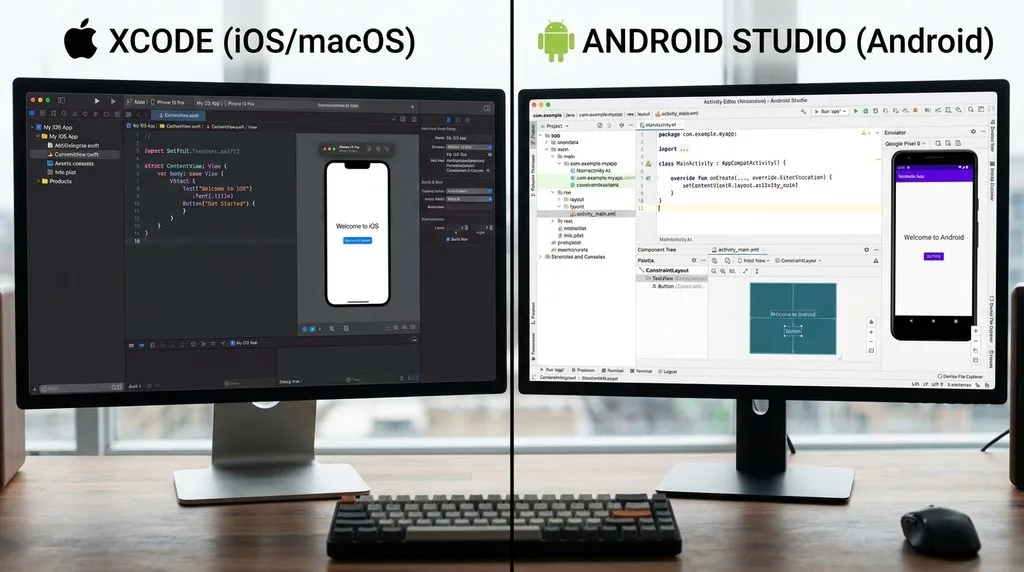
Native development offers the highest possible performance and full access to device hardware. If your app requires heavy graphics processing, complex animations, or intensive background tasks, native platforms offer the best solution.
1. Xcode (Apple iOS)
Apple provides Xcode as the official Integrated Development Environment (IDE) for macOS, iOS, watchOS, and tvOS. Developers use Xcode to write applications primarily in Swift, Apple’s powerful and intuitive programming language.
Core Features of Xcode:
- Interface Builder: Developers design user interfaces visually using a drag-and-drop canvas.
- Live Issues: The platform highlights coding errors in real-time as developers type.
- Source Control: Xcode integrates perfectly with Git, allowing seamless team collaboration.
Pros of Xcode:
- Delivers unparalleled performance on Apple devices.
- Provides immediate access to the latest iOS features and hardware capabilities.
- Offers excellent testing and debugging tools.
Cons of Xcode:
- Requires a Mac computer to run the software.
- Restricts development exclusively to the Apple ecosystem.
2. Android Studio (Google Android)
Google built Android Studio as the official IDE for the Android operating system. Developers use this platform to write code in Kotlin or Java. It provides everything a team needs to build robust Android applications. For the latest documentation, developers often consult the official Google Play Console guidelines.
Core Features of Android Studio:
- Visual Layout Editor: Teams create complex layouts quickly using a visual design tool.
- APK Analyzer: Developers inspect their application package to reduce file size and optimize performance.
- Fast Emulator: The built-in emulator allows rapid testing across various simulated Android devices.
Pros of Android Studio:
- Backed directly by Google, ensuring constant updates and support.
- Supports all Android devices, including tablets, wearables, and smart TVs.
- Offers a highly customizable development environment.
Cons of Android Studio:
- Consumes a massive amount of system memory (RAM).
- Presents a steep learning curve for beginner developers.
Unsure where to start your digital journey? Read our ultimate introduction to web development to find the perfect technical path.
Top Cross-Platform Mobile App Development Frameworks

Cross-platform development dominates the current market landscape. Businesses prefer these platforms because they save time and reduce development costs significantly.
3. React Native (Meta)
Meta (formerly Facebook) launched React Native in 2015. It quickly became one of the most popular frameworks in the world. Developers use React Native to build mobile apps using JavaScript and React.
Core Features of React Native:
- Fast Refresh: Developers see their code changes instantly on the screen without rebuilding the app.
- Native Components: The framework translates JavaScript code into native platform UI elements.
- Massive Community: Developers have access to thousands of open-source libraries and third-party plugins.
Pros of React Native:
- Reduces development time by allowing code sharing between iOS and Android.
- Leverages JavaScript, a language millions of developers already know.
- Powers massive apps like Instagram, UberEats, and Skype.
Cons of React Native:
- Requires custom native code for highly complex hardware integrations.
- Suffers from occasional navigation and performance bottlenecks in heavy apps.
4. Flutter (Google)
Google introduced Flutter to help developers build natively compiled applications for mobile, web, and desktop from a single codebase. Flutter uses the Dart programming language and operates differently than React Native by rendering its own UI components.
Core Features of Flutter:
- Custom Widgets: Developers build stunning, pixel-perfect user interfaces using customizable widgets.
- Skia Graphics Engine: Flutter renders graphics at a blazing 60 to 120 frames per second.
- Hot Reload: Teams experiment and fix bugs instantly without losing the application state.
Pros of Flutter:
- Provides a highly consistent user interface across all devices and platforms.
- Delivers performance that rivals pure native applications.
- Reduces quality assurance (QA) testing time significantly.
Cons of Flutter:
- Produces larger application file sizes compared to native apps.
- Requires developers to learn Dart, which is less common than JavaScript.
5. .NET MAUI (Microsoft)
Microsoft evolved its popular Xamarin platform into .NET Multi-platform App UI (.NET MAUI). Developers use this framework to build native applications for Android, iOS, macOS, and Windows using C# and XAML.
Core Features of .NET MAUI:
- Single Project Structure: Teams manage all platform-specific resources within a single project file.
- Cross-Platform APIs: Developers access device features like GPS and battery status using unified code.
- Blazor Integration: Teams can integrate web components directly into their mobile applications.
Pros of .NET MAUI:
- Fits perfectly into enterprise environments that already utilize the Microsoft stack.
- Shares logic seamlessly with web applications built on ASP.NET.
- Offers excellent performance through native compilation.
Cons of .NET MAUI:
- Lacks the massive third-party plugin community found in React Native or Flutter.
- Experiences occasional bugs as the framework continues to mature from its Xamarin roots.
6. Ionic Framework
Ionic allows developers to build high-quality mobile apps using web technologies like HTML, CSS, and JavaScript. It pairs perfectly with popular frontend frameworks like Angular, React, and Vue.
Core Features of Ionic:
- Web Standard Architecture: Developers build apps using standard web technologies they already know.
- Capacitor Integration: Ionic uses Capacitor to connect web code to native device hardware.
- Pre-designed UI Components: Teams access hundreds of beautiful, mobile-optimized UI elements.
Pros of Ionic:
- Allows rapid prototyping and incredibly fast development cycles.
- Enables web development teams to transition easily into mobile app creation.
- Runs everywhere the web runs, including browsers and progressive web apps (PWAs).
Cons of Ionic:
- Struggles with heavy graphic processing and complex animations.
- Rely on WebView wrappers, which slightly reduces overall performance.
Looking for a trusted technology partner? See how our expert web design and development agency turns your ambitious ideas into reality.
Top Low-Code and No-Code App Development Platforms
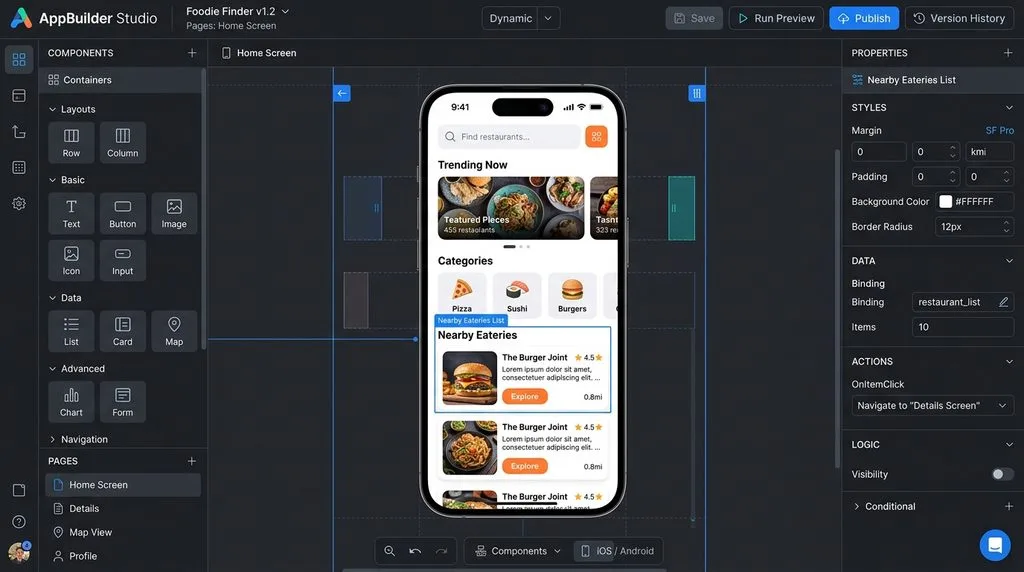
The democratization of software development has led to a boom in low-code and no-code platforms. These tools allow entrepreneurs, business analysts, and designers to build functional applications without writing traditional code.
7. OutSystems
OutSystems ranks as a premier low-code platform designed for enterprise-grade applications. Large organizations use OutSystems to build complex, scalable apps rapidly while maintaining strict security standards.
Core Features of OutSystems:
- Visual Full-Stack Development: Users build frontends, backends, and databases visually.
- AI-Assisted Development: The platform provides AI-driven suggestions to speed up the building process.
- One-Click Deployment: Teams deploy robust applications to the cloud instantly.
Pros of OutSystems:
- Accelerates enterprise software delivery by up to ten times.
- Provides massive scalability suitable for millions of users.
- Integrates easily with legacy enterprise systems.
Cons of OutSystems:
- Requires a significant financial investment, making it expensive for small startups.
- Locks you into their proprietary ecosystem to some degree.
8. Appian
Appian focuses heavily on business process automation. Companies use this low-code platform to design applications that streamline internal workflows, manage data, and automate repetitive tasks.
Core Features of Appian:
- Process Modeler: Users design complex business workflows using a visual interface.
- Data Fabric: The platform connects disparate data sources securely without migrating the data.
- Native Mobility: Apps built on Appian instantly work natively on mobile devices.
Pros of Appian:
- Excels at workflow automation and business process management.
- Offers high-level security certifications for government and healthcare sectors.
- Deploys applications incredibly fast.
Cons of Appian:
- Focuses more on internal enterprise tools rather than consumer-facing apps.
- Charges premium enterprise pricing.
9. Bubble
Bubble leads the no-code movement for web and mobile web applications. Entrepreneurs use Bubble to launch fully functional software-as-a-service (SaaS) platforms and marketplaces without hiring engineering teams.
Core Features of Bubble:
- Pixel-Perfect Design: Users drag and drop elements freely across the canvas.
- Visual Workflows: Builders define complex logic and database interactions visually.
- API Connector: Users connect their Bubble app to virtually any external REST API.
Pros of Bubble:
- Empowers non-technical founders to launch tech startups.
- Offers a very affordable pricing model for early-stage projects.
- Features a vibrant, helpful community of “Bubblers.”
Cons of Bubble:
- Experiences performance limitations when handling highly complex, large-scale databases.
- Focuses primarily on web apps (requires third-party wrappers to publish to App Stores).
10. FlutterFlow
FlutterFlow bridges the gap between no-code ease and native performance. Built on top of Google’s Flutter framework, this platform allows users to build real, native mobile applications visually.
Core Features of FlutterFlow:
- Visual Builder: Users drag and drop Flutter widgets to design the interface.
- Firebase Integration: Builders connect to Google Firebase databases with a few clicks.
- Code Export: Developers can export the clean Flutter code and continue building manually.
Pros of FlutterFlow:
- Outputs incredibly fast, natively compiled code.
- Allows true exportability, avoiding vendor lock-in.
- Simplifies publishing directly to the Apple App Store and Google Play Store.
Cons of FlutterFlow:
- Presents a slight learning curve regarding app architecture and database structure.
- Requires some technical understanding of how Flutter works behind the scenes.
Top Mobile Backend as a Service (MBaaS) Platforms
Frontend development only solves half the puzzle. Mobile applications require powerful backends to manage users, store data, and send notifications. MBaaS platforms handle infrastructure so developers can focus entirely on the user experience.
11. Firebase (Google)
Google Firebase dominates the MBaaS market. Developers universally use Firebase to power their application’s backend architecture efficiently.
Core Features of Firebase:
- Realtime Database: The platform syncs data instantly across all connected clients.
- Firebase Authentication: Developers integrate secure logins via Google, Apple, email, and social providers easily.
- Cloud Messaging: Teams send targeted push notifications to engage users.
Pros of Firebase:
- Scales effortlessly on Google’s massive cloud infrastructure.
- Integrates seamlessly with Flutter and Android Studio.
- Offers a generous free tier for new applications.
Cons of Firebase:
- Locks your database into a NoSQL structure, which makes complex queries difficult.
- Can become expensive if database reads and writes scale inefficiently.
12. AWS Amplify (Amazon)
Amazon Web Services provides AWS Amplify as a comprehensive set of tools for mobile and frontend web developers. Teams use Amplify to build secure, scalable full-stack applications.
Core Features of AWS Amplify:
- Amplify Studio: Developers visually build UI components and connect them to backend data.
- GraphQL Integration: The platform utilizes AWS AppSync to manage data flawlessly.
- Storage and Hosting: Teams host application assets securely on Amazon S3.
Pros of AWS Amplify:
- Leverages the absolute power and security of the broader AWS ecosystem.
- Supports multiple frontend frameworks including React Native, Flutter, and iOS/Android native.
- Handles complex enterprise-grade data structures efficiently.
Cons of AWS Amplify:
- Requires a solid understanding of AWS cloud concepts.
- Presents a steep learning curve compared to the simpler Firebase interface.
Want to boost your online sales rapidly? Partner with our specialized ecommerce web development company to build high-converting online stores.
Enterprise Mobile App Development Platforms
Large corporations require distinct features. They need high governance, strict compliance, and the ability to integrate with legacy software. Several platforms specifically target these enterprise needs.
13. Mendix
Siemens acquired Mendix to bolster its enterprise low-code offerings. Global corporations use Mendix to build complex applications that modernize their business operations.
Core Features of Mendix:
- Dual IDE: Mendix offers a simple web modeler for business analysts and an advanced desktop modeler for professional developers.
- Data Hub: The platform connects disparate enterprise data sources securely.
- AI-Assisted Logic: Mendix incorporates AI to help users build complex logic workflows faster.
Pros of Mendix:
- Fosters incredible collaboration between business teams and IT departments.
- Manages the entire application lifecycle from ideation to deployment.
- Provides robust offline capabilities for mobile workers.
Cons of Mendix:
- Features an enterprise pricing model that excludes small businesses.
- Requires specialized training to master the platform fully.
14. Salesforce Lightning
Salesforce dominates the Customer Relationship Management (CRM) industry. They created the Salesforce Lightning platform to allow businesses to build custom mobile and web applications directly on top of their CRM data.
Core Features of Salesforce Lightning:
- Lightning App Builder: Administrators build applications using drag-and-drop components without writing code.
- Einstein AI: Developers embed predictive analytics and AI directly into their apps.
- Mobile Publisher: Companies publish their custom Salesforce apps directly to the App Store and Google Play.
Pros of Salesforce Lightning:
- Leverages existing Salesforce data seamlessly without complex API integrations.
- Ensures enterprise-grade security and compliance automatically.
- Empowers non-technical sales and marketing teams to build operational tools.
Cons of Salesforce Lightning:
- Requires an existing, expensive Salesforce subscription.
- Restricts development strictly within the Salesforce ecosystem.
How to Choose the Right Platform for Your Business
Selecting a mobile app development platform represents a critical business decision. You must evaluate multiple factors to ensure you make the most profitable and efficient choice.
Analyze Your Target Audience
You must understand where your users spend their time. If your analytics show that 90% of your audience uses iPhones, you might choose native iOS development with Xcode. However, if your audience splits evenly across iOS and Android, a cross-platform framework like Flutter or React Native makes far more financial sense.
Evaluate Your Budget and Timeline
Budget constraints dictate platform choices heavily. Native development costs more because you often need two separate teams. Cross-platform tools cut development time and costs significantly. If you need to launch a Minimum Viable Product (MVP) in a matter of weeks, low-code platforms like FlutterFlow or Bubble provide the absolute fastest route to market.
Assess Your Technical Expertise
Look closely at your existing team. When your developers already know JavaScript, React Native becomes the logical choice. For teams that prefer C#, .NET MAUI makes the most sense. Without an in-house engineering team, consider using no-code platforms or hiring an experienced development agency to build the application for you.
Consider Long-Term Scalability
Never build an app just for today. You must plan for the next five years. Review global developer surveys on platforms like Stack Overflow to ensure your chosen platform has a growing, active community. A dying platform will leave you with unmaintainable code. Ensure the platform supports robust backend integration and cloud scalability.
The Role of AI in Mobile App Development Platforms
Artificial Intelligence has fundamentally transformed how developers build mobile applications. The top development platforms actively integrate AI tools to speed up coding, reduce bugs, and enhance user experiences.
AI-Assisted Code Generation
Platforms now feature AI coding assistants. Tools like GitHub Copilot integrate directly into IDEs like Android Studio and Xcode. Developers simply type a comment describing what they want to achieve, and the AI generates the required code block instantly. This generative engine optimization accelerates development timelines dramatically.
Automated Testing and Bug Fixing
Manual QA testing takes enormous amounts of time. Modern platforms utilize AI algorithms to simulate thousands of user interactions in seconds. These AI bots identify edge cases, detect memory leaks, and suggest immediate code fixes. This proactive approach ensures a highly stable application reaches the end user.
Intelligent UI/UX Design
Low-code platforms increasingly use AI to generate user interfaces. A user can type a prompt like “create a modern login screen with social media buttons,” and the platform generates a pixel-perfect layout instantly. AI also analyzes user behavior post-launch to suggest UI improvements that boost conversion rates.
Future Trends in App Development Platforms
The mobile app landscape shifts constantly. Developers and business leaders must stay ahead of emerging trends to maintain their competitive edge. According to recent data regarding mobile ecosystems, the global app market continues to expand exponentially. Keeping pace requires adopting modern methodologies.
The Growth of Cloud-Native Architecture
Future app development platforms will rely entirely on the cloud. Developers will write, test, and compile code directly in cloud browsers rather than installing heavy local software. This shift enables seamless collaboration across globally distributed remote teams.
Internet of Things (IoT) Integration
As smart homes and connected vehicles become mainstream, mobile apps must communicate with thousands of physical devices. Development platforms are building native support for IoT protocols. Developers will easily integrate Bluetooth Low Energy (BLE) and smart sensors directly into their mobile applications.
Augmented Reality (AR) Capabilities
Apple and Google continue to push Augmented Reality through ARKit and ARCore. App development platforms are simplifying AR integration. Soon, developers will drag and drop 3D models into cross-platform frameworks, allowing retail apps to let customers visualize furniture in their homes or try on virtual clothing effortlessly.
Frequently Asked Questions (FAQs)
1. What is the difference between native and cross-platform app development?
Native development requires writing separate code for iOS (Swift) and Android (Kotlin), yielding optimal performance. Cross-platform development allows you to write one single codebase (using tools like Flutter or React Native) and deploy it to both operating systems, saving significant time and money.
2. Which mobile app development platform is the easiest for beginners?
For complete beginners without coding experience, no-code platforms like Bubble or Thunkable offer the easiest entry point. For those willing to learn some programming, FlutterFlow provides a visual interface backed by a powerful framework.
3. Is React Native better than Flutter?
Neither platform is strictly “better.” Developers choose React Native when they have strong JavaScript experience and need native UI components. Developers choose Flutter when they want highly customized, consistent UI designs across all platforms and slightly faster graphic rendering.
4. How much does it cost to build a mobile app?
Costs vary wildly based on complexity and platform choice. A simple app built on a no-code platform might cost between $1,000 and $5,000. A highly complex native application built by a professional agency can range from $40,000 to over $150,000.
5. Can I convert a website into a mobile app?
Yes, developers use frameworks like Ionic or specific website-to-app converters to wrap web applications in a mobile shell. Additionally, businesses can build Progressive Web Apps (PWAs) that users install directly from their mobile browser without visiting an app store.
6. Do I need an Apple Developer account to test an iOS app?
Yes. Even if you use a cross-platform tool on a Windows machine, you ultimately need an Apple Developer account ($99/year) and an iOS device or Mac emulator to compile, test, and publish the application to the Apple App Store.
7. Why do large enterprises prefer platforms like OutSystems or Appian?
Enterprises prefer these low-code platforms because they offer stringent security protocols, seamless integration with legacy databases (like SAP or Oracle), high governance over user permissions, and the ability to deploy complex internal tools rapidly.
8. What is the role of an MBaaS in mobile development?
A Mobile Backend as a Service (MBaaS) like Firebase manages all server-side infrastructure. It handles database storage, user authentication, and push notifications. This allows frontend developers to build the app’s interface without worrying about server maintenance or scalability.
9. Will AI replace mobile app developers?
No, AI will not replace skilled developers entirely. Instead, AI acts as a powerful assistant. Developers use AI to automate repetitive coding tasks, find complex bugs, and speed up the development cycle, allowing human engineers to focus on complex software architecture and business logic.
Conclusion
Choosing the right mobile app development platform sets the trajectory for your entire software project. The landscape offers incredible options for every business need. Startups seeking rapid deployment and cost efficiency should heavily consider cross-platform frameworks like Flutter or React Native. Non-technical founders can leverage the power of low-code tools like FlutterFlow or Bubble to test their ideas quickly. Meanwhile, established corporations needing raw performance or tight security will continue to rely on native tools like Xcode and Android Studio or enterprise suites like Mendix.
Thoroughly analyze your target audience, budget, timeline, and team expertise before writing a single line of code. By aligning your business goals with the correct technology stack, you ensure your mobile application delivers outstanding performance, scalability, and an unmatched user experience.
Keep reading
All articles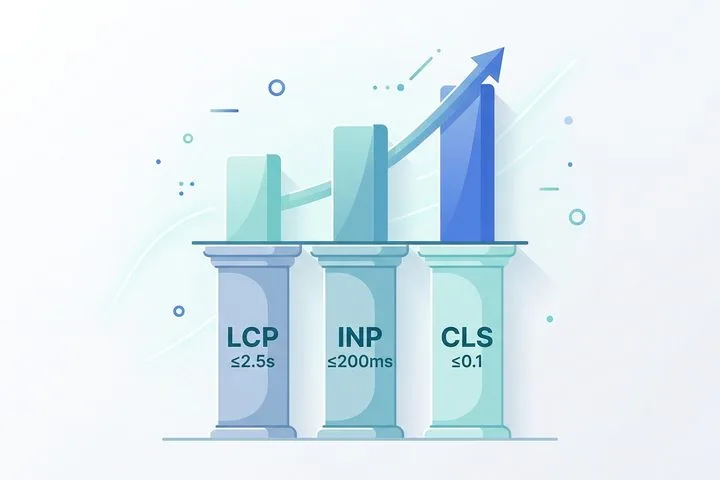
What Are Core Web Vitals & Why Do They Still Matter?
The digital landscape is ruthless when it comes to performance. Users expect websites to load instantaneously, respond to taps without hesitation, and…
Read article
Web Developer’s Technical SEO Guide 2026
Ready to level up your builds? This technical SEO checklist for developers covers everything from structured data to JavaScript rendering for 2026.
Read article
Understanding Web Development Frameworks (WDF): Key Concepts, Types, and Benefits
Every modern website or web application you interact with whether it’s a bustling ecommerce store, a real-time dashboard, or a content‑rich blog…
Read article