

Search engine optimization changes continuously. Today, search algorithms rely on traditional web crawling alongside advanced generative engine infrastructure to understand digital data. To ensure these sophisticated systems notice, parse, and rank your content effectively, you must provide a clean and logical architectural map of your website. This is where an XML sitemap plays an indispensable role.
An XML sitemap serves as a primary, direct communication channel between your web server and search engine crawlers. It lists your critical pages explicitly, ensuring that automated search bots do not miss vital pieces of content. This extensive guide breaks down everything you need to know about XML sitemaps, their core architectural frameworks, their profound SEO benefits, and exactly how you can implement them to dominate both classic and generative search landscapes.
Maximize your website’s search performance and organic traffic today by partnering with our expert team for comprehensive SEO services.
Demystifying the XML Sitemap: What Exactly Is It?

An XML (Extensible Markup Language) sitemap is a structured text file that lists all the essential URLs of a website. Think of it as a specialized blueprint designed exclusively for search engine crawlers rather than human visitors. It tells search bots exactly which pages exist on your domain, when someone last modified them, and how they relate to other assets on your site.
The Core Definition of XML
Extensible Markup Language, or XML, provides a standardized format for structuring and encoding data. Unlike HTML, which dictates how text and design elements display on a screen for human consumption, XML focuses entirely on data organization. The tags within an XML sitemap do not influence visual aesthetics. Instead, they categorize data systematically so that machine learning systems and algorithmic scrapers can read, interpret, and ingest the information instantly without processing heavy layout code.
How It Differs from HTML Sitemaps
Webmasters often confuse XML sitemaps with HTML sitemaps, but these two files serve completely distinct audiences. An HTML sitemap is an actual public web page containing a structured list of clickable text links. This page helps human visitors navigate your website when they get lost or when they look for specific, deeply nested resources.
Conversely, an XML sitemap remains hidden from standard users. It exists purely to guide automated bots like Googlebot, Bingbot, and advanced AI crawlers. While an HTML sitemap enhances user experience and distributes internal link equity across your architecture, an XML sitemap ensures raw search discovery and clean technical indexation.
The Basic Structure of an XML File
At its absolute core, an XML sitemap adheres to a strict hierarchy governed by the global Sitemaps protocol. The file begins with an opening tag that defines the XML standard and the schema location. Inside this shell, individual blocks of data declare specific URL details.
A standard, fully compliant XML file uses explicit parameters to define every link. It indicates the exact web address, specifies the absolute time of the last update, and outlines additional context regarding the nature of that specific page. Understanding this file format allows you to identify technical indexing issues before they hurt your organic visibility.
The Critical Importance of Sitemaps in Generative & Traditional SEO

Modern search landscapes demand rapid data ingestion. Generative search engines use massive language models to synthesize answers directly on search engine results pages. To include your brand’s data in these AI-driven summaries, search engines must index your articles perfectly. An optimized XML sitemap removes the guesswork from this discovery process.
How Search Engine Crawlers Work
Search engine bots discover pages through a continuous process of crawling and indexing. They begin with a known list of web addresses and follow the hyperlinks found on those pages to discover new content. However, this method contains inherent flaws. If your site features poor internal linking, or if a valuable page sits far down in your architecture, a standard crawler might never find it.
An XML sitemap completely bypasses this obstacle. It provides a definitive, central list of your preferred pages directly to the bot. Instead of relying purely on random link exploration, the crawler reads your sitemap file to find your entire content inventory in a single pass.
Crawl Budget Optimization Explained
Search engines do not allocate infinite computing resources to your website. They assign each domain a specific “crawl budget,” which represents the maximum number of pages a bot will crawl during a given timeframe. If your site wastes its crawl budget on duplicate content, broken links, or low-value pages, your high-revenue pages will remain unindexed.
An XML sitemap helps you optimize your crawl budget efficiently. By including only your highest-quality canonical URLs, you guide the bots directly toward your most valuable content. This targeted approach prevents crawlers from wasting server resources on irrelevant parameters, which ultimately cements your website’s digital footprint and enhances your overall brand authority.
Helping Generative Engines Discover and Contextualize Content
Generative AI search tools prioritize highly structured, trustworthy data sources. They require clean contextual maps to understand how your articles link together and which pages represent the definitive versions of your topics. An XML sitemap acts as a semantic guide for these LLM-driven scrapers. It offers explicit validation of your content’s freshness, allowing generative systems to source your site as a real-time authority for breaking industry news and detailed educational guides.
Key SEO Benefits of Maintaining an XML SitemapImplementing a well-structured XML sitemap yields measurable improvements across your entire digital marketing ecosystem. It addresses foundational crawling challenges and ensures your content remains viable in an increasingly competitive landscape.
Accelerate your domain authority and climb the search engine result pages quickly using our specialized, high-impact SEO backlink strategies.
Accelerating the Indexation of New Content
When you publish a new article or launch a fresh product page, you want search visibility immediately. Without an XML sitemap, weeks can pass before an automated bot naturally stumbles upon your new link. However, modern content management systems update your XML sitemap automatically the moment you click publish. Because search engines check your sitemap file regularly, they discover and index your new page within hours, or even minutes, of publication.
Preserving Link Equity During Site Architecture Changes
Migrating your website, changing your domain name, or altering your URL structures can severely disrupt your search rankings. During these complex technical updates, an XML sitemap serves as a critical safety net. By hosting a temporary sitemap that includes your old URLs alongside your new permanent links, you help search bots crawl both sets of data simultaneously. This deliberate setup accelerates the processing of 301 redirects and ensures your accumulated link equity transfers safely to your new architecture.
Overcoming Deep Pagination and Orphan Page Issues
Large e-commerce stores and extensive digital publications frequently struggle with orphan pages—valid web pages that possess zero internal links pointing toward them. Similarly, deep pagination structures often hide older products or articles from standard crawler paths.
An XML sitemap bridges this gap completely. Because it lists every active URL regardless of its internal link status, it guarantees that orphan pages and deeply nested assets receive consistent attention from search engine crawlers.
Tracking Indexation Status via Search Console
A major operational benefit of an XML sitemap involves technical diagnostic data. When you submit your sitemap file to tools like Google Search Console or Bing Webmaster Tools, you unlock deep analytical dashboards. These platforms match your sitemap links against their actual index, showing you exactly which submitted URLs contain errors, which ones face exclusion, and which ones actively drive organic impressions.
| Feature / Metric | With an XML Sitemap | Without an XML Sitemap |
| New Page Discovery Speed | Hours or minutes via instant pings | Days or weeks via organic link paths |
| Orphan Page Visibility | High; guaranteed discovery via direct list | Critical risk of zero indexation |
| Crawl Budget Allocation | Highly efficient; prioritized on core URLs | Inefficient; wasted on systemic fluff |
| Indexation Troubleshooting | Granular data breakdowns per file | Broad, ambiguous sitewide guesses |
Different Types of XML Sitemaps and When to Use Them
Not all websites share the same technical needs. A personal blog requires a different layout than a massive media outlet or an image-heavy portfolio. The global sitemap standard provides specialized formats to accommodate distinct media types and massive scales.
The official guidelines maintained at the Sitemaps Protocol Organization outline the precise definitions for these specialized formats to ensure universal search engine compatibility.
Standard Page Sitemaps
This represents the most common sitemap format. It contains standard textual web pages, blog posts, category listings, and service offerings. If you operate a straightforward service website or a foundational informational blog, a standard page sitemap covers all your indexing needs.
Image Sitemaps for Visual Search
Visual search technology relies on accurate image discovery. If your business depends heavily on photography, graphic design, or unique product illustrations, you must use an image sitemap. This specialized file appends distinct image properties to your standard page listings, forcing search engines to discover and index graphics that might otherwise remain hidden inside complex JavaScript or cascading style sheets.
Video Sitemaps for Rich Snippet Optimization
Video content drives immense engagement, but search bots cannot watch or inherently listen to video files to understand their context. A video sitemap provides critical metadata regarding the multimedia hosted on your site. It outlines the video’s title, a detailed description, the duration, the player location, and a valid thumbnail URL. This structural transparency allows search engines to feature your videos prominently within rich snippets and dedicated video tabs.
Google News Sitemaps for Real-Time Publishers
If you run an active news publication, standard sitemaps will not suffice. Google News demands a highly specific sitemap variant that only contains articles published within the last 48 hours. Once an article crosses that two-day threshold, your system must remove it from the news sitemap, though it remains in your standard archive sitemap. This rapid rotation keeps news aggregators updated with your freshest reporting.
Sitemap Index Files for Large Websites
The fundamental rules of web development place strict limitations on individual sitemap files. A single XML sitemap cannot exceed 50,000 URLs or 50 megabytes in uncompressed file size. If your portal exceeds these boundaries, you must implement a Sitemap Index File. This master file acts as a directory, containing links to multiple sub-sitemaps (e.g., sitemap-pages.xml, sitemap-products.xml, sitemap-blog-2026.xml), allowing you to scale your technical architecture cleanly.
Comprehensive Step-by-Step Examples of XML Sitemaps

Let us look closely at actual raw code samples to understand how an XML sitemap operates under the hood. Examining these files helps you spot syntax errors that could disrupt your search performance.
Example 1: A Standard Single-Page Entry
This clean, minimal snippet demonstrates how a standard web page appears inside a valid XML sitemap file. Notice the clear nested tags that outline the page context.
Breakdown of Core Components:
- This mandatory declaration tells search bots that the file uses standard XML format and employs UTF-8 character encoding.
- This primary container encloses all the individual URL listings within the file and references the current sitemap standard protocol.
- This tag opens and closes the specific data block dedicated to an individual web address.
- The absolute location tag. It must contain the full URL, including the exact protocol (https://) and any necessary trailing slashes.
- The last modification date tag. It uses the W3C datetime format (YYYY-MM-DD) to inform bots exactly when the content changed last.
- This tag suggests how frequently the content on that page shifts (e.g., daily, weekly, monthly). Modern search engines mostly ignore this tag now, relying instead on their own monitoring algorithms.
- This sets the relative importance of a URL compared to other pages on your own domain, ranging from 0.0 to 1.0. Like changefreq, modern search engines look at internal link depth rather than this self-assigned metric.
Example 2: An Image-Specific XML Sitemap Entry
To push your visual media into image search results, you can extend your standard sitemap syntax by incorporating dedicated image extensions.
<?xml version="1.0" encoding="UTF-8"?>
<urlset xmlns="http://www.sitemaps.org/schemas/sitemap/0.9"
        xmlns:image="http://www.google.com/schemas/sitemap-image/1.1">
  <url>
    <loc>https://vastcope.com/ui-ux</loc>
    <image:image>
      <image:loc>https://vastcope.com/images/ui-ux-design-wireframe.jpg</image:loc>
      <image:caption>Advanced responsive mobile application interface wireframe design</image:caption>
      <image:title>UI-UX Design Strategy Blueprint</image:title>
    </image:image>
  </url>
</urlset>
Example 3: A Video-Specific XML Entry
For heavy multimedia pages, incorporating video schemas directly into your XML code helps search engines display rich snippet play buttons alongside your search listings.
<?xml version="1.0" encoding="UTF-8"?>
<urlset xmlns="http://www.sitemaps.org/schemas/sitemap/0.9"
        xmlns:video="http://www.google.com/schemas/sitemap-video/1.1">
  <url>
    <loc>https://vastcope.com/video-editing</loc>
    <video:video>
      <video:thumbnail_loc>https://vastcope.com/thumbnails/video-production.jpg</video:thumbnail_loc>
      <video:title>Professional Video Post-Production and Effects Tutorial</video:title>
      <video:description>Learn how clean color grading and advanced audio mixing transform raw video clips into cinematic content.</video:description>
      <video:content_loc>https://vastcope.com/videos/post-production-guide.mp4</video:content_loc>
      <video:duration>540</video:duration>
    </video:video>
  </url>
</urlset>
Example 4: A Sitemap Index File Structure
When your website scales up significantly, you must utilize a clean index configuration to distribute your data sets neatly without hitting individual file limits.
<?xml version="1.0" encoding="UTF-8"?>
<sitemapindex xmlns="http://www.sitemaps.org/schemas/sitemap/0.9">
   <sitemap>
      <loc>https://vastcope.com/sitemap-pages.xml</loc>
      <lastmod>2026-06-03T12:00:00+00:00</lastmod>
   </sitemap>
   <sitemap>
      <loc>https://vastcope.com/sitemap-blog-posts.xml</loc>
      <lastmod>2026-06-03T15:30:00+00:00</lastmod>
   </sitemap>
</sitemapindex>
How to Generate and Submit Your XML SitemapYou do not need to write raw XML code by hand every time you update your website. Modern automation tools and developer frameworks simplify the generation and delivery process significantly.
Simplify your technical setup and content distribution with a seamless, fully customized solution built by our CMS development team.
Generating Sitemaps via Content Management Systems
If you run your website on popular platforms like WordPress, Shopify, or Webflow, sitemap generation happens out of the box. Modern plugins like Yoast SEO, Rank Math, or built-in system settings automatically build dynamic XML files for you. These tools listen for site updates constantly. The exact moment you modify a category, add a product, or save a blog draft, the platform rebuilds the underlying XML file instantly to reflect that specific adjustment.
Automated Custom Sitemap Scripts for Large-Scale Databases
If you manage a custom-built web platform constructed on Node.js, Python, or Ruby on Rails, you will need to build an automated server-side routine. Developers accomplish this by writing scheduled tasks (cron jobs) that query your main database every night. The script fetches your latest active URLs, converts the data into strict XML format, and saves the output directly to your root directory as a public file.
Build an ultra-fast, search-optimized website from scratch by collaborating with our professional full-stack engineers for advanced [suspicious link removed] solutions.
Submitting Your Sitemap to Google Search Console
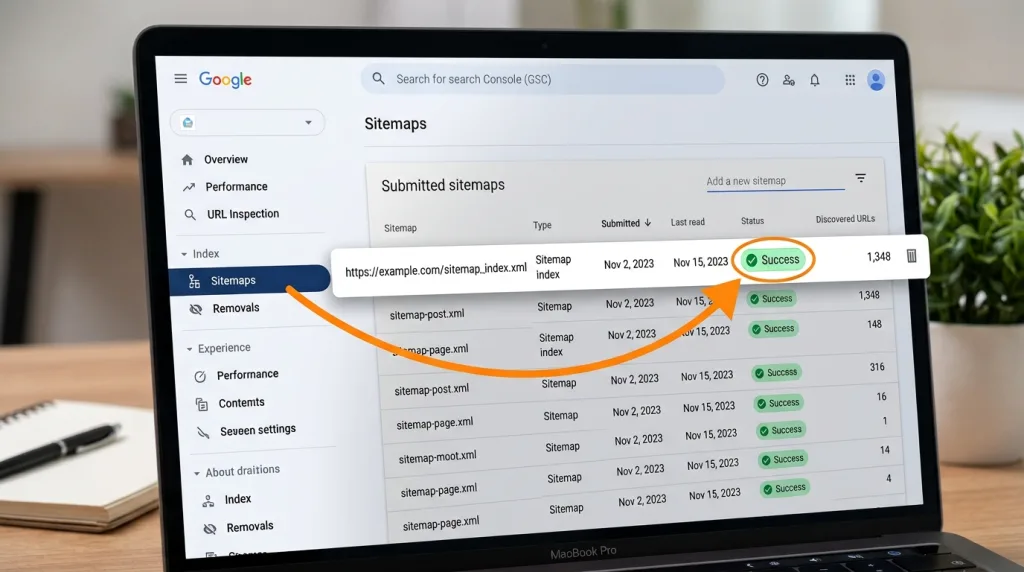
Once your XML sitemap file goes live on your server, you must inform search engines about its exact location. Google makes this easy through their primary administrative interface.
- To register your file successfully, use this simple sequence:
- Log into your verified account on the Google Search Console Dashboard.
- Look at the left-hand navigation sidebar and locate the “Indexing” section.
- Click directly on the Sitemaps option.
- Go to the “Add a new sitemap” input field.
- Enter the exact terminal URL extension of your file (e.g., sitemap_index.xml).
- Click the blue Submit button to complete the registration.
[Log into Search Console] ??? [Navigate to Sitemaps] ??? [Enter XML Extension] ??? [Click Submit]
Google will queue your file for immediate review. Once the bots finish processing the code, you will see a green “Success” status notification appear inside your control history.
Submitting Your Sitemap to Bing Webmaster Tools
Do not ignore secondary search networks. Bing provides an equally critical administrative platform for web tracking. Access the Bing Webmaster Portal, locate their dedicated Sitemaps management tab, paste your complete sitemap URL into the registration box, and click submit. Bing shares this crawl data with Yahoo and other partner engines, expanding your overall organic visibility.
Referencing Your Sitemap in the Robots.txt File
To guarantee that alternative web crawlers and generative AI bots discover your sitemap without manual console registrations, you should add a direct reference inside your site’s robots.txt file. This text file sits in your root directory and serves as the initial checkpoint for all incoming search bots. Add a single line at the top or bottom of that file using this format:
Sitemap: https://vastcope.com/sitemap_index.xml
This universal placement allows any compliant automated program to locate your entire content layout instantly upon scanning your domain.
Technical Best Practices and Hard Limits to Avoid Errors
A poorly configured sitemap can confuse search bots and lead to crawling drops. To keep your indexing clean, you must adhere to the global specifications that govern internet data transmission.
File Size and URL Count Constraints
As mentioned earlier, an individual sitemap file cannot contain more than 50,000 URLs, and its uncompressed size must stay under 50 megabytes. If your file crosses either threshold, search engines will stop processing your data, leading to incomplete indexing. To prevent this issue, divide your data into separate files and connect them using a clean master index file.
Absolute vs. Relative URLs
Every single address you list within your XML sitemap must be an absolute URL. Do not use relative paths like /blog/article-title. You must include the entire address, starting with the exact security protocol and your verified domain name (e.g., https://vastcope.com/blog/article-title). Additionally, remain consistent with trailing slashes and subdomains. If your primary site uses https://, do not accidentally list http:// variants inside your sitemap file.
Dealing with Canonical Tags and Redirects
Your XML sitemap should only contain high-value, indexable pages. It should never serve as a dumping ground for every link your server generates.
Keep These Out of Your Sitemap:
- URLs that feature a 301 or 302 redirect status code.
- Pages blocked by your robots.txt configuration.
- URLs with a noindex robots meta tag attached.
- Duplicate URLs that point to an alternate master page via a canonical tag.
- Parameters, tracking tokens, or internal search result pages.
Including non-indexable or broken pages wastes your crawl budget and creates technical confusion, which can cause search engines to distrust your sitemap data over time.
Character Encoding and Escaping Special Symbols
Because XML uses specific characters like < and > to define code blocks, you cannot use those raw symbols inside your web address fields. If your site features URLs with ampersands, quotation marks, or apostrophes, you must use proper escape entities to avoid breaking the file format.
| Raw Character | Character Meaning | Compliant XML Escape Entity |
& | Ampersand | & |
' | Single Quote / Apostrophe | ' |
" | Double Quote | " |
< | Less Than | < |
> | Greater Than | > |
Common XML Sitemap Mistakes and How to Fix Them
Even experienced web developers make technical mistakes when managing sitemaps for large websites. Spotting these issues early protects your hard-earned organic visibility.
Including Non-Indexable or Blocked URLs
This remains the most common error flagged inside search diagnostic consoles. It occurs when a webmaster adds a noindex tag to a page to keep it out of search results but forgets to remove that page from the XML sitemap. This conflicting setup forces search bots to loop through your pages unnecessarily, as your sitemap requests indexing while your page source explicitly denies it. Regularly audit your search console reports to identify and remove these conflicting links.
Outdated Lastmod Timestamps
Some poorly configured plugins modify the <lastmod> date every time a user leaves a comment or visits a page, even if the main text remains unchanged. This false reporting tells search bots that your content has been updated, causing them to re-crawl identical data. Only update your modification timestamps when you make meaningful edits to your core text, layouts, or metadata assets.
Mismatches Between Language Versions
If your business operates a multilingual website using hreflang attributes, your sitemap setup requires precision. You must list every localized version of a page clearly, or use advanced XHTML links inside the sitemap to map your alternate language profiles together. Failing to link these localized versions properly can lead to duplicate content flags across different regional domains.
Conclusion: Future-Proofing Your Website’s Discoverability
An XML sitemap is far more than a basic technical checkbox. It serves as a foundational bridge that connects your website directly to the core infrastructure of modern search engines and advanced generative answer tools. By providing a clean, automated, and error-free map of your high-quality content, you ensure your site remains crawlable, indexable, and competitive.
As search systems rely more heavily on real-time data extraction and automated answer generation, maintaining an accurate sitemap becomes essential for your digital survival. Review your technical configurations, fix any underlying script bugs, and monitor your webmaster consoles consistently. Building a healthy, optimized crawl environment today secures your brand’s presence across the search landscapes of tomorrow.
Convert your newly optimized organic traffic into high-paying, long-term clients with our data-driven, strategic lead generation programs right now.
Frequently Asked Questions (FAQs)
Does having an XML sitemap guarantee my website will rank higher?
An XML sitemap does not act as a direct ranking factor, meaning its mere presence will not automatically push your pages to the top of search listings. Instead, it serves as an essential technical discovery tool. It ensures that search engines can easily find, crawl, and index your pages. A page must be indexed before it can rank, making an XML sitemap an foundational prerequisite for all your ongoing optimization efforts.
What happens if I choose not to submit an XML sitemap to Google?
If your website features an impeccable internal linking structure, search engine crawlers will likely find most of your public pages naturally over time. However, skipping an XML sitemap increases the risk that bots will miss orphan pages, deeply nested product links, or newly published blog posts. You also lose access to valuable indexation analytics inside your search console accounts.
Can I name my XML sitemap file something other than sitemap.xml?
Yes, you can use any file name you prefer, provided it features a valid .xml extension. Many websites use custom names like main-index-2026.xml or secure-data-map.xml to prevent malicious scrapers from easily downloading their entire content directory. As long as you register your custom name inside your Search Console account and reference it correctly in your robots.txt file, search engines will track it perfectly.
Should I include my product utility pages like the checkout or cart inside my sitemap?
No. You should exclude utility pages like your shopping cart, checkout screens, user profile dashboards, privacy policies, and internal search results from your XML sitemap. These pages hold no educational or commercial value for public searchers. Excluding them protects your crawl budget and ensures search engines focus entirely on your high-value content.
How often should my website’s XML sitemap update?
Your sitemap should update dynamically in real time. For content-driven websites, the file should refresh the moment you publish a new page or modify existing text. If you manage a static website that rarely changes, generating a new sitemap file manually once every few months or after major structural updates is sufficient.
Is an HTML sitemap still necessary if I already have an XML sitemap?
Yes, both files serve entirely different audiences and complement one another. Your XML sitemap caters exclusively to automated search bots and AI crawlers to ensure efficient discovery. Your HTML sitemap provides an organized, accessible page for human users navigating your site, which simultaneously improves internal link equity distribution across your domain.
Keep reading
All articles
Boost Domain Authority: 5 Link Building Ways 2026
Link Building in 2026: 5 Proven Ways to Boost Authority Imagine opening your search engine in 2026. Instead of a simple list…
Read article
What Is A Source File? The Complete Guide for Designers and Clients
When a graphic designer delivers a final logo, a photo editing specialist sends back a retouched portrait, or a 3D artist completes…
Read article
Web Security Threats: Common Attack Vectors Guide
You probably check your email, shop online, or scroll through social media every single day. But have you ever stopped to think…
Read article